
Performance, along with autonomy (working time on a single battery charge), is one
Samsung Exynos 990 processor
Samsung Galaxy Note performance story20 Ultra, I would like to start not with the results of the benchmarks (they will come later), but by talking about the processor of this smartphone - Samsung Exynos 990. It is manufactured using a 7-nanometer technological process, which, due to the laws of physics, already has a very conditional interpretation. Here it is rather worth remembering that the transition to each next level in technical processes reduces current consumption, which increases energy efficiency. In other words, the lower the number, the faster the processor runs and the less it overheats compared to the previous generation. A modern flagship processor, which includes the new Exynos 990, is such a complex product of technology that a detailed study of it without complex technical calculations is simply impossible. Fortunately, we don’t need this - just remember that it has an integrated graphics coprocessor (DSP) for image processing and a separate coprocessor for working with neural networks, which is gaining popularity and weight (in this processor it has two cores). In practice, working with neural networks involves identifying shooting scenes and automatically selecting the best camera operating mode. When a smartphone camera itself determines that there is a dog, cat, flower or food in front of it, this is the result of the technomagic of neural networks. Neural networks are also actively used in image post-processing (we’ll talk about this separately, but not now), creating excellent pictures using the “point and press” principle. And everyone has begun to forget that in modern 8-core processors only 4 cores work simultaneously - one for “heavy” tasks that require calculations. Others are for simple ones that do not require high performance - their operation allows the smartphone to live longer without recharging. Well, the Exynos 990 also has a version with an integrated 5G modem, although for our conditions this is (yet) irrelevant. Here's a demo of the processor for those interested:
What affects the performance of the Samsung Galaxy Note 20 Ultra
If you are still following the thought, thenSmartphone performance is a complex and complex thing, which is influenced by many factors. The downside of high performance has always been a decrease in battery life. Autonomy and performance are two opposing elements that go hand in hand, and smartphone manufacturers are constantly looking for a reasonable compromise between them. One that would suit the maximum number of buyers. Fortunately, the Samsung Galaxy Note 20 Ultra is a smartphone for tech-savvy users, so it allows this process to be controlled, if not completely (throttled, that is, the automatic reduction of power consumption and performance in order to protect it from overheating and other troubles has not been canceled), then at least in semi-manual mode.
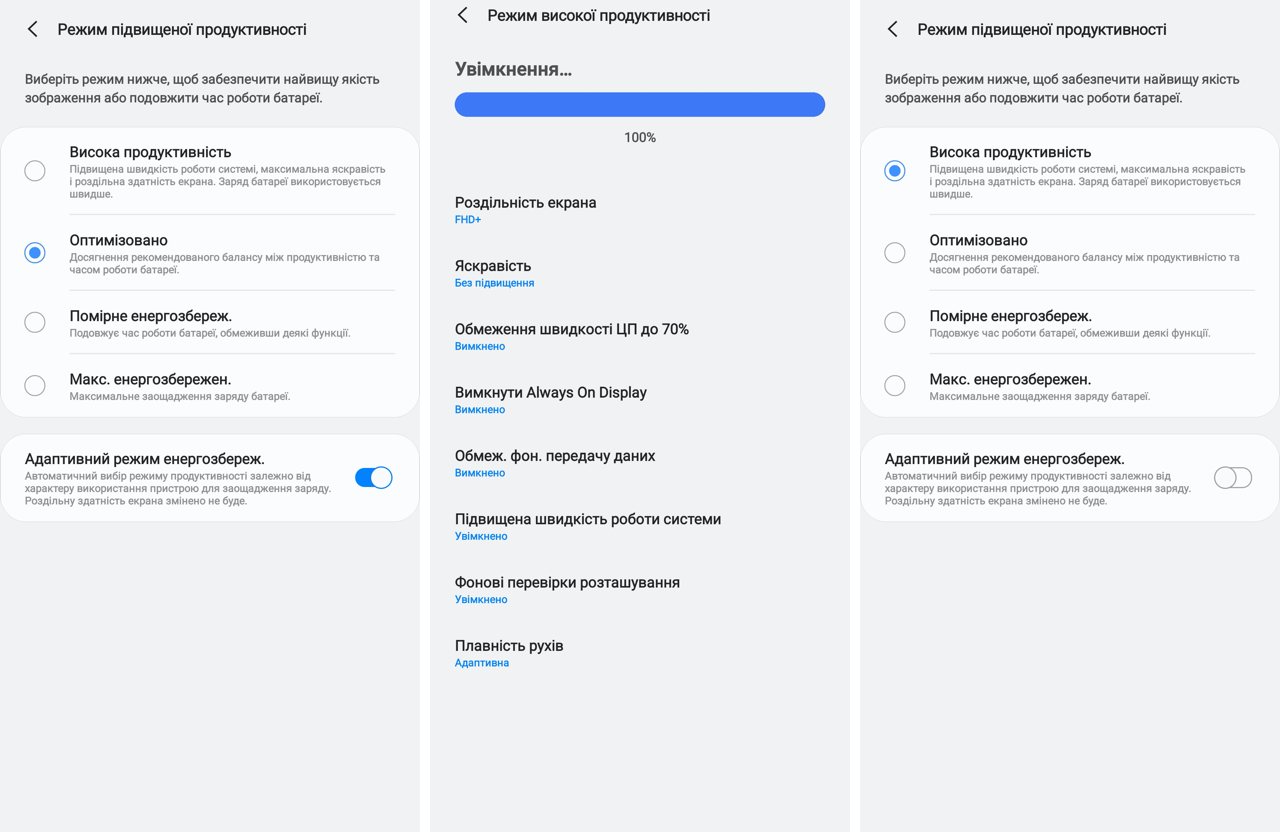
In the Device Maintenance settings –The battery has a power management section (which, as I said, goes hand in hand with performance), where you can choose from 4 performance modes: High Performance, Optimized, Moderate Power Saving, and Maximum Power Saving. Each mode has its own set of instructions, which (performance is a complex issue, remember?) affect the performance-autonomy connection. If you want to get the most out of your smartphone (for example, for better graphics in a game), then select the high productivity mode and disable the adaptive power saving mode. Although for most users, choosing Adaptive Power Saving Mode and Optimized Productivity Mode will be a smart choice. That is why it is installed in the smartphone by default - for those who never mess with these settings, using the Samsung Galaxy Note 20 Ultra will be optimal.
</ img>
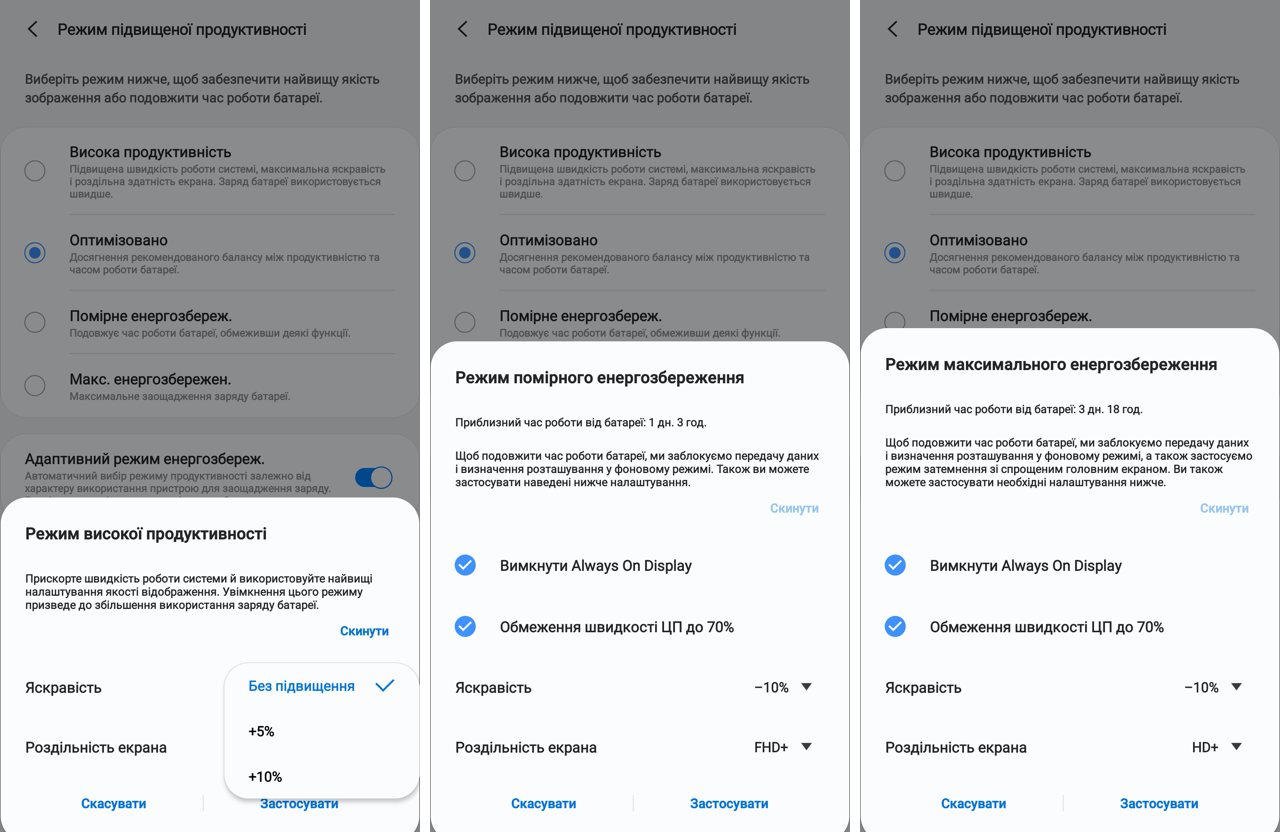
Why geeks love the Galaxy Note series of smartphones20 - this is because Samsung also gives you the opportunity to fix something manually (provided you fully understand what is happening). Even in the preset modes, you can tweak the operating settings a little more by selecting the screen resolution and using (or not using) the suggested options for reducing the display brightness.
</ img>
Fantastic benchmarks and what affects them
Now that you understand that performanceof a modern smartphone is a fickle quantity, it’s time to move on to performance benchmarks. Where you can see how it changes depending on the selected productivity modes described above. Here we cannot help but dispel another misconception that is circulating on the Internet and disturbing the fragile minds of young people of all ages. Ideologically, benchmarking is a tool that allows you to compare products and measured values with the same similar products (your own or competitors). At the same time, this is not a panacea, nor an exact science, because all benchmarks are built on the simple principle of comparing work on algorithms artificially created by the benchmark developers, which, if possible, imitate the real operation of applications. At the same time, if you know how the algorithm works, you can change the software of your smartphone so that the results look as attractive as possible. This is approximately what Volkswagen did, which, as a result of changing the software in its cars, got into a scandal with the distortion of harmful emissions from diesel engines. In the modern world, where the performance of flagship smartphones is excessive, the value of benchmarks no longer affects much (although for some buyers all this is of “huge” importance, but they are a minority and they don’t do much on the market, however, they are capable of creating constant background noise).
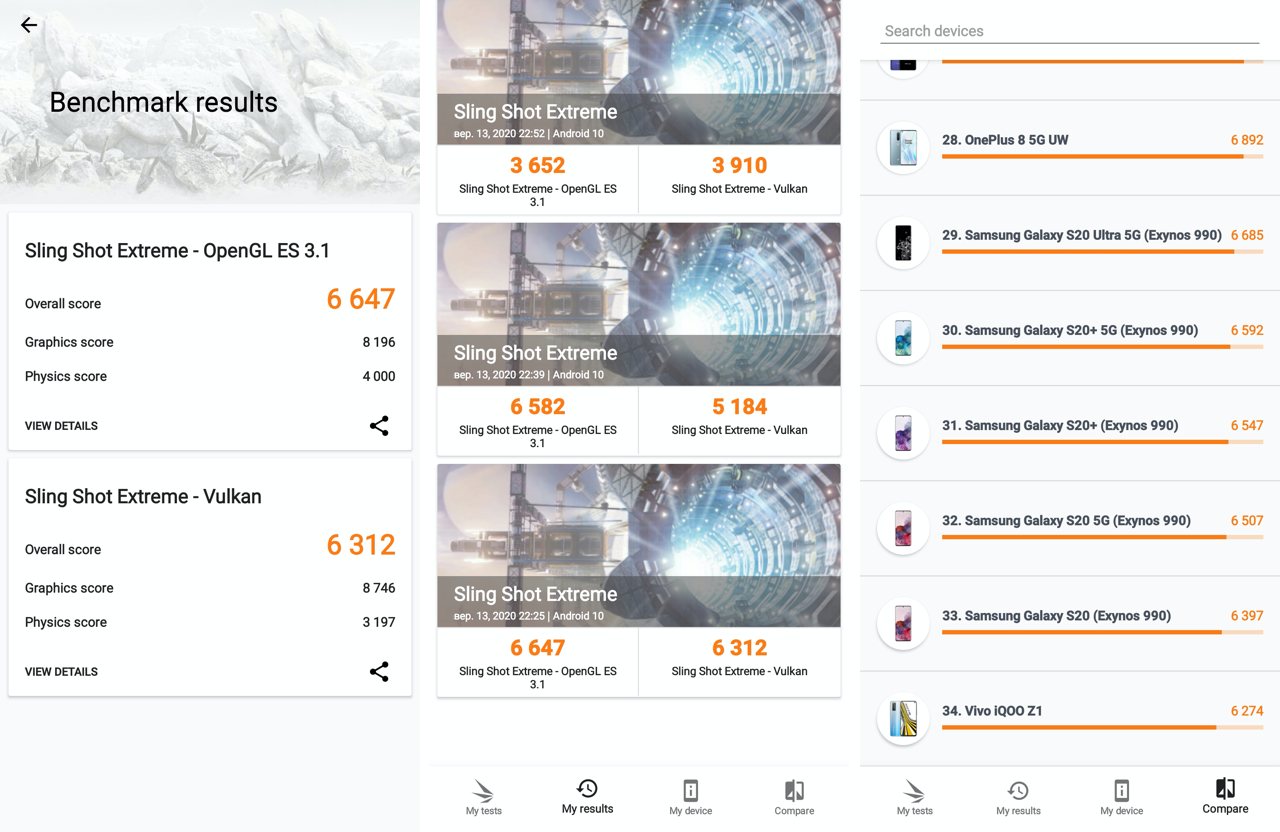
What can we see in the benchmarks?In 3DMark, the Samsung Galaxy Note 20 Ultra's performance in the Sling Shot Extreme test in different modes varies from 3652 points in moderate power saving mode to 6647 points (a difference of 80%). That is, the same smartphone can show very different benchmark results under different operating conditions. And this is without taking into account other factors, of which there are many. For example, you don’t know how many applications were running in the background at that time and how they worked, distracting the processor for their tasks. But they still received some kind of notifications (mail, instant messengers, social networks) and periodically went to the Internet for new pieces of information. What else can be useful to learn from this benchmark? For example, you can see that the difference between moderate energy saving mode and maximum productivity is less than a percent. Which once again confirms the correctness of choosing this processor operating mode by default. It is also clear that the performance of the Samsung Galaxy Note 20 Ultra is approximately the same as the performance of the Samsung Galaxy S20 in all its guises. There is nothing surprising here - both of these smartphones use the Exynos 990 processor, which, in turn, suggests that the processor plays a leading role in the performance of the smartphone (also, of course, the amount of RAM and a bunch of other little things).
</ img>
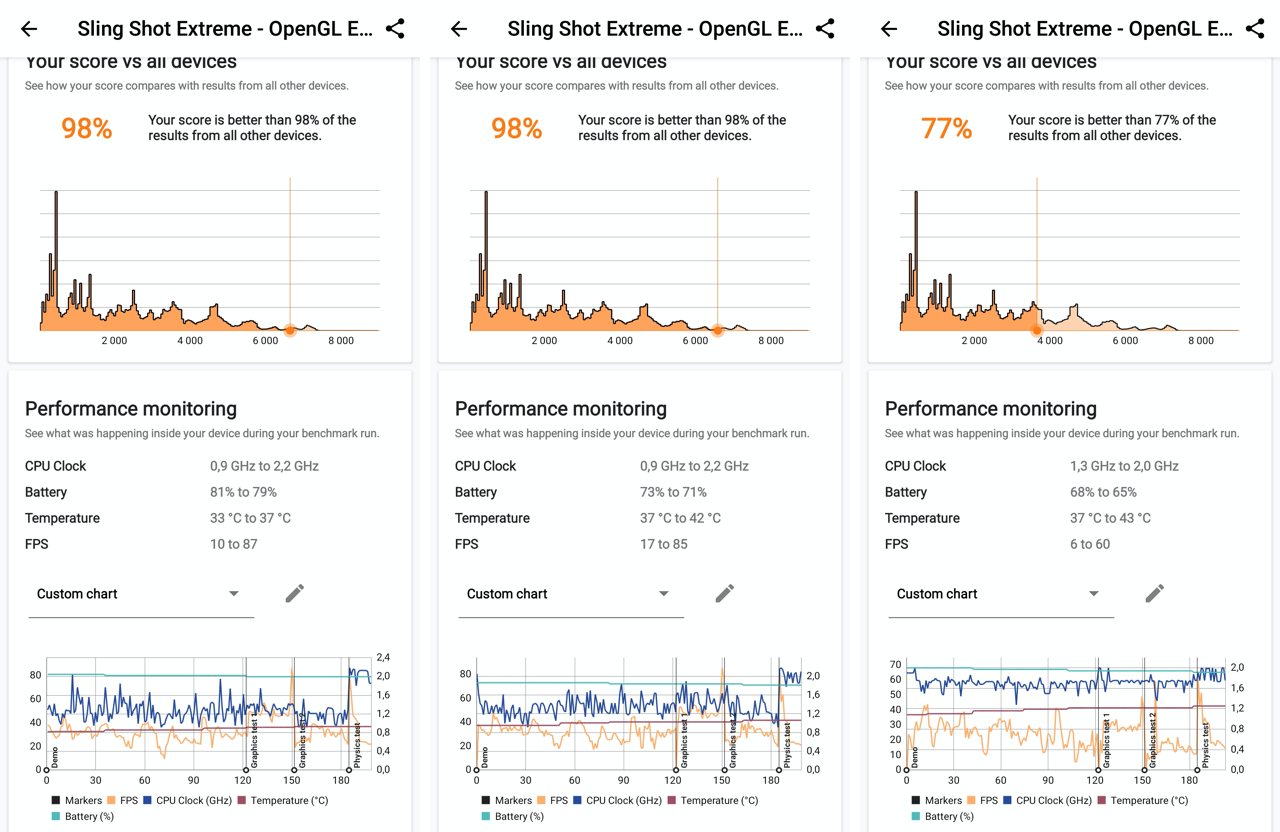
Here's how the test went in all three cases:(from left to right modes: high productivity, optimized, moderate energy saving). Interestingly, the processor temperature did not exceed 43 degrees, that is, the smartphone did not overheat. FPS was maximum in the highest productivity mode and reached 87 frames per second (the lowest, predictably, was in power saving mode - there it did not rise above 60 and fell the lowest - up to 6 frames per second). It’s also interesting that even in the lowest performance mode, the Exynos 990 processor remains more productive than 77% of smartphones on the market.
</ img>
To evaluate the performance of the Samsung Galaxy Note 20 Ultra in practice, just look at how the gameplay of something truly spectacular looks like on it, for example, Asphalt 9:
Three important things to remember about the performance of the Samsung Galaxy Note 20 Ultra
- It has a flagship Exynos 990 processor with multiple coprocessors
- Performance is not a constant and can be controlled in the settings
- The default productivity mode is optimal and will work in most cases
To be continued. If you have questions about the Samsung Galaxy Note 20 Ultra smartphone, leave them in the comments, I will try to answer.