
What do we know about Samsung Bixby? That this is Samsung's own version of the assistant, working according to some algorithms
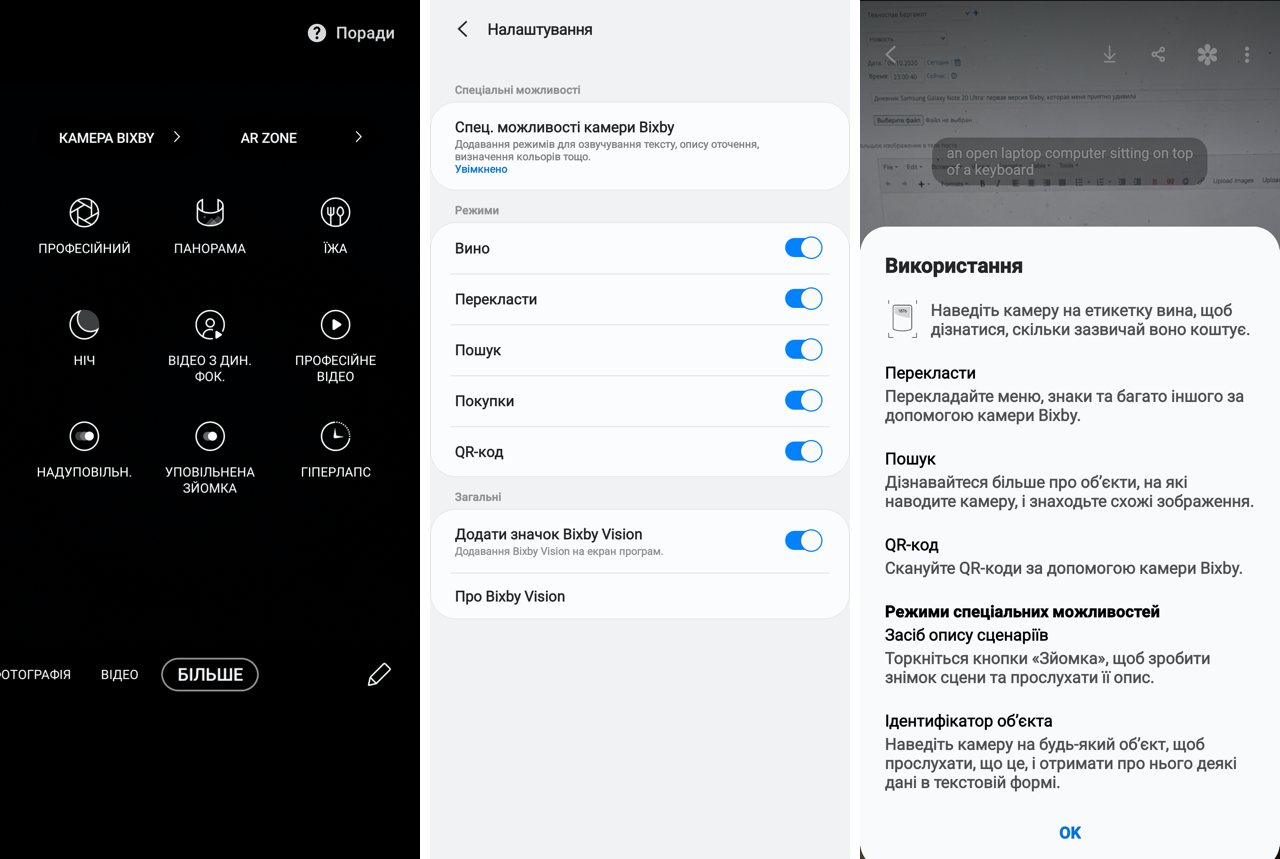
My experience of using Bixby regularly has begunfrom the most frequently used smartphone features. Of course, we are talking about the camera. The Bixby section appeared in Samsung cameras several years ago. And it includes all the smart services that require a camera. First of all, this is, of course, reading QR codes. QR codes themselves are not as widespread here as, for example, in China, where they are used by everyone, young and old, but sometimes reading codes is still necessary in our conditions. In Samsung smartphone cameras, this function is available in the Bixby section. There is also a translator (using Google Translate functionality). There are several more operating modes of the Bixby camera, which are not relevant for our country. For example, Shopping - the object at which the camera is pointed is looking for goods in the Amazon store. Wine (you need to point the camera at the label of the wine bottle) - the Vivino service is used. Search - it’s not about searching in general, but about finding interesting objects (as indicated in the comment when shooting, “for inspiration”, Microsoft and Pinterest services are used. By the way, in France, out of curiosity, I once looked for the label of a wine that was brought to us in restaurant, and actually found it, surprising everyone with his "knowledge" about wine. The new version of the Bixby camera, which is used in the Galaxy Note 20 Ultra, has several more modes: Scene Description, Object ID, Text Reading and Color Detector. All this can be useful for blind people (by the way, we have a separate interesting text about how blind people use smartphones). And all this works, but, I repeat, in practice it can be convenient for the blind or for having a pleasant time with modern technologies, and There are practical benefits from reading QR codes.
</ img>
Bixby Routines: scenarios for all occasions
A few years ago on a podcast I learned aboutthat smartphones of the near future (for you and me this is already the present and now you will understand why) will predict our desires and our behavior. Sounds fantastic? No, if you think about it, our behavior and scenarios for using a smartphone differ from the time of day, our location and the connected zoo of devices. And all this data is already in our smartphone. A simple example: you wake up and pick up your smartphone. How many of you do things differently? Everyone has different use cases - some read news reports, others read weather information. Some people look at overnight likes on Instagram, others look at views of their videos on YouTube, and others look at the latest controversies and discussions on Facebook or Twitter. Let us separately highlight such a genre as parent chats in Viber. Although it could be housemates, for example. Another scenario is that you get into your car and drive to work. It's great if you have Android Auto, but if you don't, you can automatically start an energetic Spotify playlist for your commute. Or a new podcast. Or whatever you listen to while traveling. Come to the office. The smartphone connects to the office Wi-Fi network. And here, too, there may be different options - do you want to read mail and messages on your smartphone or is it better to give them up altogether? Are you connecting to headphones? Want to change the volume level? How about changing the phone ringer volume level? Do you need it to be maximum or, conversely, do you need silent mode?
Now all these scripts can already be used andconfigure it yourself in the Bixby Routines app. The future has already arrived, congratulations! And the more and more often you use them, the more accurate Bixby's recommended scripts (and their number) will be in the near future. In this case, of course, all of them will be available for adjustment depending on your preferences. This magic is activated in the “Additional functions” settings:

</ img>
A dozen ready-made scripts are already available,which, firstly, close a lot of life situations, and, secondly, open up a huge field for new experiments with technologies. You can create the future right here and right now!

</ img>
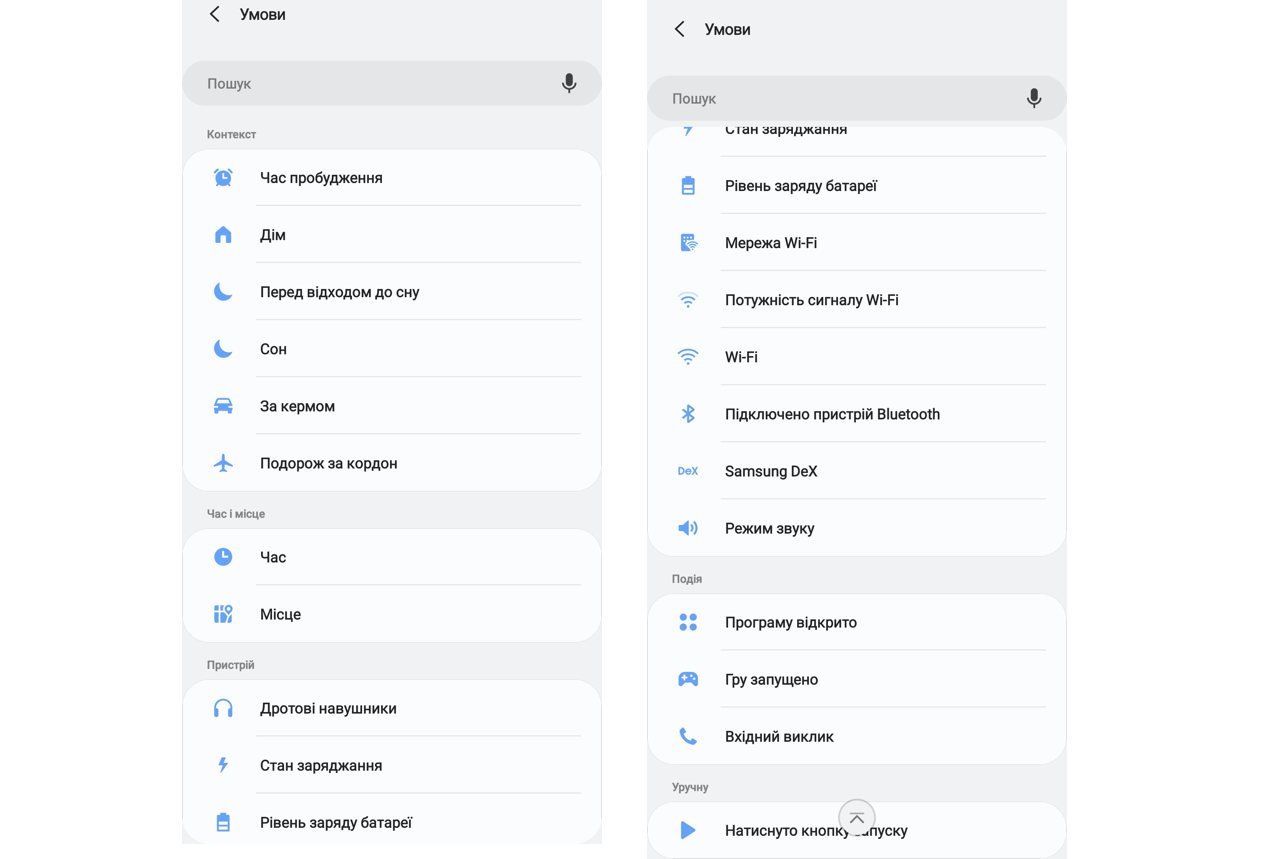
The list of conditions for scenarios takes up two screensmenu. Events can be time periods, locations (home, office, cottage, favorite cinema or dog walking area), connected devices. Triggers can be the launch of specific applications, battery level. A huge field for experiments!
</ img>
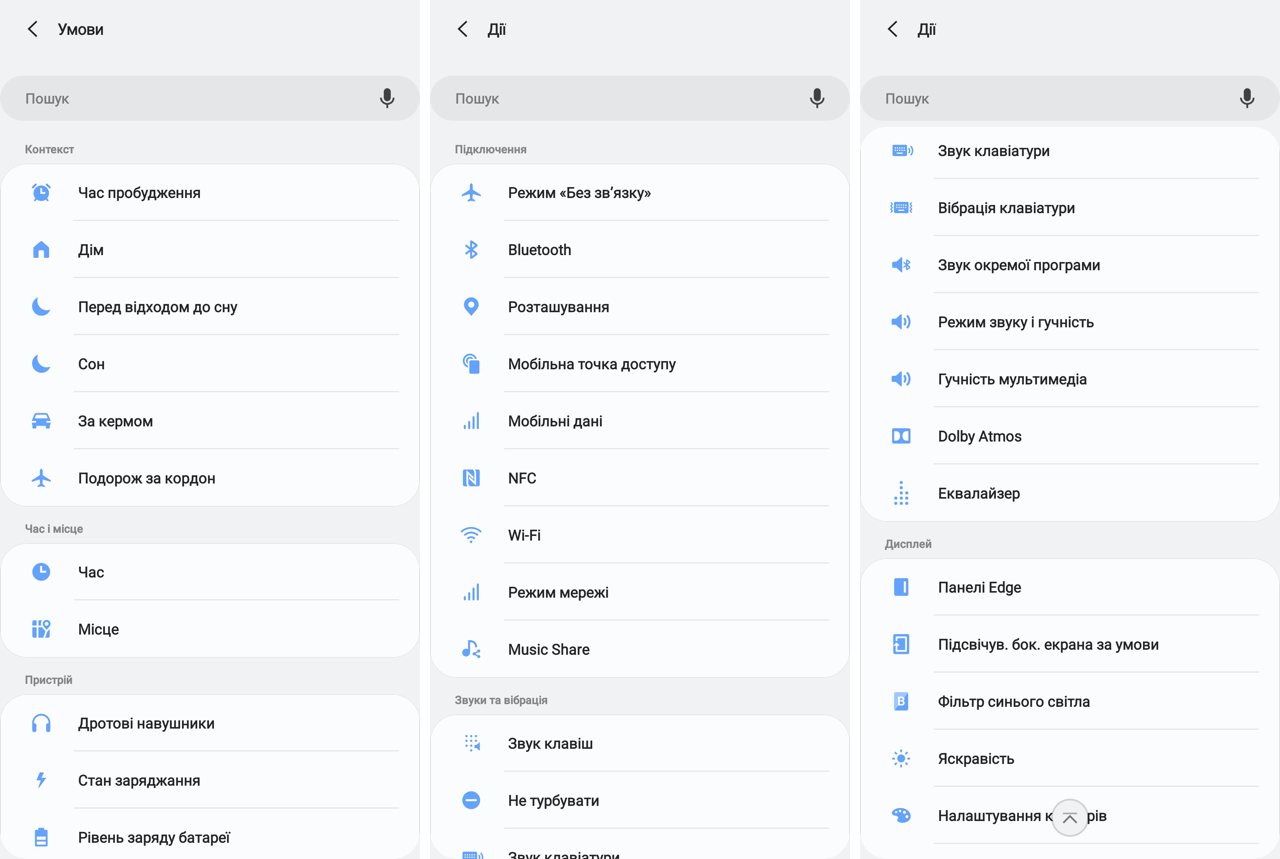
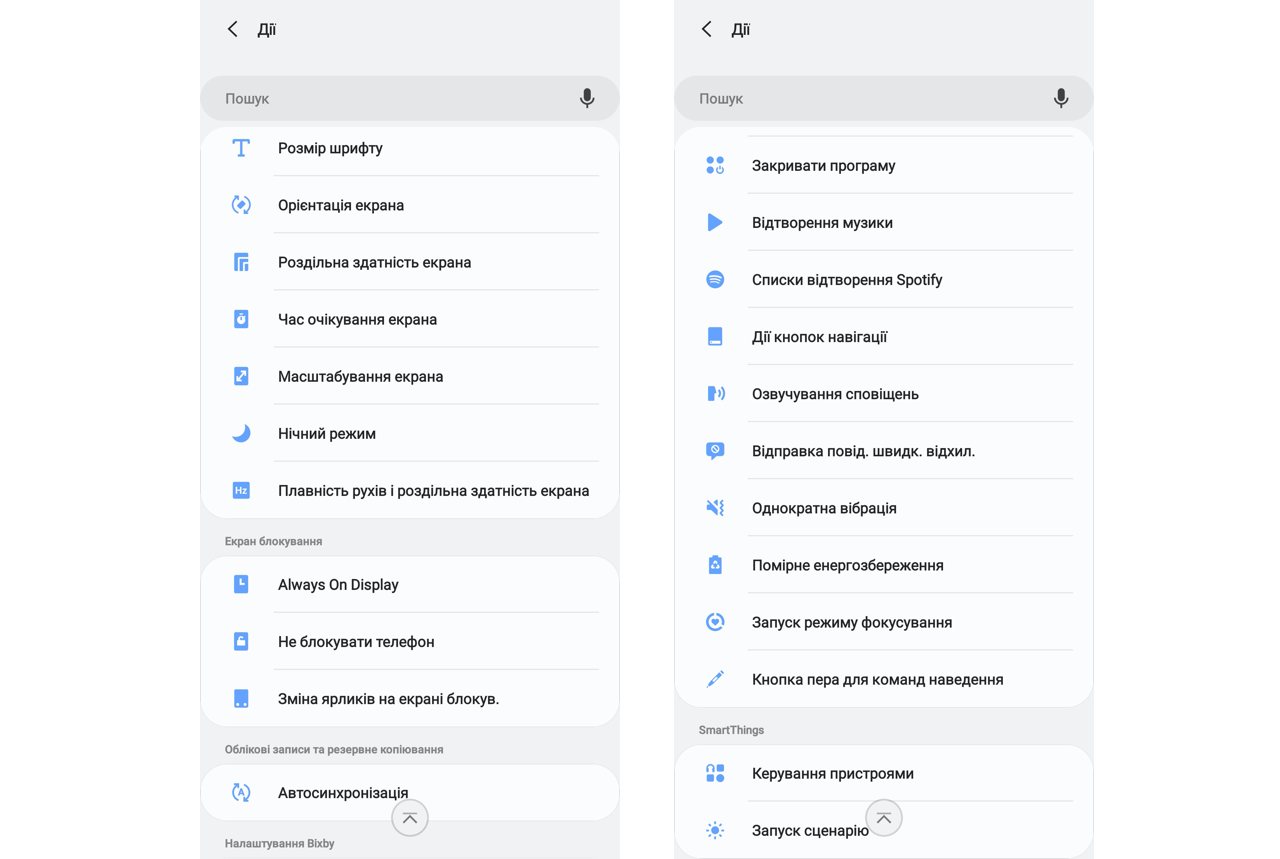
List of actions available for managementmore - five menu screens! Here you can find almost everything you can do with your smartphone in its settings. There is room for even a seasoned geek to turn around.
</ img>
</ img>

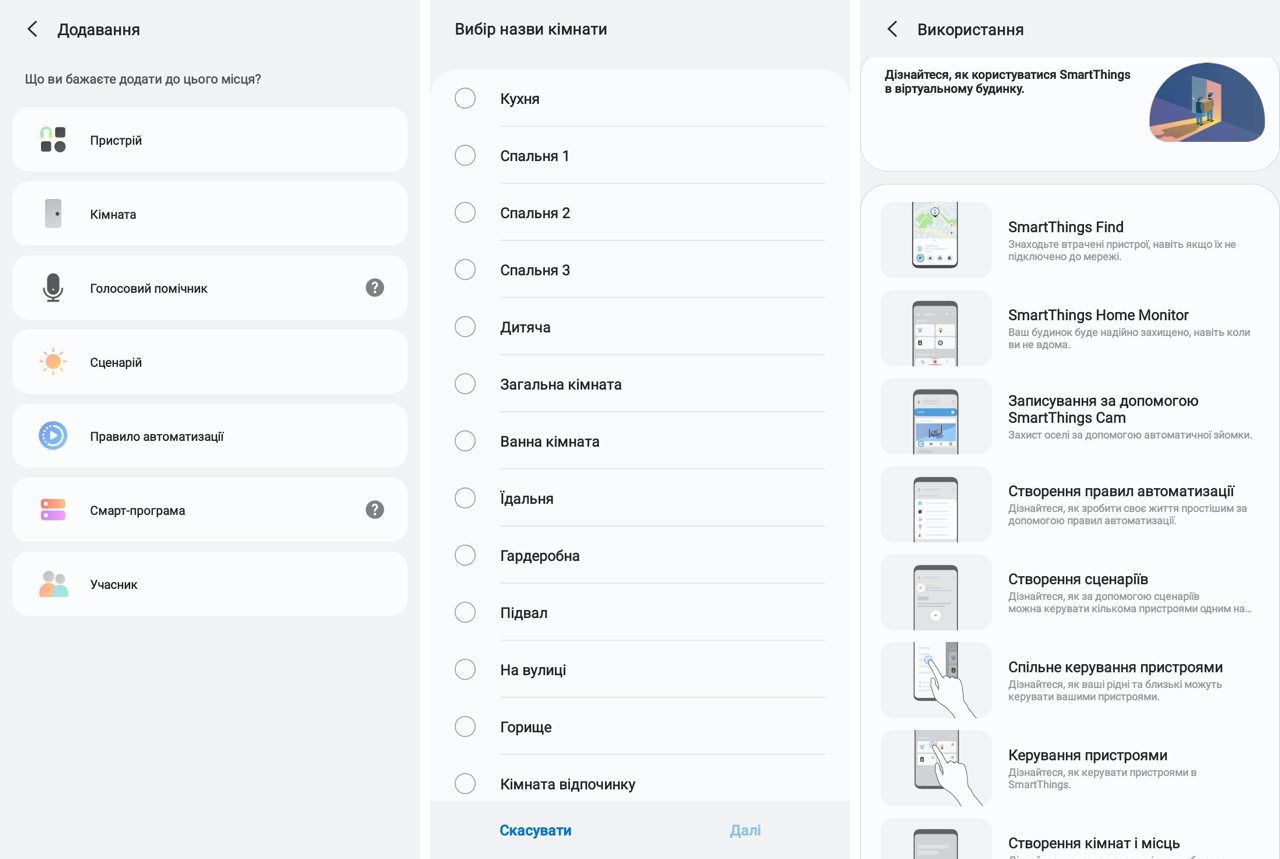
But the most interesting thing is in the last act.- Launch a script that opens a window into a separate universe of the Internet of Things (Samsung calls this SmartThings). The corresponding application is launched to control all (mostly future) smart home devices:

</ img>
To take advantage of all these benefitscivilization, you will need to install plugins and additional applications. And also buy all these devices for controlling a smart home: CCTV cameras and security, lighting throughout the apartment, smart cleaning and comfort. To be honest, at the sight of all this, I have two thoughts at once. Firstly, in the next years I will have a lot of work with this entire technique. Secondly, I am sure that somewhere in a secret laboratory not far from Seoul, engineers are already working on the creation of both new devices for the future smart home, and the automation of their work, and the smartphone will be the control center of this entire economy.
</ img>
Coming back from talking about the future, to talking aboutthe present, I personally activated an additional script that allows you to turn off annoying pop-up notifications when playing games on your smartphone. And my life immediately became a little less nervous, and therefore a little more pleasant. I also experimented with different settings for the smartphone while working at home and in the evening, when I do not want to receive notifications from instant messengers and mail that arrive around the clock. This made it possible to make the balance between work and personal life a little more convenient. In general, as I said, there is a huge field for settings and experiments to make your life more comfortable. And all this thanks to the smartphone. We all scold technology for making our lives unbearable and dependent. Now is the time to return everything back to the same technologies. The way it will be more convenient and useful for us. Speech, no less, about control over your own life in an era of satiety with information.
Three important things to remember about Bixby on the Samsung Galaxy Note 20 Ultra
- The Bixby Vision app inside the system camera allows you to read QR codes without installing additional apps. And can be used to translate texts.
- Bixby Routines scripts are already capable of even more precisely customizing the smartphone to the user’s preferences, taking into account his habits, places he visits and time.
- In the future, when we are surrounded by more and more smart home technology, we will use automatic scripts for its work, creating our own comfortable environment.
To be continued. If you have questions about the Samsung Galaxy Note 20 Ultra smartphone - leave them in the comments, I will try to answer.