Not every program you buy on your iPhone, iPad or Mac works as you expected. Sometimes application
Advertising
Advertising
If you have any problems withpurchased from a music, movie, TV show, book or application from the iTunes or App Store, you can return the money for them. However, a good reason is needed for this. Money will not be returned if you specifically downloaded something to just try it.
Below we will tell you how you can return the money.for a purchased program through iTunes, as well as how to return money for a subscription in the App Store. This is also useful in cases where you have been charged for an iTunes subscription that you do not need, but you forgot to cancel it. We will tell you how to return the money.
- What happens when you report a problem
- How to refund subscription via iPhone or iPad
- How to refund iTunes subscription money
- Report a Problem Website
What happens when you report a problem
When you report a problem with the application, youYou can choose one of six options. Further actions by Apple depend on the reason chosen. In some cases, money is returned immediately, and in others, you are redirected to the developer to solve the problem. If the application did not appear on your device after downloading, you will be given the opportunity to download it again.
Advertising
Advertising
Here is a list of available reasons:
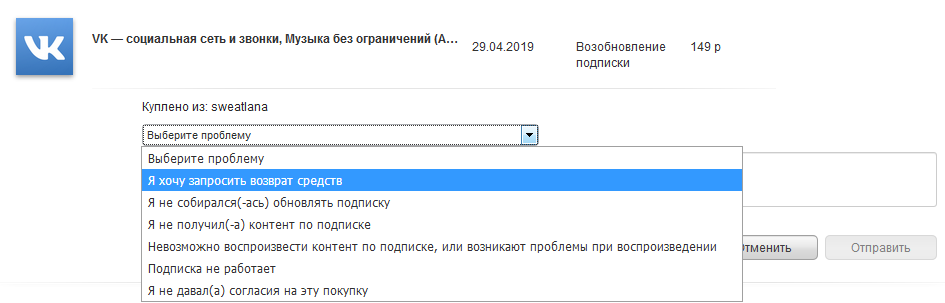
- I want to request a refund: If you are unsatisfied with a game, application or subscription, you can try to return the money. Just describe why you are unhappy, and Apple will decide whether to refund you or not.
- I did not give consent for this purchase: If money was withdrawn from you without your consent, send a request for a refund as soon as possible.
- I did not receive subscription content: You will be redirected to the developer's site, and he will have to solve the problem.
- Unable to play subscription content, or there is a problem playing the content: Redirecting to the developer again.
- Subscription not working: Redirect to the developer.
- I was not going to renew my subscription: This option is suitable for those who did not manage to cancel an unnecessary subscription. There is a small chance to return the money.
How to refund subscription via iPhone or iPad
There is no built-in feature in the iTunes Store or App Store apps that lets you report problems. Fortunately, opening the site is also optional, you can use the Mail application.
- Open the applicationMailon your device.
- Find the letter about the purchase you made -Receipt fromApple.
- Select a check for the content you want to refund for. It can be found by date or amount.
- ClickReport a problemunder purchased content. The site will open.
- Enter yourApple ID and password.


- Select a problem from the menu and submit your request.
You will receive a response from Apple within a few days or a week, depending on whether your request is approved or not. Usually, with approval, money is returned within a couple of days.
How to refund iTunes subscription money
Open the programiTuneson your Mac and follow the steps below.
Advertising
Advertising
one)From the menu above, selectScore.
Advertising
Advertising
2)From the menu bar, selectAccount>View.


3)Enter your Apple ID password.
four)In sectionPurchase historyclickSee all.


five)Find the program you want a refund for and click next to itStill. Then clickReport a problem.
6)The Report a Problem site will open. On the menuChoose a problemselect the reason for the request and addDescription.


7)ClickTo send.
Report a Problem Website
You can skip the step with iTunes and immediately open the site.
one)Go to this site and sign in with your Apple ID.
2)A tab will openPurchases.
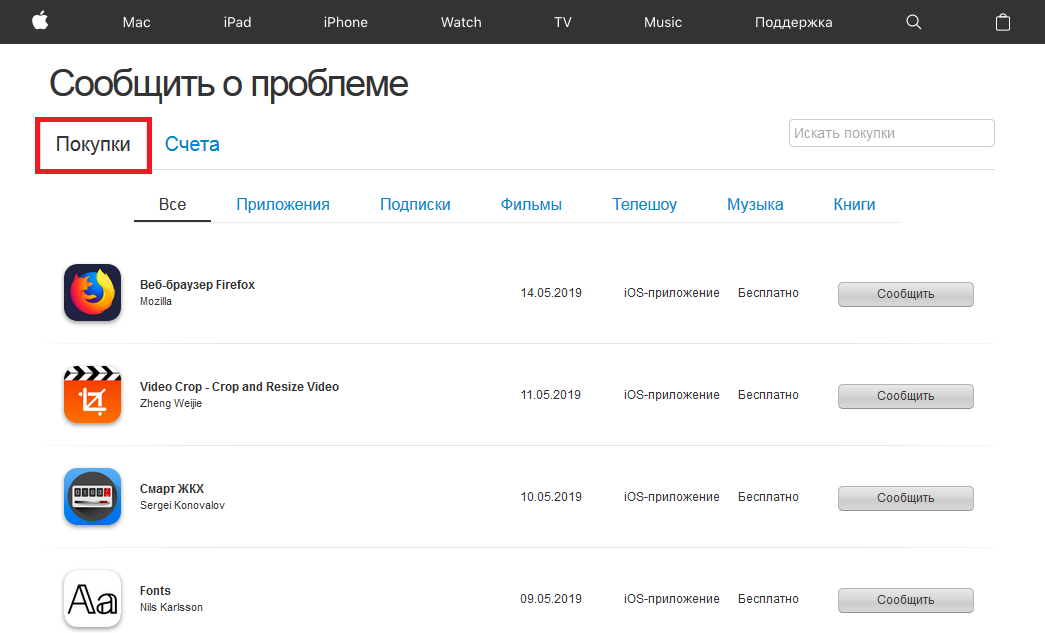

3)You will see a list of all purchased programs and applications. Find the one you want to return money for and clickTo report.
four)On the menuChoose a problemselect the reason for the request and addDescription.

five)ClickTo send.
Apple may refund your money, redirect a request to the program developer, request additional information, or simply refuse.