One of the stupidest features of iOS is the restriction on downloading applications over the mobile Internet. It is forbidden
Advertising
Advertising
Fortunately, in iOS 13 it can be turned off, and below we will tell you how to get around the 200 MB limit on iPhone.


In iOS 13 Apple, when you try to downloadthe application is more than 200 MB on the mobile Internet, you will see a notification. It offers to wait for Wi-Fi connection or download the application immediately. There is also an option that allows you to permanently remove this notification. Accordingly, now there is a way to remove the 200 MB limit on the iPhone.
How to get around the 200 MB limit on iPhone
Step 1: Open the appSettings.
Step 2: Select sectioniTunes Store AndApp Store.
Step 3: Scroll toApp Downloads.
Step 4: Here you have three options:Always allow,Ask If Over200MBAndAsk First.
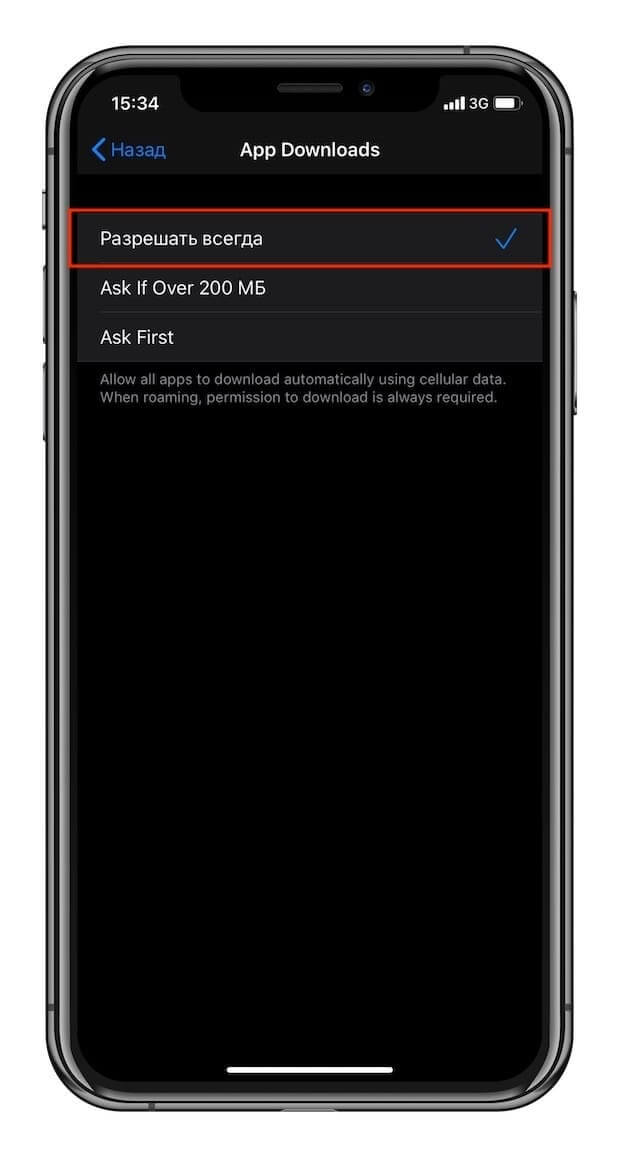

Step 5: To turn off the notification, check the box next toAlways allow.
Congratulations, now you know how to get around the 200 MB limit on iPhone and download any application anywhere and anytime.