In recent months, the popularity of video calls has increased several times. All companies including WhatsApp, Google Duo,
Advertising
During group video calls FaceTime windows withtalking people increase at the same time. This makes it easier to understand who is speaking right now. It is very convenient for calls with a small number of participants, but when several people speak at the same time, it is annoying. Fortunately, in iOS 13.5 there was an opportunity to disable the function, and below we will tell you how to do it.
How to disable magnifying windows in FaceTime
Step 1: Open the Settings app on your iPhone.
Step 2: Go to General > Software update and update to iOS 13.5.
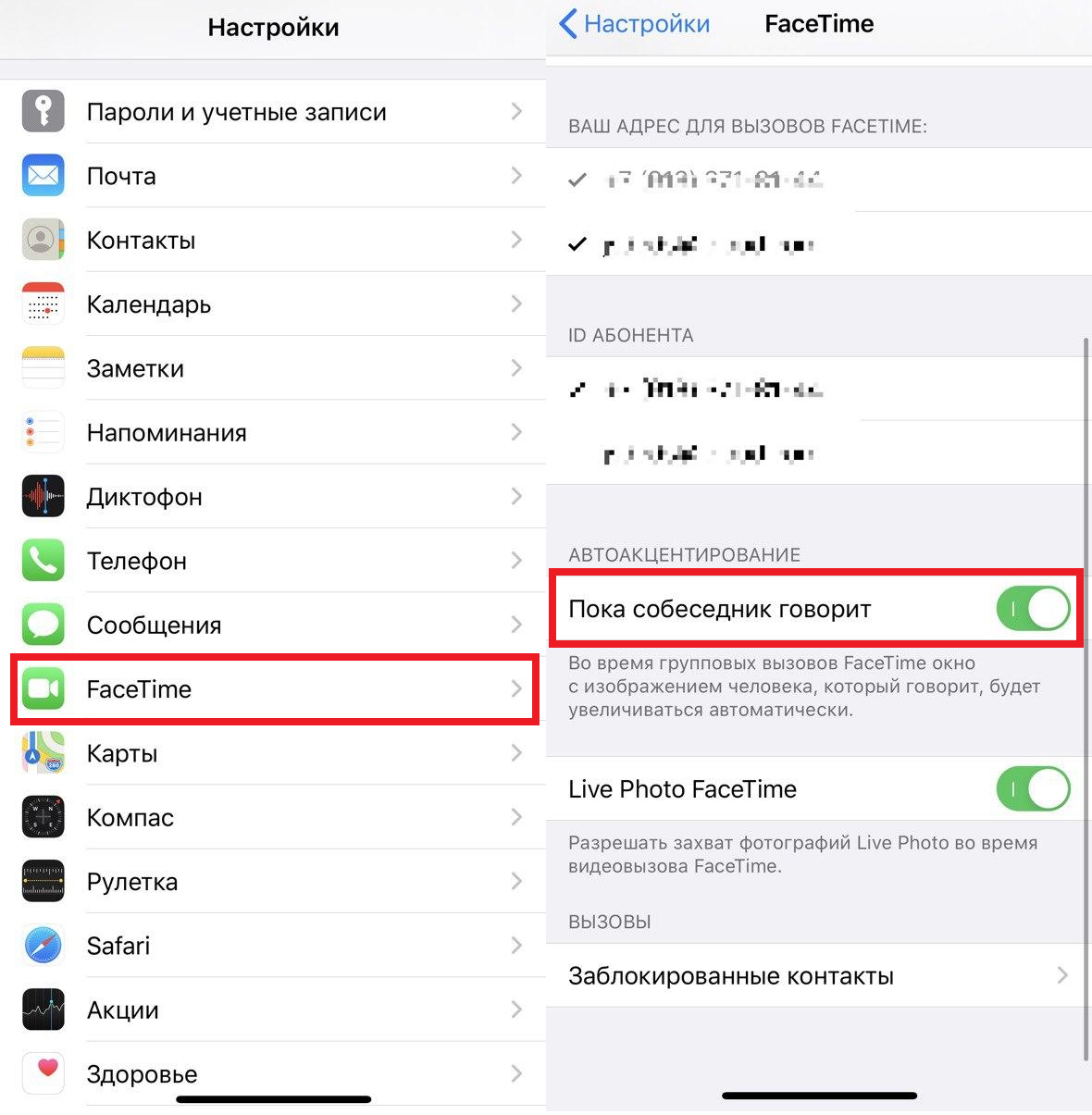
Step 3: After that, go to Settings and select the FaceTime section.
Step 4: Here you will see an option While the interlocutor speaksin the “Auto Accent” section.
Step 5: Disable this option to disable automatic enlargement of speaker windows.

It's nice that Apple quickly responds to requests.their users, especially at such a time. The company also changed the Face ID function to make it easier to unlock a smartphone in a medical mask. We hope you find this article helpful.