Don't want your iPhone or iPad updating or transferring data in the background while you're not using it
Advertising
Advertising
Simply turn off the background update.applications so that they do not continue to work until you use the device. As a bonus, you will notice that charging after this will last for longer.
According to Apple, background application update"Allows them to update content when connected to Wi-Fi or mobile Internet in the background." That is, even when you are not using the application, it continues to download and transfer content. By disabling the function, you are unlikely to notice any changes.
How to disable background update of applications on iPhone and iPad
- Open the applicationSettingson your device
- SelectMain.
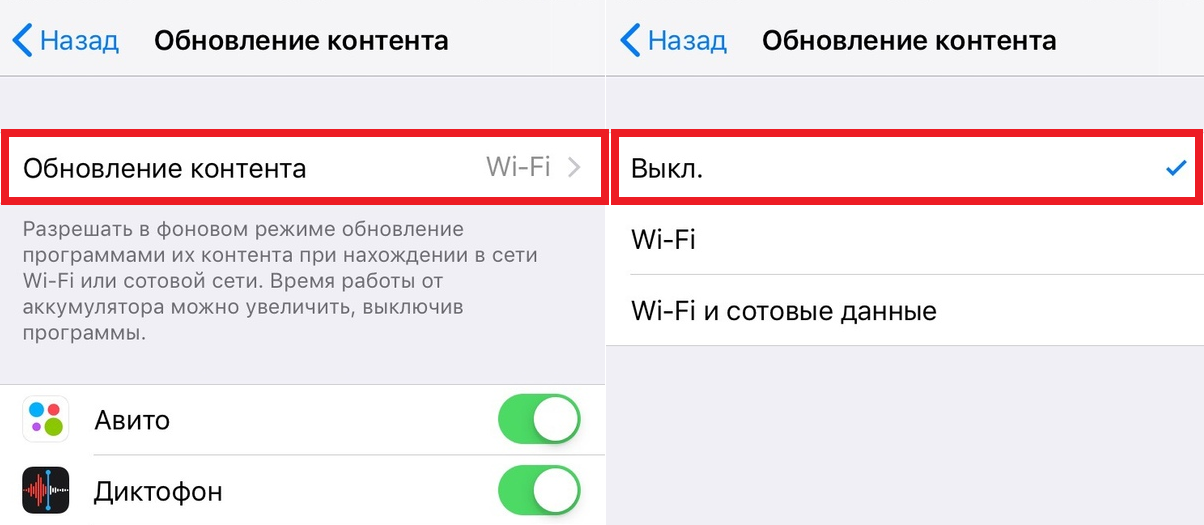
- Open sectionContent Update.
- SelectContent Updateand check the box next toOff.

Advertising
Advertising
Most users will not notice anychanges after disabling the function. When you open applications, they will be updated immediately, which is very convenient. Moreover, charging will be consumed more slowly. We have repeatedly recommended disabling the background update to save power.
If you are worried about somethe application shares personal data, like your location, then you can turn off geolocation services. Many applications ask for permissions that they don’t need, so you need to provide access to geolocation only when necessary. For example, the Maps application will not work without this.
Power-saving mode also temporarily disables background updating of applications.
How to enable background update in iOS
- Open the applicationSettings.
- SelectMain.
- SelectContent Update.
- ClickContent Updateand selectWi–FiorWi–Fi and cellular data.
Whether or not to use a background update is your personal decision. If you charge quickly, it’s better to disable the function. If everything suits you, you can not touch anything.