With the release of macOS Catalina 10.15.5, Apple introduced a new battery health feature for macOS. Similar
Advertising
Advertising
On average, people use MacBook laptops for 5years or even longer. Most often, the first to die is a MacBook battery. Although it can be replaced, it is quite expensive. The new battery status feature should extend the life of your MacBook.
How does battery health management work in macOS Catalina?
The function analyzes how you use yourMacBook, and how you charge it. It will not let the laptop charge 100% when it is not needed. If the charge is always 100% and the laptop is always connected to a power source, this will negatively affect the battery. Many MacBook owners always keep them plugged in, which is wrong. A new feature will protect the battery from wear.
However, the function will not prohibit the laptopcharge up to 100%. He will analyze how you use it, and then adjust the charging to your schedule. If you have an unstable schedule, and you are always in a hurry, then it is better to disable the function, because there will not be much benefit from it. However, if you never disconnect the laptop from the power source, you need a function.
Advertising
Advertising
Supported MacBooks
All MacBook and MacBook Pro models with Thunderbolt 3 ports (2016 and later) support the new feature. On older models you will not find it.
The feature is enabled by default and takes effect immediately after installing macOS 10.15.5. If you buy a new MacBook with macOS Catalina 10.15.5, then you need to enable the function yourself.
How to disable battery health management onMacbook
Step 1: Go toSystem Settings > Energy Savingon your MacBook with macOS Catalina 10.15.5.
Step 2: Select an optionBattery Statusat the bottom of the window.
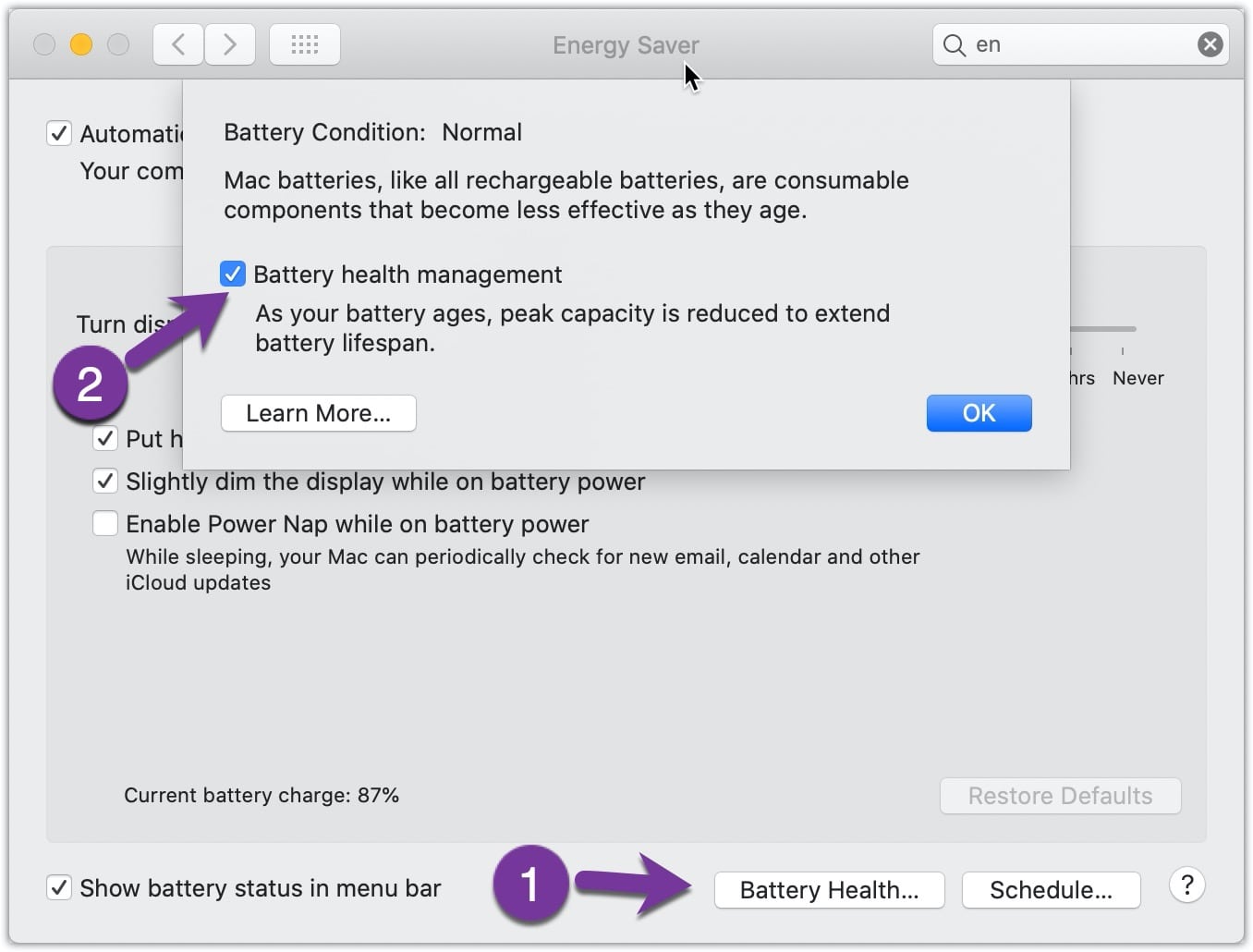

Step 3: On the window that opens, there will be an option to disable the function. After which you will need to confirm your action.