iOS 11 contains many new technologies that improve camera performance. Added new ARKit platform, new mode
The function is built into the grid, so first youYou will need to enable it in the settings. The tool allows you to determine whether an object is ideally evenly positioned in relation to any surface (for example, a wall or ceiling). This feature helps you take perfect, symmetrical shots.
Advertising
Advertising
How to enable level
Step 1: OpenSettings.
Step 2: Scroll down to the list of applications and selectCamera.
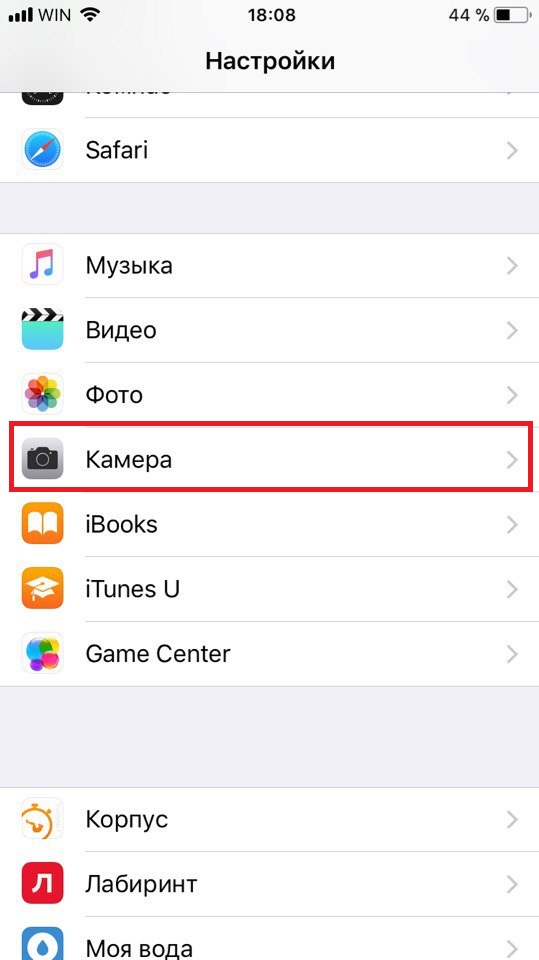

Step 3: Then enable the optionGrid.


How to use level
Step 1: Open the Camera and you will see a grid of 9 squares. This feature alone will help you take better photos by the rule of thirds.
Step 2: In the center of the screen you will notice two white crosses. They look like a plus (+).


Step 3: Move the camera to align thesecrosses. When they are on top of each other, they will turn into one yellow cross. Now you can take a picture. When the cross is yellow, it means that the photograph is perfectly parallel to the floor.


The function works in the Photo, Portrait, Time Lapse and 1x1 modes, but does not work in Video and Panorama.