Do Not Disturb Mode – a convenient function for cases when you need to abstract yourself from everyone. However, even with
You can add these contacts to your Favorites or simply create a new group with them. But there is another way - with the help of the Forcing during emergency option.
Advertising
Advertising
How to enable Forcing during emergency
When you enable the option for a contact, he will be able tocall or write you a message even when the Do Not Disturb mode is active. It is also worth noting that the option will bypass the silent mode on your smartphone.
Configure exclusion contacts for calls and messages separately. You can allow everything or just calls / messages.
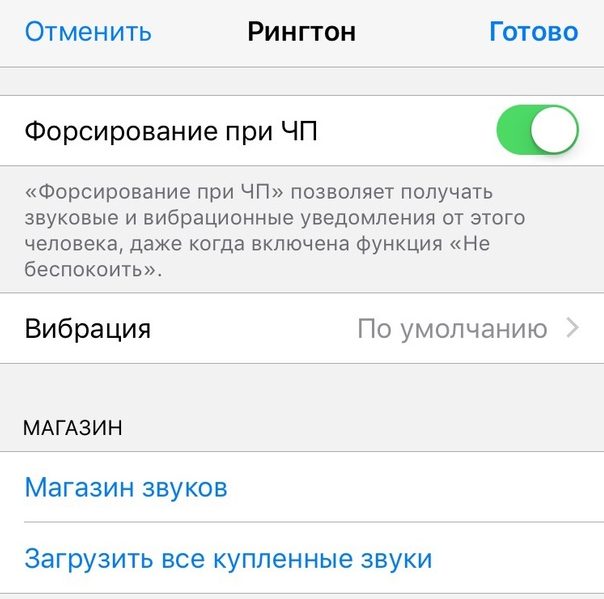
Forcing during emergency calls
one)Open the applicationContacts.
Advertising
Advertising
2)Select the desired contact and pressEdit / Edit.
3)SelectRingtone.
four)At the very top of the screen, click on the switch next toForcing during emergency.
five)ClickIs done.

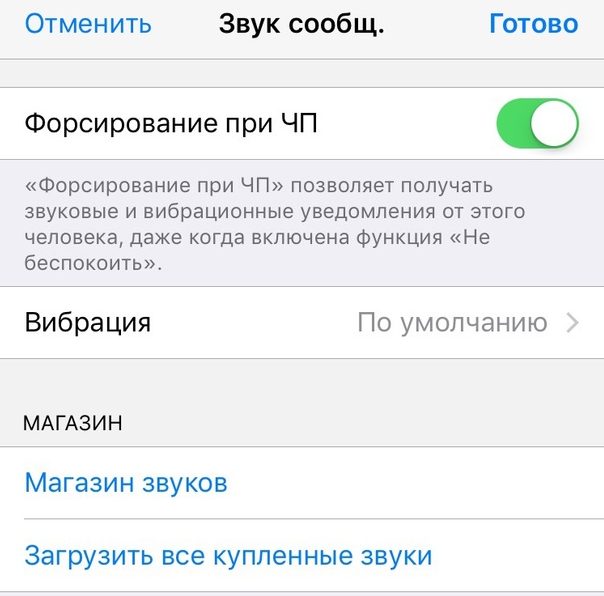
Forcing for emergency messages
one)Open the applicationContacts.
2)Select the desired contact and pressEdit / Edit.
3)SelectMessage sound.
four)At the very top of the screen, click on the switch next toForcing during emergency.
five)ClickIs done.

After that, you will see a message stating that the option is active in the contact information.
You no longer have to add contacts to special groups or favorites. Simply turn on the option for each of them.