The Unc0ver team has released a new version of their tool for all iPhones and iPads running iOS 13.3.1 – iOS 13.5. This is the first in many
Advertising
Advertising
This is still a semi-tethered jailbreak, which meansYou will need to reinstall it after each reboot of the device. Fortunately, this is done without using a computer. The peculiarity of Unc0ver version 5.0.0 is that it supports all models with iOS 13.3.1 - iOS 13.5.
Supported devices
- iPhone 6s
- iPhone 6s Plus
- iPhone 7
- iPhone 7 Plus
- iPhone SE (2016)
- iPhone SE (2020)
- iPhone 8
- iPhone 8 Plus
- iPhone X
- iPhone XR
- iPhone XS
- iPhone XS Max
- iPhone 11 Pro
- iPhone 11 Pro Max
- iPhone 11
- 2020 iPad Pro
- 2018 iPad Pro
- 2017 iPad Pro
- iPad Air 3
- iPad Air 2
- iPad mini 5
- iPad mini 4
- iPad 5, 6, 7th generation
Jailbreak Unc0ver 5.0.0 can be used for all iPhone and iPad with iOS 13.3.1 - iOS 13.5.
Training
- Delete any iOS 13 update files over the air via Settings > Storage and reboot your device before installing the jailbreak.
- Jailbreak Unc0ver fully supports Cydia and Substrate.
- Be sure to keep a copy of all your important data before proceeding with the process.
Advertising
Advertising
How to install Unc0ver jailbreak for iOS 13.5
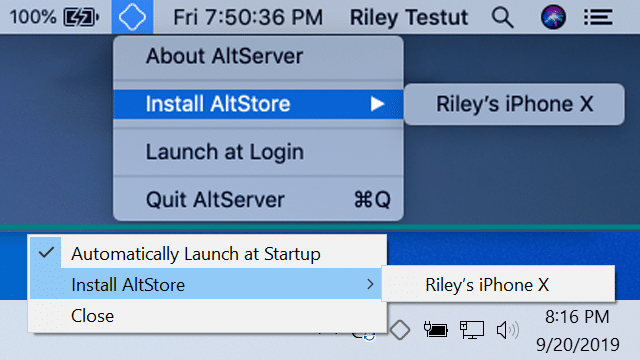
Step 1: Download AltServerfrom hereto your computer and run the program.Connect your iPhone to your computer using a USB cable. AltServer is available for Mac and Windows. You will need to install the Mail plugin during the AltStore setup process.
Step 2: Select the AltServer icon on the Mac menu bar, then select Install AltStar. Now you need to choose your iPhone or iPad.
Advertising
Advertising

Step 3: The AltStore icon should appear on Homeyour iPhone screen. On it, go to Settings > Basic > Manage your device, select your Apple ID and start trusting the developer certificate.
Step 4:While your iPhone is connected to your computer, download the latest version of Unc0verfrom here. You will see the option “Open In ..»(Open in), which must be used to open the IPA file in AltStore. This will begin the installation process. You may need to enter your Apple ID details during the installation process. Use the same Apple ID as above.
Step 5: Return to the home screen of your iPhone,Launch the Unc0ver app and click the Jailbreak button. The application does the rest on its own. Your iPhone will respring in the process, after which the Cydia icon will appear on the home screen.
There may be a jailbreak error. In this case, just restart the smartphone, open the Unc0ver application and try again. If the application continues to freeze and give errors, close it, clear the application cache, restart your smartphone, turn on Airplane mode and try again.
When you finish the installation, you can find a list of the best sources of Cydia for iOS 13 - iOS 13.5.