Recently, listening to the radio has become popular again.
Solution to the problem
Directly listen to the radio on Apple devicesimpossible, because they simply are not equipped with a hardware FM module. It’s useless to look for where the radio is in the iPhone. For the same reason, there are no programs that provide radio without the Internet for the iPhone. Here the internet comes to the rescue. If you have a fast enough connection, you can listen to the desired radio station through the network. There are special programs for this, a number of which are in the official App Store. Many of them are free.
Advertising
Advertising
One of the best apps is Audials Radio, a radio for the iPhone from German developer Audials AG.
Work basics
First, it’s worth noting: The app is completely free. To enjoy the full functionality of Audials, just download the radio to your iPhone. No annoying ads and idle premium features that rightly annoy many users.
Despite the full English language, the main menu is intuitive and accessible to most users who do not know English.
Advertising
Advertising
Audials Radio works with any typeinternet connection. After starting, a set of icons appears on the start screen. Some of them open additional menus, while others show recently listened radio stations.
After a short download (“Buffering” label), playback starts. During the sound of a specific song, the artist and name are displayed on the screen, as well as a splash screen illustration:


In screen lock mode, the picture is as follows:


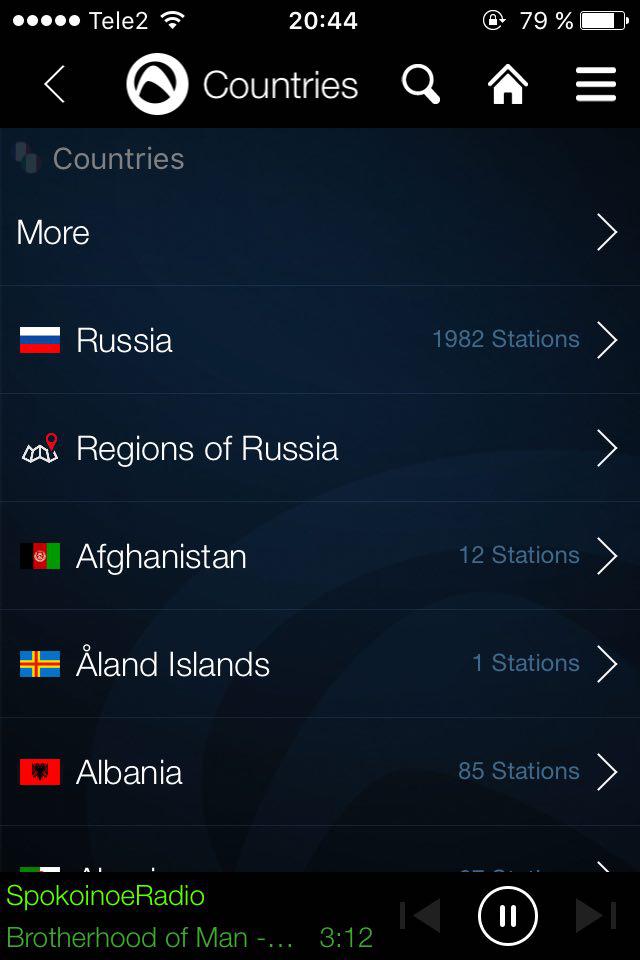
The Audials Radio app makes it easy to sort your radio stations – at any timeYou can choose to be classified by genre or country of broadcasting.

Advertising
Advertising
The application supports popular Russian-language radio stations:
- Radio record
- Our radio
- Echo of Moscow
- Europa Plus
- and many others.
Record functionradio recording with subsequent breakdown into separate tracks. A list of recorded songs is displayed in the Recordings menu, available on the main page of the application. Here you can listen to the recordings made at any time, as well as add them to your favorites or delete them from there:


Audials Radio - Not Only Favorite Music
The application additionally contains a hugea list of audio and video podcasts on various topics - yoga classes, culinary masterpieces, issues with interesting facts and much more. In a separate menu item, you can select the language of interest.


Similar menu offers a list of radio stations withsimilar sounding is a great opportunity to expand your musical horizons. The application “remembers” the radio stations that the user listened to recently, and displays their list in the separate menu “Recent Stations”:
Advertising
Advertising


Special features of the application
A few words about the interesting features of AudialsRadio You can call the context menu, which allows you to put the application into an operating mode that is convenient for use when traveling while driving a car:


There is also an off timer - for those wholikes to fall asleep to the sounds of his favorite radio stations. After a period of time selected by the user after the start of listening, the program itself will stop playback:
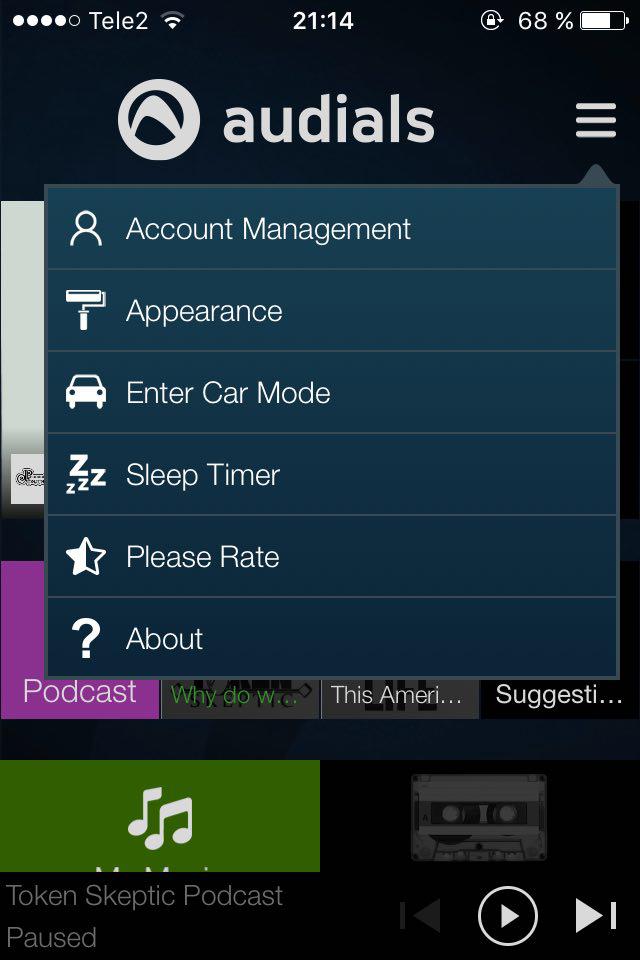

You can also create a free account and access it from other devices. Available synchronization with the social network Facebook.


If the type of program is not pleasing to the eye, a couple of background settings and display icons are offered in the menu to choose from.
Finally, I would like to note energy efficiencyapplications - for 30 minutes of continuous listening, the battery power of the iPhone 4S decreased by only 7%, which is a good indicator for Internet radio on an iPhone, comparable to the work of a smartphone in the background when connected to Wi-Fi.
Thus, if there is a fairly inexpensive and fast Internet, Audials Radio will be a pleasant assistant for any iPhone user for exploring the world of broadcasting.
Download for iPhone, iPad: Audials Radio in the AppStore
Official Website: Audials.com
Cost:gratis


Audials Radio & Podcast
Price:
Free