The virtual assistant Siri is famous for performing voice commands, but you can also interact with it
Turning on the “Enter text for Siri” function, you can correspond with the assistant messages. The text command “set the timer for 5 minutes” will be executed in the same way as the voice command.
Advertising
Advertising
This option is part of Universal Access on Mac OS, as on iOS.
How to writeSirimessages toMac OS
Feature available in macOS High Sierra 10.13 and later.
- Go to the Apple menu and select “System Preferences”.
- Then select "Universal Access" and in the side menu click "Siri".
- Check the box next to "Enter text for Siri."
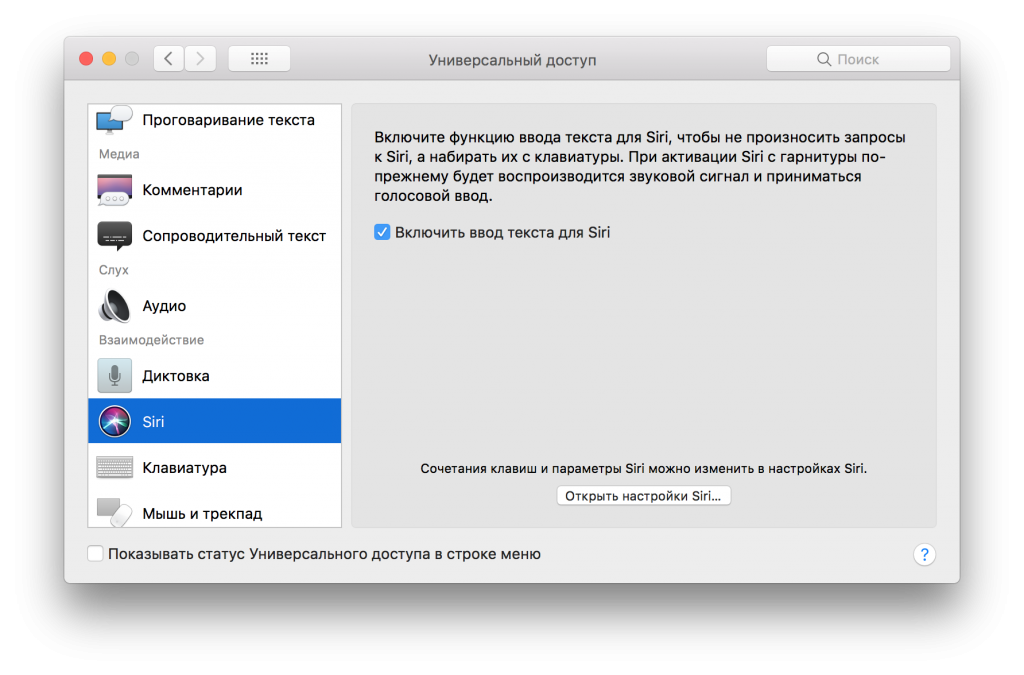

- Close the settings.
Now you can send Siri commands in the form of messages, instead of speaking them out loud.
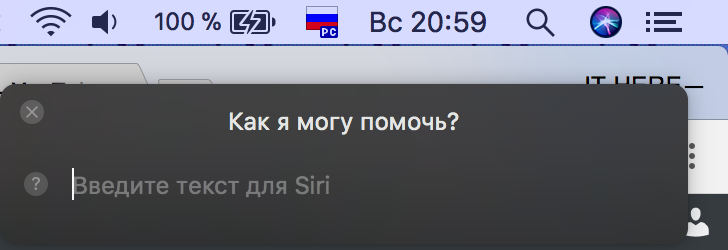

Siri is activated as before - by pressingon the icon in the upper right corner of the screen, by clicking on the icon in the dock or by a key combination. But now you do not need to say the command out loud, you can enter it in the form of text.
If you don’t know what Siri can do, you can read this article. We also recommend that you read about the hidden capabilities of the virtual assistant.