If you didn't know, you can easily remove Screen Time limits for apps and entire
Advertising
Advertising
Recall that Screen Time is a new feature.iOS 12, which allows you to set time limits for the use of specific applications or entire categories. The function is very useful if you want to spend less time, for example, on social networks, or want to limit the time that your child spends on his smartphone.
Below we will tell you how to delete previously set application limits. The method will be the same for the iPhone and iPad.
How to remove the screen time limit
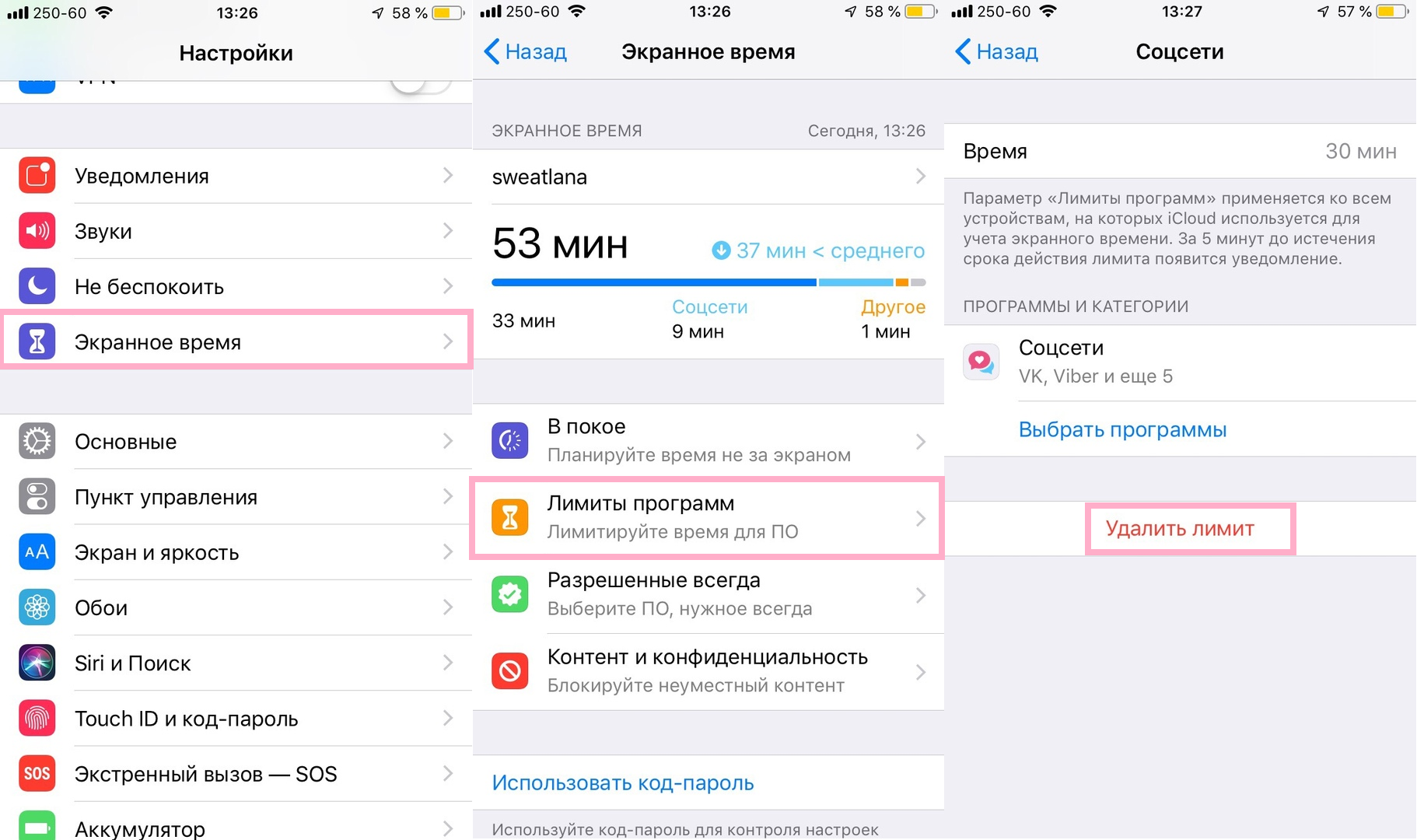
- Open the applicationSettingson iPhone or iPad.
- Select sectionScreen time.
- Select hereProgram Limits.
- Select the application or category whose limit you want to remove.
- ClickRemove limit.

Advertising
Advertising
- Confirm that you want to remove the limit by clicking againRemove limit.
- Repeat the steps for the remaining limits that you want to delete, or just close the Settings.
After you remove the limit for an application or category, you can use them an unlimited amount of time as before.
For example, if you previously set a limit on the use of social networks, then after removing it, you can use Facebook, Twitter, Instagram, Snapchat, etc. any time a day.
Of course, you can completely disable the Screen Time function, but you will not receive weekly reports that many users like so much.
Recall that the Screen Time function is available in iOS 12 and later.