Some Mac models have a second-generation Apple security chip called T2. Without him you have no
Advertising
Advertising
In this article, we’ll show you how to find out if your Mac has an Apple T2 security chip.
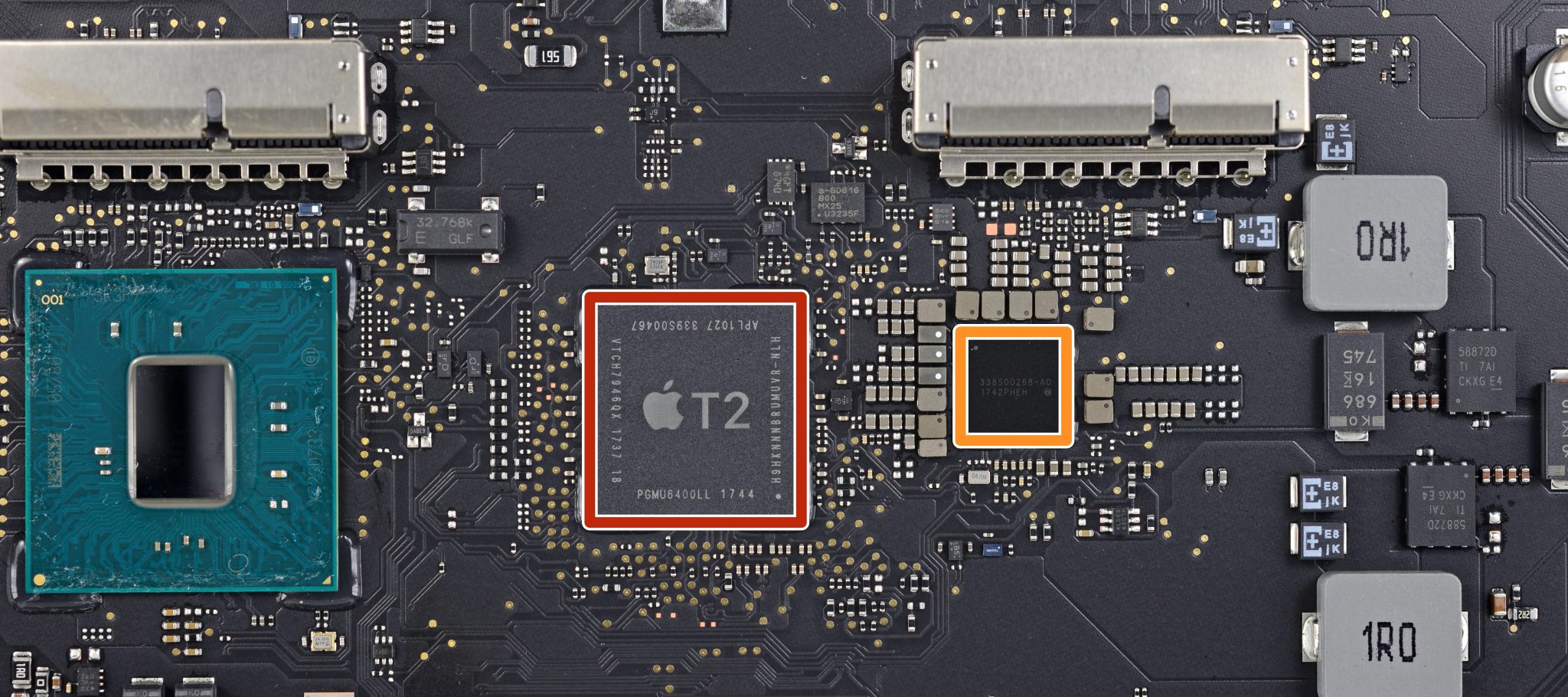
T2 is Apple's proprietary processor that provides a new level of protection through the integration of several controls on older Mac models.
By updating and integrating severalcontrols available on other Mac computers (such as the system control controller, image processor, audio controller, and solid state drive controller), the T2 processor opens up new possibilities for the Mac computer. For example, the T2 processor provides a new level of security thanks to the Secure Enclave coprocessor, which is the basis for new encrypted storage capabilities and secure boot.


Advertising
Advertising
So far, only four Mac models have this processor.
Advertising
Advertising
ModelsMacwith processorApple T2
The Apple T2 processor is in the following computer models:
Advertising
Advertising
- iMac Pro
- Mac mini 2018
- MacBook Air 2018
- MacBook Pro 2018
How to determineMac with processorApple T2
You can use System Information to find out if your Mac has an Apple T2 processor.
one)In Finder, select the Apple menu, and from the menu,About itMac.
2)Select a tabMain, and thenSystem Information.
3)From the menu on the left, selectControlleroriBridgedepending on what version of macOS you have.
If your computer has a new processor, then in the window on the right you will see "Apple T2 processor." If there is no such inscription, then you have an old model without a chip.


If your Mac does not have a new processorsecurity, you can still do the same thing, but not so safe. For example, the FileVault processor uses system encryption, but it is not as strong. The webcam will work as usual, but it will be less secure, and someone can gain unauthorized access to it. And the process of exporting video in 4K will be longer than on new models.
ABOUT processorApple T2
T2 processor delivers a new levelsecurity thanks to the Secure Enclave coprocessor, which is the basis for new encrypted storage capabilities and secure boot. And the image processor interacts with the FaceTime HD camera, providing advanced color matching, improved exposure settings, as well as automatic exposure and automatic white balance based on face recognition technology.


Here is all that is integrated in T2:
- Always-on processor
- Audio controller
- HEVC Video Transcoder
- Image processor
- Co-processor Secure Enclave
- Solid state drive controller
- System control controller
CPUAlways-on
Thanks to the integration of the processor "always-on" chipT2 provides Hi, Siri, regardless of the Intel CPU. You can activate Siri with a voice command to find the files you need, run the program, etc.
Audio controller
On Mac models with an Apple T2 processor, built-inspeakers and a headphone jack are considered different devices that are independent of each other. In this way, you can send sound effects to your Mac speakers and listen to music or other audio on wired headphones so you don’t get distracted by different sounds. In addition, with the new processor, your Mac’s microphone mutes completely when its cover is closed.
Video transcoderHEVC
The Apple T2 processor contains a special video transcoder for the H.265 format, thanks to which video decoding is up to 30 times faster and video quality is getting better.
Image processor
Image processor works withFaceTime camera to analyze and improve picture quality. Among its features are improved color matching, improved exposure settings, as well as automatic white balance based on face recognition.

Co-processor Secure Enclave
Secure Enclave Cryptographic CoprocessorIt is the basis for the new features of encrypted storage and secure boot. Thanks to him, devices run only with the legal version of the operating system. In addition, it protects Apple Pay and Touch ID data.
Solid state drive controller
Data on the internal drive is also protected by the T2 processor. Thanks to real-time data encryption, all your data in the storage is fully protected.
System control controller
This controller is responsible for functions such asreaction to pressing the power button and detecting the closing and opening of the laptop cover. It also controls the battery, prevents overheating and illuminates the keyboard. As a bonus, it provides the operation of motion and lighting sensors, an indicator lamp, a battery indicator, and even the operation of external displays.

