If your iOS device is in a service center or you need to find out if it is stolen, lost or under warranty
- Where is the iPhone serial number?
- Get Serial Number Using iTunes
- In the “About this device” menu
- Check iPhone by serial number
Where is the iPhone serial number?

 What does the iPhone serial number look like?
If you still keep the original packaging from your device, then you can find the serial number printed on the barcode label.
Advertising
Advertising
For users of iPad and iPod Touch: The serial number of your device can be found on the back of the case at the bottom at the base, it is applied by engraving.

 For users:
- iPhone 3G
- iPhone 3GS
- iPhone 4 (GSM model)
- iPhone 4s
The serial number of your device is printed on the SIM card tray, along with the IMEI number of the device.
Advertising
Advertising
For users:
- iPhone 7
- iPhone 7 Plus
- iPhone 6s
- iPhone 6s Plus
- iPhone 6
- iPhone 6 Plus
- iPhone SE
- iPhone 5s
- iPhone 5c
- iPhone 5
You can find out the serial number only on the device’s box, in the device’s settings or in iTunes. Next we will show how to do it.
Get Serial Number Using iTunes
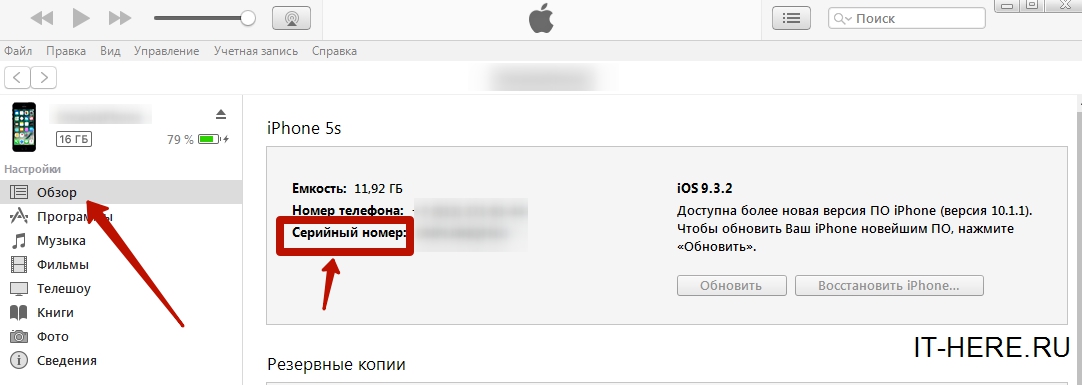
 Where to find the serial number in iTunes
Connect your device to Mac or PC, launchiTunes app and click on the device name to open the Browse tab. You'll see your device name, capacity, and serial number listed next to your model thumbnail. You can also copy the serial number by right-clicking on the field and selecting Copy.
In the “About this device” menu

 How to find out iphone serial number
On your iOS device, in the app"Settings", select"Basic">"About this device"and scroll down to the fieldSerial number.
Check iPhone by serial number
Now that we know our serial number, it remains to check the iPhone by the serial number on the official Apple website. For this:
- Go to specialpage,in the field “Enter the hardware serial number” enter your number that you found out earlier.
- Enter verification code
- Click “Continue“
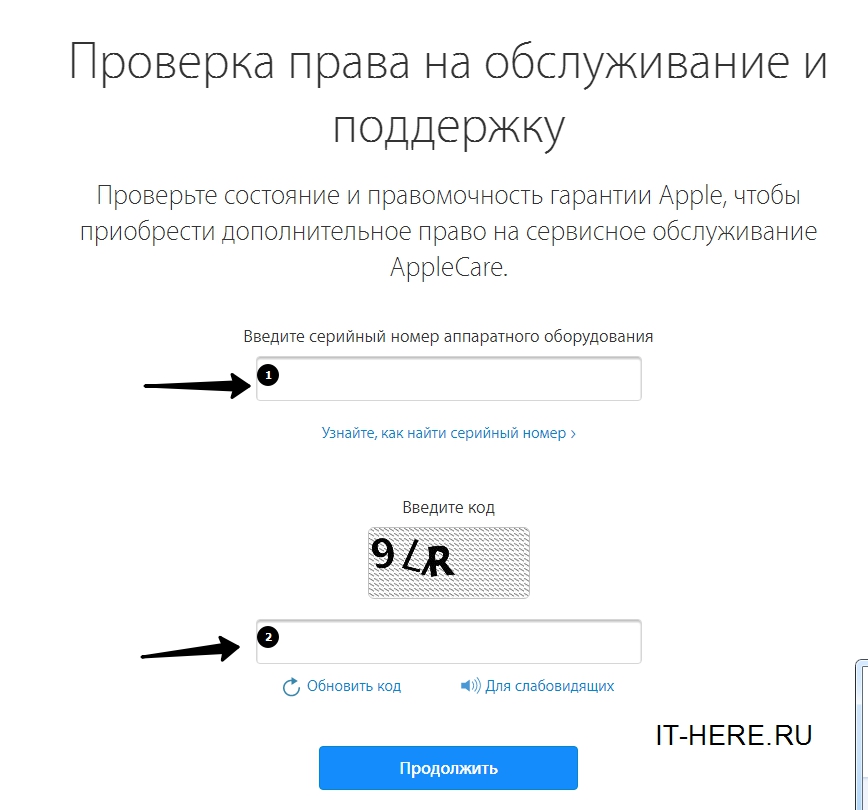
 Check iPhone by serial number