The iPhone is capable of many functions, however, its main goal is still to adopt and
How to fix the lack of sound during a call on iPhone:
No sound during a call: checking the volume level
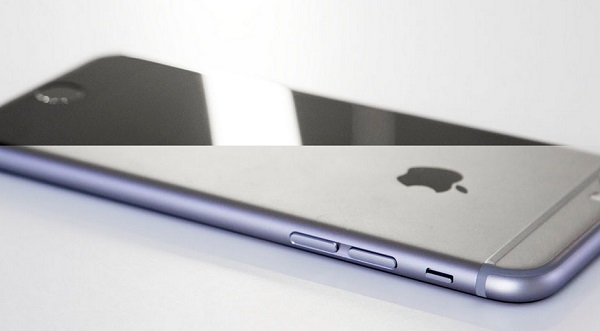

In order to check the set volume level on your iPhone, use the volume buttons located on the side panel.Thus, before you receive or make calls, check the set volume level on your device.
Advertising
Advertising
Cleaning the headset jack and pin connector


Using soft, dry cleaning wipes, clean the headset jack and pin connector fromIf you are unable to remove the detected objectyourself, contact the Apple Store Service Center.
IPhone speaker cleaning
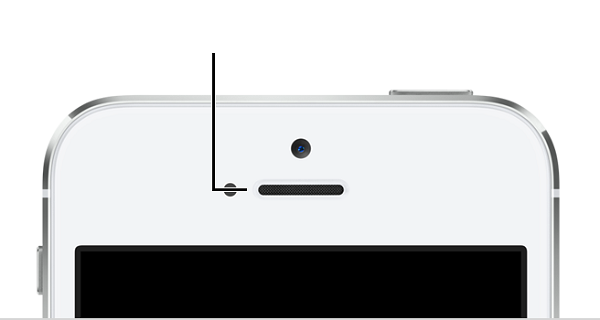

iPhone earpiece is affecteddirt and dust. Cleaning the speaker is an effective way to troubleshoot problems with no sound on your device during a call. To remove dust and dirt from the receiver, use a small, sharp, non-metallic object (such as a toothpick); a soft-bristled toothbrush will also work for cleaning. In addition, this method of cleaning the speaker can be an effective preventative measure.
Check the mute button
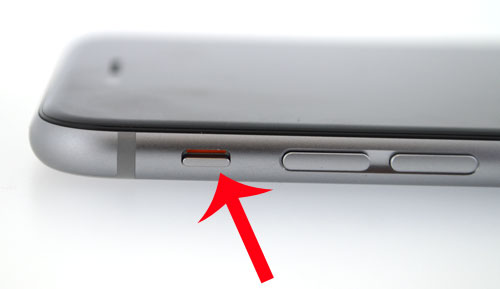

Make sure the mute button is notenabled on iPhone. If you see an orange bar next to the button, your device is muted. Turn on the sound of an incoming call by toggling the silent mode button. Then adjust the volume level.
Advertising
Advertising
Reboot iPhone


Rebooting iPhone is one of the mostэффективных способов устранения каких-либо неполадок на вашем устройстве, в том числе связанных с отсутствием звука. Для перезагрузки выключите и включите iPhone заново.
Erase content and settings
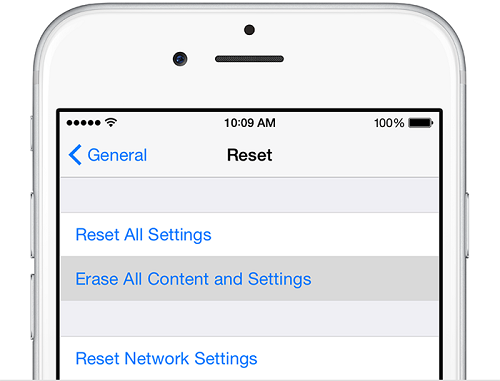

Use this option only as a last resort. To delete all content on your device and reset settings, go toSettings> Basic> Reset> Erase content and settings. Make sure you back up data on your iPhone using iTunes or iCloud before resetting.
That's all! We hope this solves your problem of no sound during a call on iPhone. If you have any other solutions, please share them in the comments!