The most important of all the icons in your iPhone's status bar is the battery charge indicator. He's already great
Advertising
Advertising
Fortunately, a new tweakSmoothbatterysolves this problem by providing many ways to customize the battery indicator.
After installing the tweak, a new section will appear in the Settings.
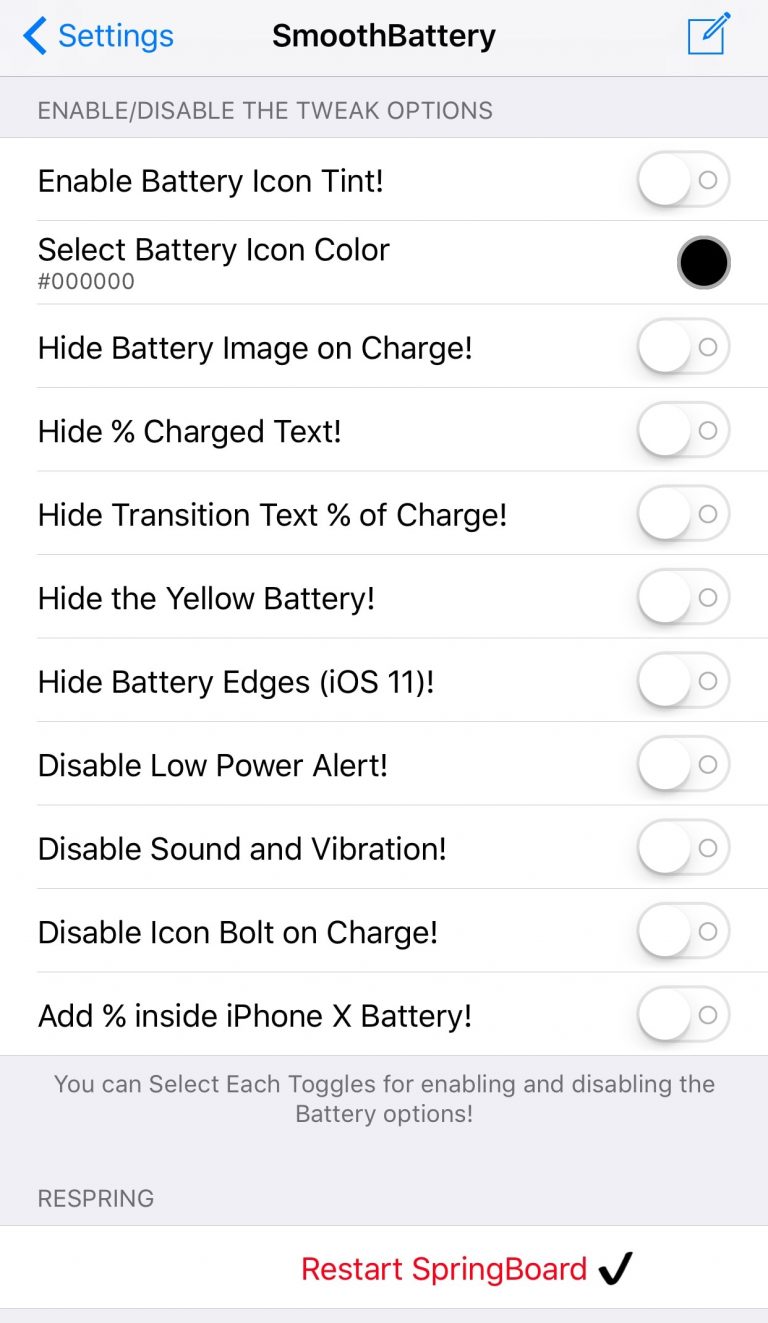

Here you can:
- Disable and enable the selected color of the battery indicator.
- Hide the notification of the connection to the power source.
- Hide text with percentages of charging when connected to a power source.
- Hide text on the screen while charging.
- Do not display yellow when the battery is low.
- Hide the black frame around the battery icon.
- Disable notification with iOS power saving mode.
- Mute sound and vibration.
- Disable the charging icon on the battery icon during charging.
- Add battery percentage to icon oniphone X.
At the bottom of the section in the Settings there is also a button for respring, so that it is more convenient to apply the changes.
If you want the interface of your iPhoneIt was different from everyone else, the SmoothBattery tweak is just for you. You can download it for free from the BigBoss repository. It supports jailbreak devices iOS 9 - 11.