Apple is expected to launch a new Apple Watch this year. The company is also updating the software
We first looked at watchOS 4 at WWDC 2017 on June 5th. Read on to find out about all the new features.
Advertising
Advertising
When will Apple release watchOS 4?
On June 5 at WWDC 2017 we watched a preliminarywatchOS 4 review. After the announcement, watchOS 4 entered the beta testing stage, which will last several months. It will finally be available for everyone to download around September 2017.
However, if you registered as a beta tester, you can download the earlier version of watchOS 4 earlier - perhaps by the end of June 2017.


Advertising
Advertising
What's new in watchOS 4?
Here is a brief summary of the new Apple Watch features that will be presented to us in the next version of the watch’s operating system.
Siri WatchFace
We will start with some new watch dials. It may be a bit superficial - but in fact it is not. At least, certainly not the first dial.
The new “Siri face” will display informationfor you personally, using self-learning similar to predictive features and contact suggestions in iOS. (Which, in our experience, work quite well for themselves, but far from ideal, even though these things are improving all the time.) Does this mean that Siri will work on Watch when you are offline? Or can it be based on information available exclusively on the device?


Siri on Watch displays information fromusing machine learning to fit your daily activities. Therefore, on the display you will see information and application shortcuts that are most relevant to your current needs.
You can rotate the Digital Crown to scroll vertically through various notifications and applications.
Other new dials
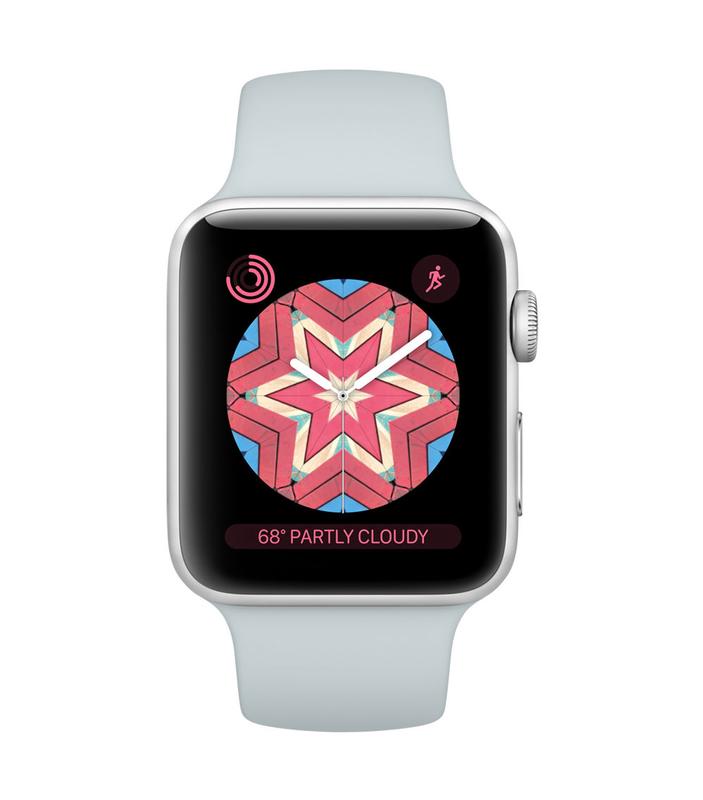
Apple also released two other groupsdials for watches. First of all, it is a dial in the form of a kaleidoscope, which you can rotate with the help of Digital Crown, creating a hypnotic effect. The visual elements rotate and change shape, just like these strange toys that everyone seemed to like so much in the sixties.

There are also new watch faces with heroesDisney, including the most popular Mickey Mouse and Minnie Mouse, which are now available. Woody, Jessie, and Buzz Lightyear (from Toy Story) are also making their way to the Apple Watch, and are now available to those who have access to the iOS 11 beta.
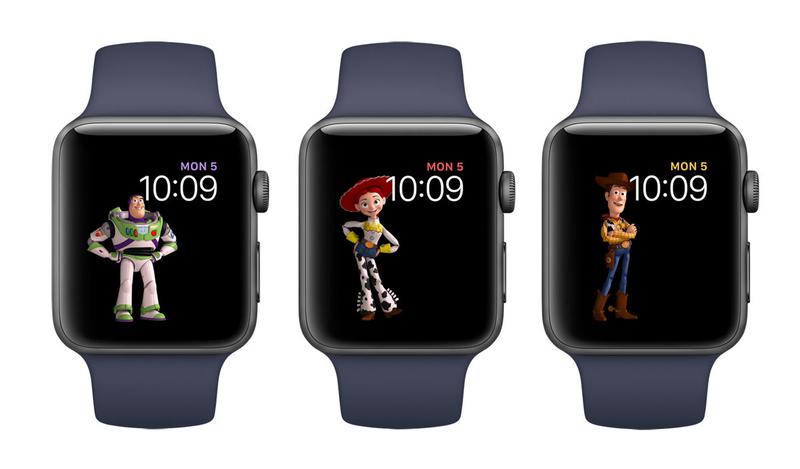

Visually, they seem a little more advanced,than the previous ones. Mickey and Minnie were animated, but rather limitedly - they basically just sway back and forth to the clock. But the new dials include slightly longer animations that behave differently each time you rotate your wrist.
Apple called them "vignettes." For example, one of them is a character climbing up from the bottom of the screen onto the watch dial.
Along with Woody, Buzz and Jesse, you will find Bulzai, Hamm, Rex and aliens from Planet Pizza.
You can make the characters appear on your watch at random, by choosing the Toy Box option in the settings.
Activity and training
Activity (and what we consider to be concomitantapplication, Workout) are almost certainly the most popular watch apps. Therefore, we were pleased to see that Apple continues to improve and complement these applications. As elsewhere, Apple is gradually increasing the impact of personalization and machine learning.
Activity Notifications are now overpersonalized - for example, they tell you if you are close to receiving any achievement. Also appeared "smart learning", which is again tailored specifically for you. It will offer monthly tasks based on your history and records.
Advertising
Advertising
Now the watch has a wonderful new brightanimation to commemorate the completion of your Activity rings (it looks nice, but can get boring after a few months …) and adjust your swimming workouts in the pool. Apple says resting at one end of the pool will automatically be captured and marked as the end of one lap and the start of another, useful for precise timing.
We're thrilled to see Apple are implementingtwo-way data exchange with equipment in the gym. (The hopeless inaccuracy of treadmill training has been annoying for a long time - and the device with the more accurate data is right there!)


You just need to tap on the NFC tag toconnect watches with equipment for simulators. Although, obviously, you will need to find a gym first that supports this feature. We believe it will take some time to get this system up and running outside of California.
There is a new Interval Workout withhigh intensity. It is a challenging and highly effective form of workout that uses your heart rate to get you to work at your best. We really enjoyed testing this workout with the Moov HR Sweat activity tracker.


Apple also realized that notifications were wrongimportant during training, so Do Not Disturb is automatically activated when you start training. Of course, the watch will automatically turn it off after completing your workout.
Oh, and the last change to the workout interface: you can swipe left from the workout menu to access the music controls. (Why wasn't it right from the start?)
Advertising
Advertising
Music
The Music app on Apple Watch has been redesigned to look much better than before. High-quality album covers have appeared - they can be scrolled with the Digital Crown.
(The Digital Crown seems to become much more useful in watchOS 4, which is great because it felt like an underused control in watchOS 3.)
The new music app also triesanticipate your needs - you will automatically see the music and playlists that you listen to regularly added to your watch. It also includes Apple's featured playlists, including Apple Music Picks, My Favorite Tracks, and New Music. Of course, you'll need an active Apple Music subscription to view this option.
The Apple Watch also supports multiple playlists for the first time.
Advertising
Advertising
Other changes
There's a new, redesigned Dock interface - you can vertically scroll through the latest apps with the Digital Crown. (It's a wheel again!)
There is speculation that the new News app for watchOS is based on the watchOS 4 demo, but we have no exact information. It might just be a redesign of the interface.
There is a new flashing light in the Control Center which is useful for keeping you safe in the dark.
Apple claims you will see faster applications and better background performance.
You can also pay with Apple Pay on your Apple Watch using your Apple Pay Cash account, although this feature was originally only available to US users.
Finally, glucose monitoring will appear on the Apple Watch, although there is not yet enough data on the accompanying hardware that is likely to be needed for this.