Apple's long-awaited HomePod smart speaker is finally available to order in the US, UK, and Australia.In
Given Apple’s great love for detail,it is not surprising that HomePod has many small but useful features that are not in the columns of Google and Amazon. HomePod has a set of standard functions for smart speakers, such as the ability to listen to music, add reminders or events, find out the weather, etc. However, there are enough features that set HomePod apart from the rest. And, most likely, you do not even know about them.
Advertising
Advertising
If you are still in doubt about buying a HomePod in the future, go through the list below. Perhaps he will immediately help you make a decision.
#10Good sounding
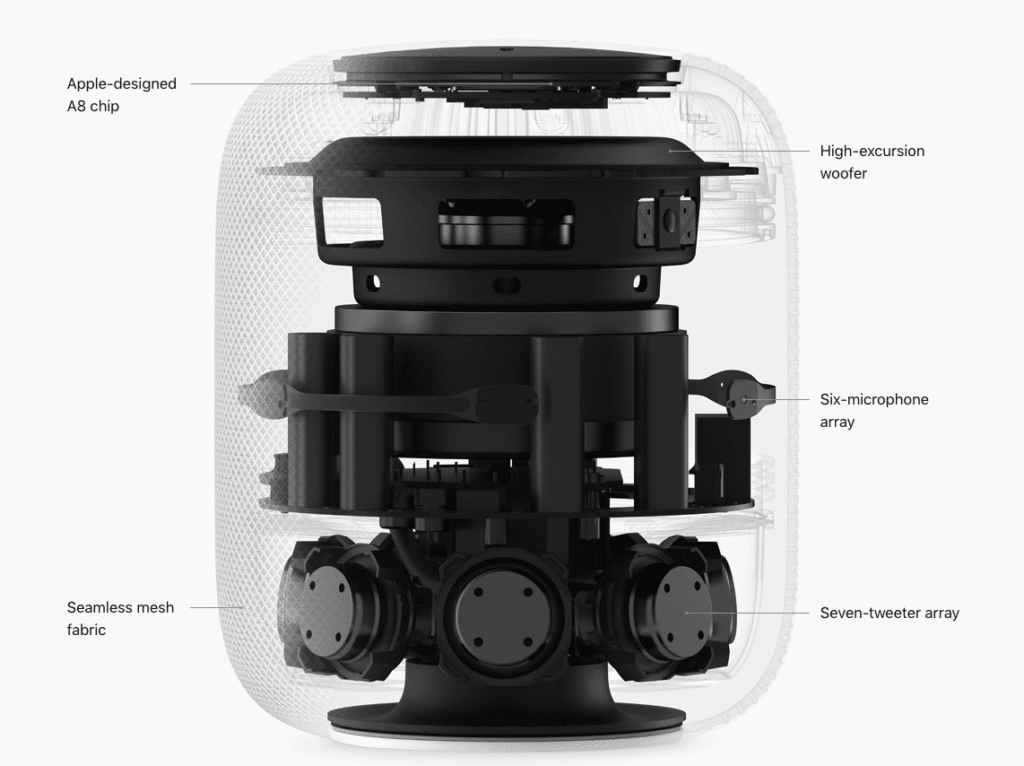
Do not judge HomePod by its size. Despite its rather small size, the speaker is completely filled with speakers and microphones, and it also has a woofer with a high excursion and an exclusive amplifier from Apple. The woofer greatly increases the bass, which other speakers of the same price category are not capable of.

Advertising
Advertising
# 9 Setting music to space
Siri's smart speaker is smart enoughto automatically adjust music playback to the space in which it is located. HomePod divides the sound into directional and diffused. The directional sound is directed towards the center of the room, and the scattered sound is directed in different directions, and then pushed off the walls. Thanks to this function, you get the best music sound depending on where the speaker is. For example, if it stands against a wall, the sound will be directed to the center of the room, and if the speaker will be in the middle of the room, the sound will be scattered in all directions. And thanks to the built-in accelerometer, the speaker understands when it is being moved, and can change the sound settings.
Advertising
Advertising
#8Saving energy
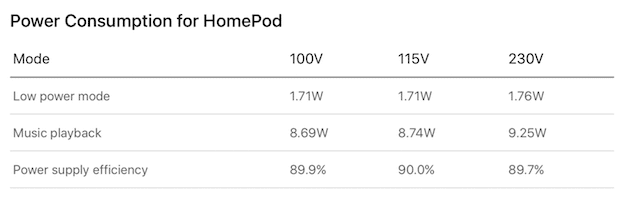
Despite the A8 processor, 6 microphones, a woofer andmuch more, the HomePod is very energy efficient. Apple says that when playing music, the HomePod "consumes less power than a typical average LED light bulb." This is very impressive. Smart power management features are also able to turn off some speaker elements in energy-saving mode to reduce energy consumption even further.

#7Integration withiTunes
HomePod integrates with Apple Music by default,therefore, it is very easy to listen to music through it. To do this, just purchase a subscription. If for some reason you do not want to subscribe, the column will be able to play songs purchased through the iTunes Store. However, keep in mind that HomePod will not automatically play absolutely all the songs from your iTunes library. Only songs purchased through the iTunes Store.
Advertising
Advertising
#6Support callsiPhone
HomePod may act as a speakerfor calls on your iPhone. This means that you can answer calls using the speaker and not waste time searching for your phone. And due to the fact that the sound of HomePod is many times better, the voice of the interlocutor will also be heard more clearly.
#5HiSiri
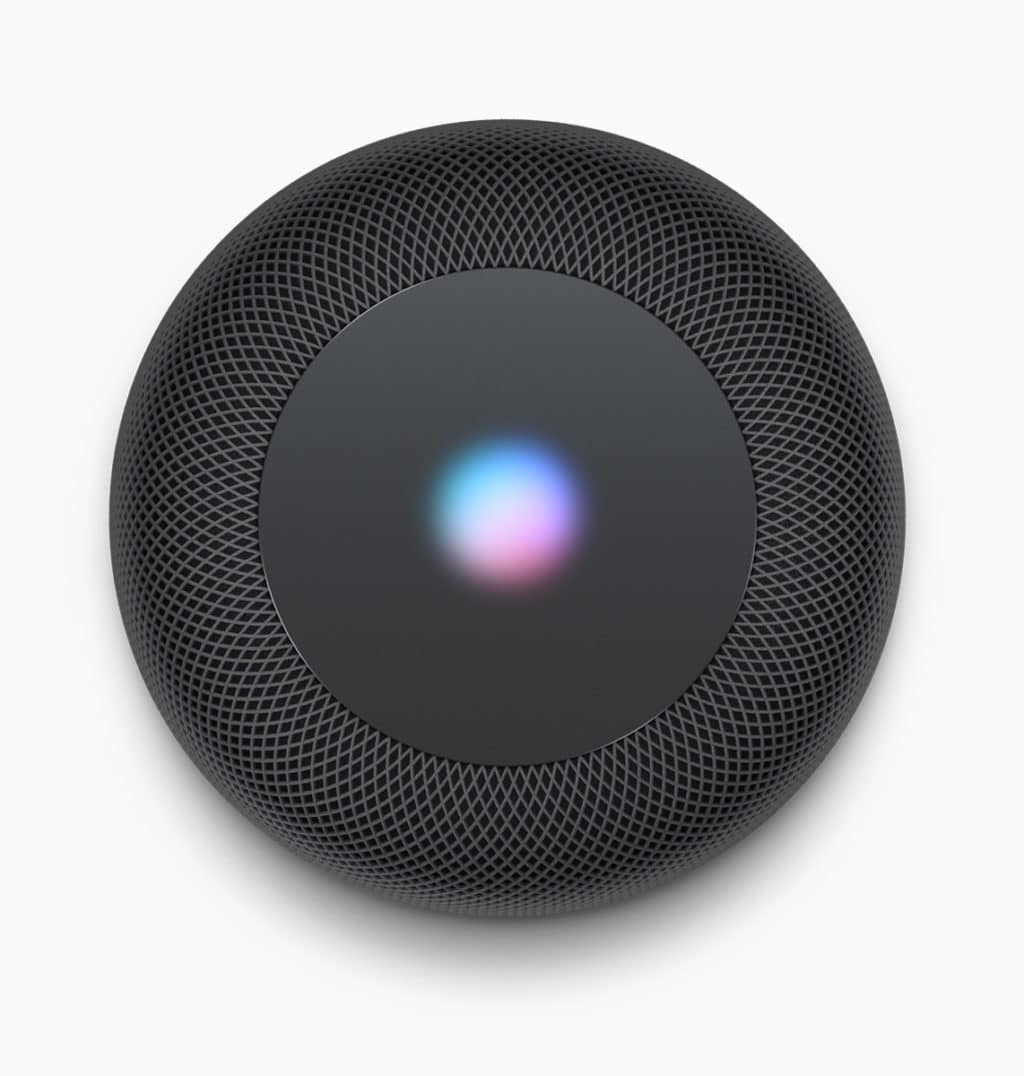
Apple has added 6 microphones to the HomePod. They are arranged so that they can hear the words “Hello Siri,” even if you say them from the other end of the room. Moreover, microphones are able to hear the command, even when the speaker plays music at full volume. And for this you do not even need to scream.

#4Reading notifications
HomePod will be associated with your accountiCloud, and therefore the column will be able to read all your notifications. This is a very useful feature because you won’t need to search your iPhone every time to check notifications. In addition, HomePod will only read out new notifications when you are near the speaker. If you are not at home, notifications will not be read in order to maintain privacy.
# 3 Limited access to calendar and reminders
HomePod does not support multiple users,but the column is able to protect the privacy of its owner. If you are not at home, other family members will be able to listen to music through the HomePod and ask Siri questions, but will not be able to add reminders or find out what events are added to your calendar.
#2Plain process settings
HomePod setup will be similar to setupAirPods headphones. This means that you just need to bring your iPhone to the column. A notification will appear on the smartphone, and then you can configure the smart column on it.
The Google Home and Amazon Echo columns have a longer and more complex setup process.
It is worth noting that before setting up HomePod you will need to enable two-factor authentication and connect an iCloud account.
# 1 AirPlay 2, Bluetooth 5.0
Apple has provided many details about the contentcolumns, but said nothing about the data transfer functions. However, we already know that HomePod supports Bluetooth 5.0. So far, the smart column can only be connected to iOS devices, but if Apple decides to change this, the reliability and quality of its connection to other devices will be very high.
In the upcoming iOS 11 update.3 will support AirPlay 2. HomePod will also support AirPlay 2. The function will allow you to play the same music at once on several HomePod speakers that are in different rooms.