Apple finally demonstrated iOS 11 at WWDC 2017. Although the new version will not be available to users until the fall
Advertising
Advertising
1. New control center
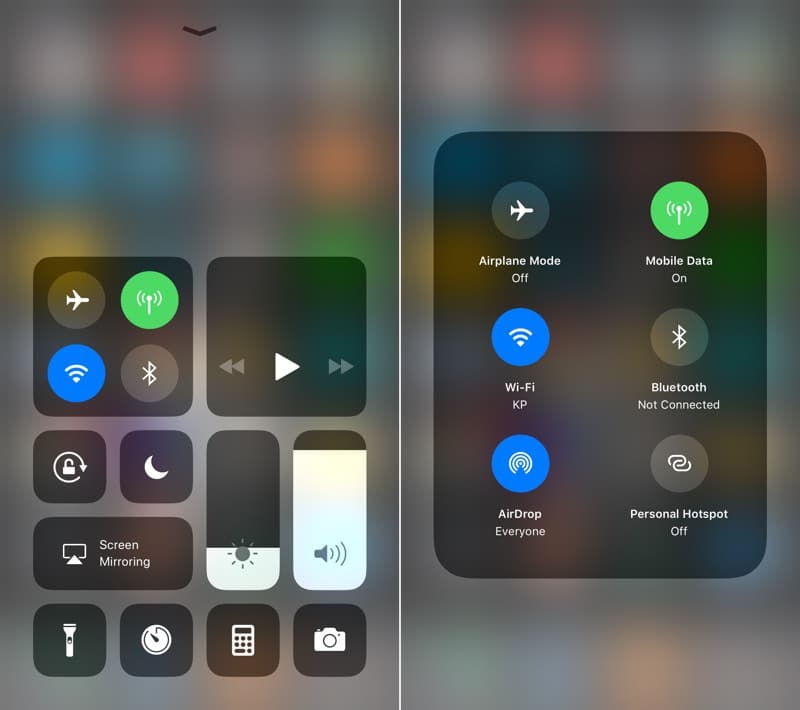

After years of waiting, Apple has finally redesigned the control center. At first glance, it looks somewhat strange, but everything can become clear as the beta version is tested.
The control center no longer has tabs. Instead, it contains tiles that you can interact with using 3D Touch. They can be opened like directories on the home screen. So, for example, inside one of them are settings for connecting to a mobile network and modem mode.
Advertising
Advertising
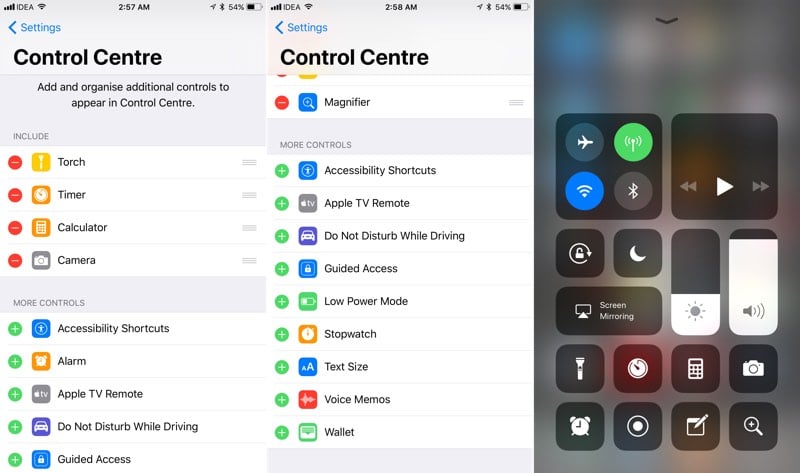

This simplifies device management. The contents of the control center can be changed through settings: you can add many additional tiles there.
2. iMessages, Siri and Metadata in iCloud
Apple seems to be pretty confident in iCloud,to save all iMessages, Siri and photo information there. This is a big step forward for Apple, which will put an end to the isolation of data on individual devices, long overcome by competitors such as Google.
Siri now behaves the same on Mac and iPhone. And more importantly, your new Mac will not re-index all your photos for three days.
3. New dashboard for applications in iMessage


IMessage applications have become one of the mostsignificant innovations in iOS 10, but they had some disadvantages. Firstly, sometimes instead of them it is better to use full-fledged applications. Secondly, they are simply inconvenient to constantly find and open.
The last mistake was fixed in iOS 11: at the very bottom of the window is now a horizontal panel containing applications that will always be placed on it.
4. Do Not Disturb while Driving


Apple has implemented the Do Not Disturb option.which can literally save someone’s life. After enabling custom settings, iOS 11 automatically detects when you're in the car and turns off alerts. Using 3D Touch, you can tell the phone that you are not driving and you don’t need to activate the mode this time.
There are two ways to find out if you are driving: Bluetooth detection and Wi-Fi frequency research.
Since this technology is based onDo not disturb mode, you can make an exception for some contacts. In addition, a reply will automatically be sent in response to the message informing you that you are busy.
5. More features and applications for Siri


Advertising
Advertising
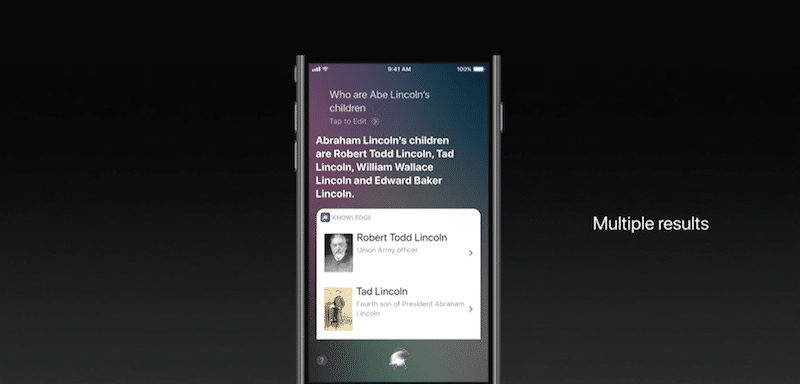
Siri's virtual assistant has become much smarter iniOS 11. Sound and GUI have also been improved; thus, the voice became more natural, and a new masculine version was added. In addition, translation support has been introduced for Chinese, French, German, and Italian.
Advertising
Advertising

Advertising
Advertising
Siri is now more active. For example, noticing that you bought a concert ticket through Safari, he may suggest that you add an alert on the same date.


SiriKit has undergone the biggest update. Now application developers will be able to work more closely with Siri. Among other things, the management of plans and the addition of notes are supported.
6. New App Store Design


App Store App Design in iOS 11 Was CompleteRedesigned for the first time since the store appeared 9 years ago. You can see it in the screenshots. Large and bold headlines, large images, and many horizontal-scrolling containers remind us of Apple Music.
The new Today section contains daily updated lists of the best apps. Added new sections “game of the day” and “application of the day”.
Games and applications are separated from each other and placed on separate tabs. Viewing detailed descriptions of applications has also been redesigned, and purchases inside them are displayed directly in the App Store.
7. P2P in Apple Pay
Apple Pay now supports money transfersaccording to a client-client model a la Venmo. This feature is integrated into iMessages, so you can quickly send money to your interlocutor. Your credit card is used for payment and Touch ID is used for authorization.
Upon receipt of money, they are sent directly toan Apple Pay Cash card, something like an electronic wallet. This money can be used for purchases, sending to other users or transferring to a bank account.
8. Editing Live Photo
Apple has greatly expanded the capabilities of Live Photo. It became possible to crop them, turn off the sound, loop or turn back, and also extract frames from them.
9. Maps works indoors
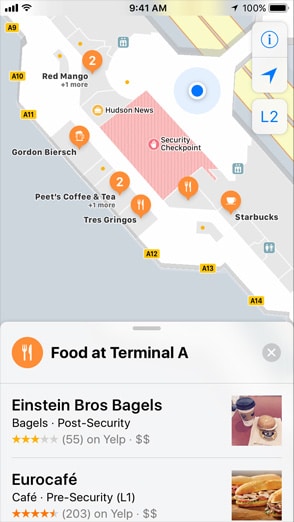

Apple Maps is also affected by the update. Now they display floor plans for over a hundred shopping centers around the world. Improved and built-in navigator.
10. Unified Notification Center
Although not all our hopes for the centernotifications were justified, it is now the same both on the home screen and on the lock screen. Therefore, you do not have to unlock the phone just to open the list of alerts.
Bonus: ARKit and other APIs
One of the main topics of WWDC was the technicalside of the new OS. The most significant step forward should be recognized ARKit, with which Apple enters the race with competitors in the field of augmented reality. ARKit will allow developers to use the processor, camera and motion sensors of the iPhone to implement AR and VR technologies.
Other iOS components that have become more open to third-party app developers are Apple Music and Camera, for which the MusicKit and Vision APIs were introduced respectively.
Watch this video to see the new OS version in action:
Many other small iOS 11 innovations have remained unreached in this article, so keep checking our posts.
What do you think about iOS 11? Are you satisfied with the changes? Share your opinion in the comments below.