Despite all the criticism, Facebook remains one of the largest social networks where users can
If you use Facebook, then probably more than oncestumbled upon a funny and interesting video that they wanted to save on their iPhone. Unfortunately, in the application itself there is no way to download video on the iPhone.
Advertising
Advertising
However, there are several other ways to save videos from Facebook directly to the iPhone. Below we will tell you about three different ways to get around the limitation of the official application.
</ p>Method 1: Online Download ManagerFacebook
There are many sites that allow you to save videos from Facebook. One of them is FBDownload. To it you will need a browser with support for downloading files. For example, the loader.
Advertising
Advertising
Step1:Download the appLoaderfrom the App Store. If you can't find it, follow this link.
Advertising
Advertising
Step 2:If you have already copied the link of the video you want to download, skip this step. If not, open the Facebook app and find the video you want. Click the buttonSharein the lower right corner, and then selectCopy link.


Step 3:Open the downloader app and enterfbdownload.ioto the address bar.
Step 4:When the site loads, paste the video link into the search bar and then click the buttonDownload.


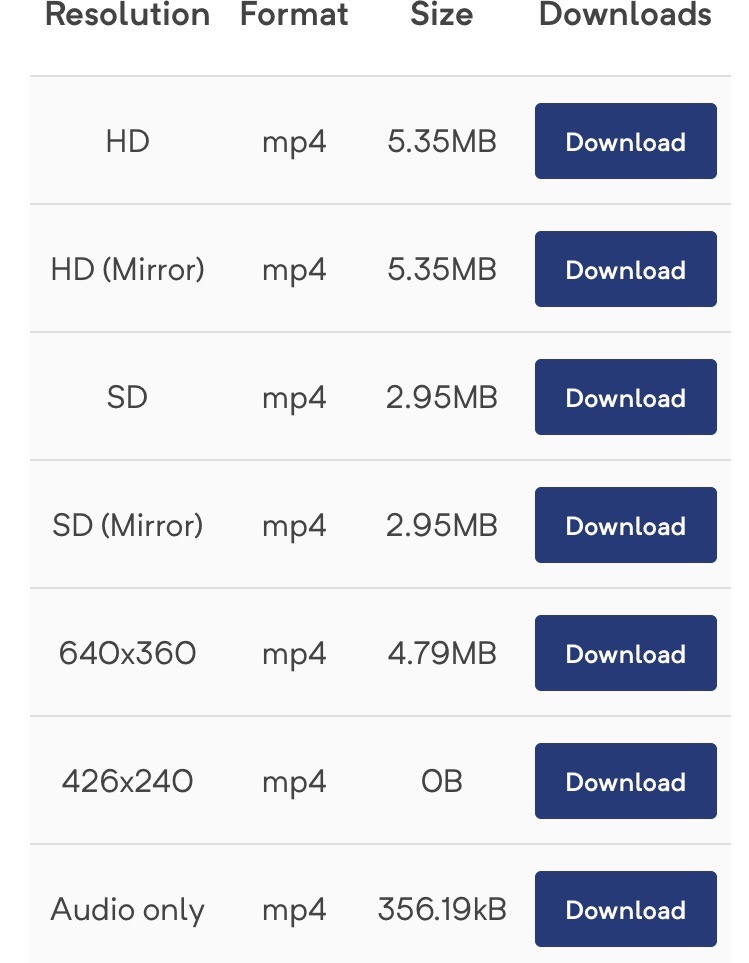
Step 5:Once the files are generated, a table will appear at the bottom of the page with available permissions and download links. Select the desired option, click on the buttonDownloadnext to it, and then in the window that appears, selectDownload.

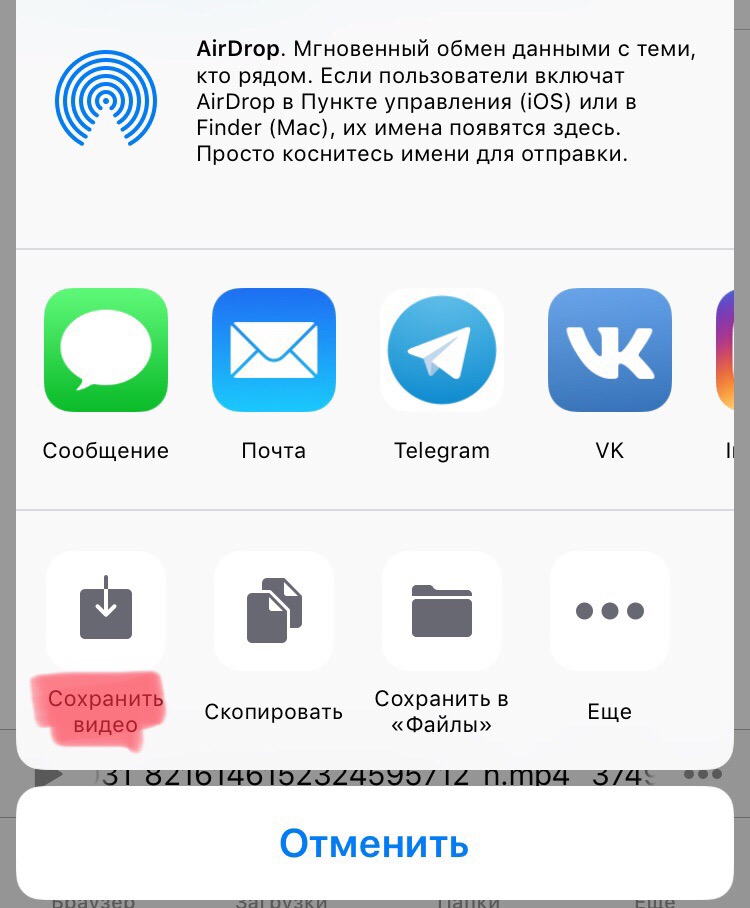
Step 6:The application will start downloading the video. You can view your progress on the tabDownloads. When the video downloads, swipe left and selectAct>Open in .... From the menu that appears, selectSave video. That's all, the video has been saved to the Photos application.

The way2: Facebook++
Facebook++ – unofficial appFacebook with many additional features, including the ability to download videos, but it requires jailbreak. You can download it to your device through the Cydia Impactor program.
Note:To use Facebook++, you need to uninstall the official Facebook application.
Step 1:Download the Facebook++ IPA file to your computer from here. You also need to download Cydia Impactor for Mac, Windows or Linux.
Step 2:Connect your iPhone to your computer and launch Cydia Impactor.
Step 3:Drag the Facebook ++ file into the Cydia Impactor window.
Step 4:Enter your Apple ID and password.
Step 5:Cydia Impactor will begin installing Facebook++ onyour device. Once completed, the Facebook icon will appear on your iPhone's home screen. Before launching the application, go to Settings > Basic > Profiles (the section may be called a little differently).
Step 6:Open your Apple ID profile and click Trust.
Step 7:Now open Facebook++ and find the video you want. You will see a Save button, which you can use to download the video to your iPhone.
Method 3: Third Party Program
There are many programs for downloading videos fromdifferent social networks on the computer. One of them is 4KDownload. The program is supported on macOS, Windows and Linux. In it, you can download the video from Facebook to your computer, and then transfer it to your iPhone via AirDrop or in another way.
We told you about three different ways.save videos from Facebook to iPhone. Each of them has its own minuses and pluses, but they all work with any devices and operating systems. Moreover, all of the above methods are free.