Users who switched from the Windows platform to Mac have probably wondered if there is an analogue of F5 on Mac.
We’ll tell you about the Mac equivalent of the F5 key for updating web pages. This will be especially useful for those who switched to a Mac with Windows.
Mac Browser Update: Command + R
Most web browsers on Mac are updated with a keyboard shortcut.Command+R. It works in Safari, Chrome, Firefox, Opera, Epic, Brave, etc.
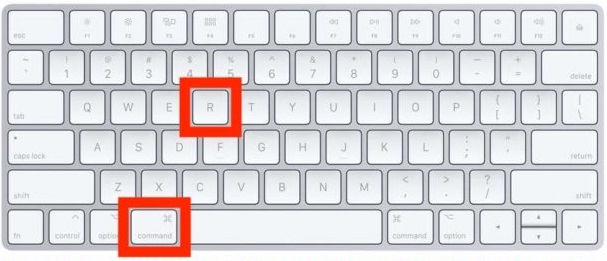

Below we will talk more about individual web browsers.
Safari
Safari is the default browser on Mac, so you'll use it most often. To refresh a web page in Safari, use the keyboard shortcut you already know:
- Command + R
This shortcut will refresh the page, i.e. will do the same as the F5 key on Windows. The combination works both in the standard version of the browser and in the version of Safari Technology Preview for developers. It is the equivalent of the F5 key.
To refresh a page in Safari without loadingcache, use the combination Command + Option + R or hold down the Shift key and click on the refresh icon. This method is more suitable for experienced users and developers.
Chrome
The same keyboard shortcut is used to refresh the page in the Chrome browser:
- Command + R
It is valid for Chrome, Chrome Canary, andetc. There is nothing complicated yet - just remember one key combination. And with the addition of the Shift key, you refresh the page without loading the cache.
Chrome browsers like Epic, Brave, and others have the same keyboard shortcut.
Firefox
Using Firefox Browser on Mac? Great, because here the key combination for updating will be exactly the same!
- Command + R
You probably already noticed some similarities ... Just as the F5 button is responsible for updating web pages on Windows, the combination Command + R responds on Mac.
Opera
Users of the Opera browser will also not be surprised, because the same keyboard shortcut works for them:
- Command + R
As you may have noticed, the combination of Command + R on a Mac updates web pages in almost all browsers.
Other programs
Many other programs also have an update function, but not all of them respond to a key combination. For example, the Mac App Store is updated with Command + R, but it doesn’t work in Finder.
We hope you remember this simple key combination and will use it for networking.