On any original iOS installation, each of the notification icons is red and contains text
This tweak allows you to choose almost anycolor for notification icons, but the most exciting feature is the ability to automatically color the icons according to the prevailing color in the application icon.
Advertising
Advertising
ColorMeBaddge can do this for both app icons and folders, and includes several different algorithms to choose from, each different from the others.
In addition, the tweak has additional settings.to change the color of text inside icons, recolor those that do not contain numbers (for example, "!" icons can be colored to draw special attention) and much more.
The tweak adds a panel to the Settings app where you can tweak some options to your liking:
Advertising
Advertising


Individual settings for applications, folders, other icons, brightness and others are divided into sections and can be configured separately.
The options for app icons and folders are basically the same:
Advertising
Advertising
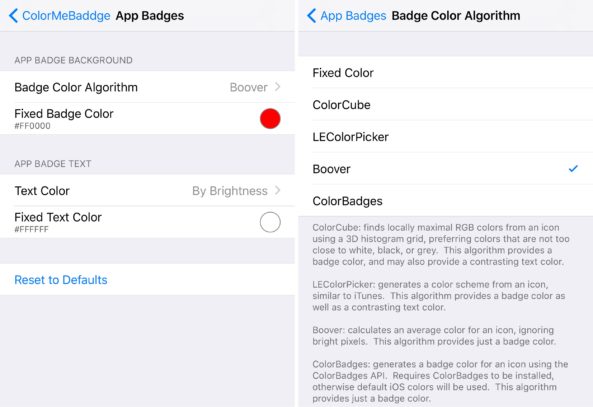

You can choose a color for the background of the icon and texton it: the color can be constant or change according to one of the preset algorithms that dynamically change it in accordance with the icon itself.
It should be remembered that simple algorithms can havedifferent requirements. For example, the ColorBadges algorithm requires the ColorBadges jailbreak tweak to be installed, while the Boover, ColorCube and LEColorPicker algorithms do not require any additional components and are different from each other.
By and large, they all look the same, buthave slight differences in the way they get the color setting data, which can lead to slight visual differences. Many users will hardly notice the differences, but for them the main criterion for choosing an algorithm is performance.
The last two lines, brightness settings and additional parameters, allow even more customization:
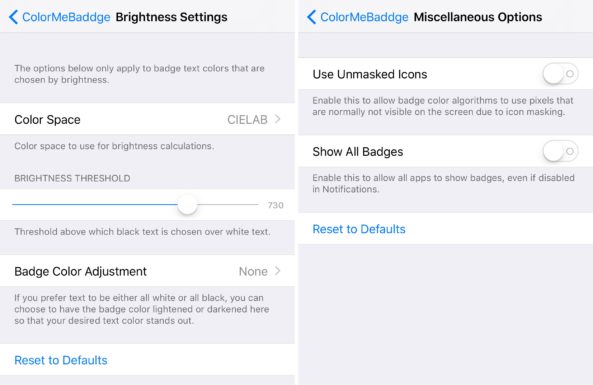

In the brightness settings panel you can changecolor space, brightness and select settings for adjusting color to text. In additional settings, you can apply the tweak even to hidden application icons, which are usually transparent, and also change the notification settings, so that the icons will be displayed even on applications from which notifications are disabled.
ColorMeBaddge is a pretty good waymake your home screen look different from standard iPhones and iPads. While this is just a minor aesthetic detail, you'll be surprised at how much it can enhance the look and feel of your device over the original Apple devices.
If you're interested in giving ColorMeBaddge a try, you can download it from the Cydia BigBoss repository. The tweak works on devices with iOS 8-10 and jailbreak.
Do you like the idea of coloring the notification icons on the home screen? Share your thoughts in the comments below.