Some Mac users don't like the fact that the FaceTime app starts automatically.Sometimes it happens
Sometimes the reason is that you don’tclosed FaceTime before rebooting, and sometimes a bug or a problem with the "FaceTime plist" file is to blame. In the second case, the problem can be solved, and below we will describe how.
How to disable FaceTime autorun on Mac
- Close FaceTime if it is running on a Mac right now.
- Open Finder and press Command-Shift-G, and then paste in the following address:
~ / Library / Preferences / com.apple.FaceTime.plist
3. Move the "com.apple.FaceTime.plist" file to another folder. For example, on the desktop or in a folder with documents.
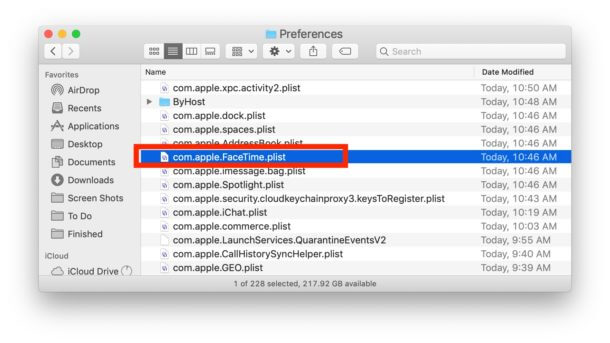

- Restart your computer as usual.
The problem with FaceTime autorun on Mac should be resolved. The next time you start FaceTime, you may need to reconfigure some options.
How to disable FaceTime autostart on incoming calls
You can also disable the program from auto-starting for incoming calls by turning off FaceTime. The easiest way is to chooseFacetimeon the menu bar and thenTurn offFacetime.


Now the program will not start automatically, even when you receive an incoming call.
You can enable the Do Not Disturb mode, and FaceTime will not start on incoming calls either. However, you will also not hear sounds and receive notifications on your Mac.
We also recommend that you read about how to disable FaceTime on other devices.