Not long ago, Apple released a major release of iOS 8.3, which included a large list of improvements
Advertising
Advertising
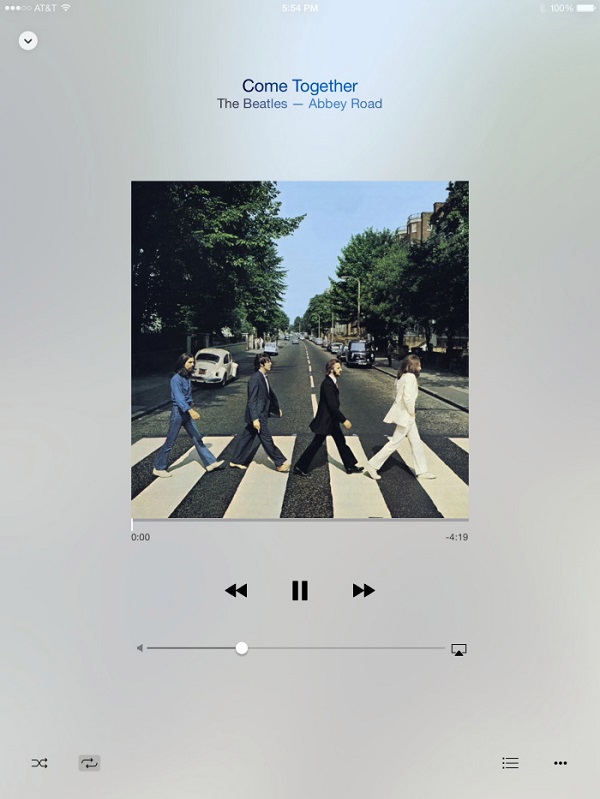

Download iOS 8.4 beta today is available from the iOS Developer Portal. Let us immediately note that iOS 8.4 is available only to registered iOS developers. Let us remind you that Apple released a public beta version of the firmware, but it seems that not this time. iOS 8.4 is compatible with the following devices:
- iPhone 6 Plus, iPhone 6, iPhone 4S, iPhone 5S, iPhone 5S, iPhone 5, iPhone 5c
- iPad Air 2, iPad Mini 3, iPad 2, iPad (3-gen), iPad (4-gen), iPad Air, iPad mini, iPad mini with Retina
- iPod Touch 5G
According to the notes, in iOS 8.4 a preview of the “all new” music in the Music application. Which confirms rumors that Apple will launch its own streaming music service. Here is the full list of changes in iOS 8.4 (original text):
The iOS 8.4 Beta includes an early preview of the all-new Music app. With powerful features and an elegant new look, enjoying your music is easier than ever. This preview provides a sneak peek into what we’ve been working on, and what’s to come – the music is just getting started.
All-New Design. Music app has a beautiful new design that makes exploring your music collection easier and more fun. Personalize playlists by adding your own image and description. Enjoy stunning pictures of your favorite artists in the Artists view. Start playing an album right from the album list. The music you love is never more than a tap away.
Recently Added. Albums and playlists you’ve recently added are now at the top of your library, making it effortless to find something new to play. Simply tap play on the artwork to listen.
Streamlined iTunes Radio. Discovering music with iTunes Radio is easier than ever. You can now quickly return to your favorite stations in Recently Played. Choose from a selection of hand-curated stations in Featured Stations, or start a new one from your favorite artist or song.
New MiniPlayer. With the new MiniPlayer, you can see what’s playing and control playback while browsing your music collection. To open Now Playing, just tap on the MiniPlayer.
Improved Now Playing. Now Playing has a stunning new design that showcases your album artwork the way it was meant to be. In addition, you can begin wirelessly streaming your music using AirPlay without leaving Now Playing.
Up Next. It’s now simple to find out which songs from your library will play next - just tap the Up Next icon in Now Playing. You can even reorder, add, or skip songs whenever you like.
Global Search.You can now search from anywhere in the Music app — just tap the magnifying glass. Search results are conveniently organized to help you quickly find that perfect song. You can even start an iTunes Radio station right from Search.
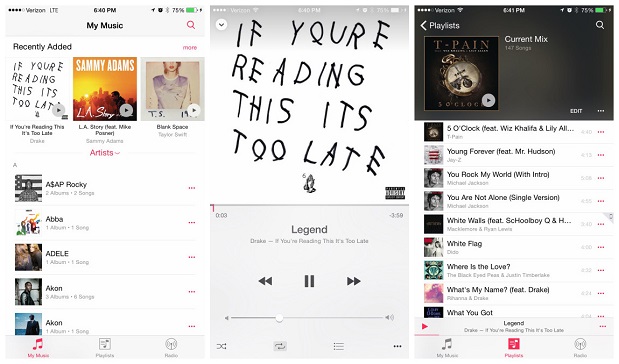

Apple is rumored to show a new music streaming service onWorldwide Developers Conference( Worldwide Developers Conference)coming this June.
Advertising
Advertising
You can also watch a video that shows how the Updated iOS 8.4 player looks and works:
Advertising
Advertising
As part of the Music app update, audiobooks have moved from the music app to iBooks.
Advertising
Advertising
Download iOS 8.4 beta (direct links without a developer account):
- iPad Air 2 (Wi-Fi Model 1566)
- iPad Air 2 (LTE Model 1567)
- iPad Air (Model 1474)
- iPad Air (Model 1475)
- iPad Air (Model 1476)
- iPad 4 (CDMA)
- iPad 4 (GSM)
- iPad 4 (1460 model)
- iPad mini (CDMA)
- iPad mini (GSM)
- iPad mini (Wi-Fi Model 1432)
- iPad mini 2 (Wi-Fi + LTE Model 1489)
- iPad mini 2 (Wi-Fi Model 1490)
- iPad mini 2 (CDMA Model 1491)
- iPad mini 3 (China)
- iPad mini 3 (Wi-Fi)
- iPad mini 3 (LTE)
- iPad 3 Wi-Fi (3rd generation)
- iPad 3 Wi-Fi + LTE (GSM)
- iPad 3 Wi-Fi + LTE (CDMA)
- iPad 2 Wi-Fi (Rev A)
- iPad 2 Wi-Fi
- iPad 2 Wi-Fi + 3G (GSM)
- iPad 2 Wi-Fi + 3G (CDMA)
- iPhone 5 (model 1428)
- iPhone 5 (model 1429)
- iPhone 5c (model 1456 1532)
- iPhone 5c (model 1507 1516 1526 1529)
- iPhone 5s (model 1453 1533)
- iPhone 5s (model 1457 1518 1528 1530)
- iPhone 6
- iPhone 6 Plus
- iPhone 4s
- iPod touch 5G
Download links for iOS 8.4 beta (only available to registered iOS developers):
Advertising
Advertising
iPad:
- iPad Air 2 (Model A1566)
- iPad Air 2 (Model A1567)
- iPad mini 3 (Model A1599)
- iPad mini 3 (Model A1600)
- iPad mini 3 (Model A1601)
- iPad Air (Model A1474)
- iPad Air (Model A1475)
- iPad Air (Model A1476)
- iPad mini 2 (Model A1489)
- iPad mini 2 (Model A1490)
- iPad mini 2 (Model A1491)
- iPad (4th generation Model A1458)
- iPad (4th generation Model A1459)
- iPad (4th generation Model A1460)
- iPad mini (Model A1432)
- iPad mini (Model A1454)
- iPad mini (Model A1455)
- iPad Wi-Fi (3rd generation)
- iPad Wi-Fi + Cellular (model for ATT)
- iPad Wi-Fi + Cellular (model for Verizon)
- iPad 2 Wi-Fi (Rev A)
- iPad 2 Wi-Fi
- iPad 2 Wi-Fi + 3G (GSM)
- iPad 2 Wi-Fi + 3G (CDMA)
iPhone:
- iPhone 6
- iPhone 6 Plus
- iPhone 5s (Model A1453, A1533)
- iPhone 5s (Model A1457, A1518, A1528, A1530)
- iPhone 5c (Model A1456, A1532)
- iPhone 5c (Model A1507, A1516, A1526, A1529)
- iPhone 5 (Model A1428)
- iPhone 5 (Model A1429)
- iPhone 4s
iPod touch:
- iPod touch (5th generation)
What do you think of the new music player?
</ p>