Please be warned that the tool is still in early development and may not work perfectly. Them
what suchMeridian?
Meridian- an analogue of the LiberiOS tool, but only for iOS 10. It was created by developer and hacker Ben Sparks.
Advertising
Advertising
The tool is based on the “v0rtex” exploit andKPPless method to provide root access on iOS 10 devices – 10.3.3. It is more stable than previous apps and also supports iPhone 7 and iPhone 7 plus.
Cydia does not yet support the new tool, as the Substrate update has not been released. We recommend that you use the “g0blin” jailbreak for now, as Cydia works with it.
Warnings:
- We recommend that you wait for a more stable update. Install an earlier version of the jailbreak only if you are a developer.
- Remember that the application is still at an early stage of development and may not work properly on some devices.
- Filza does not work yet.
What kind devices supportsMeridian?
The new tool supports 64-bit devices. They are listed below.
Advertising
Advertising
iPhone
- iPhone 5s
- iPhone 6
- iPhone 6 Plus
- iPhone 6s
- iPhone 6s Plus
- iPhone SE
- iPhone 7
- iPhone 7 Plus
iPad
- iPad Air
- iPad Air 2
- iPad Pro
- iPad mini 2
- iPad mini 3
- iPad mini 4
iPod
- iPod touch 6
Firmware
Below is a list of all supported versions of iOS, however, the developer has not yet tested his tool with versions below iOS 10.3. We recommend waiting for the update.
- 10
- 10.1
- 10.2
- 10.3
- 10.1
- 10.1.1
- 10.2
- 10.2.1
- 10.3
- 10.3.1
- 10.3.2
- 10.3.3
Download jailbreakMeridian
- Beta 1 (IPA)
Requirements
- 64-bit iPhone, iPad or iPod.
- Firmware iOS 10 – 10.3.3.
- A computer with macOS, Linux, or Windows.
- Cydia Impactor Program.
How to install jailbreakMeridian
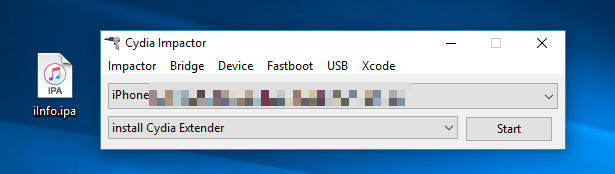
Step 1: Launch the Cydia Impactor program, which can be downloaded here.
Step 2: Connect your device to the computer and make sure that the Impactor tool has detected it.
Step 3:DownloadMeridian IPAvia the link provided above. Move it to your desktop.
Step 4: Drag this file into the Cydia Impactor window.

Advertising
Advertising
Step 5: After that, enter your Apple ID and password.


Step 6: Wait for the installation process to complete. When the application appears on the home screen, disconnect the device from the computer.
Step 7: Open Settings and go toBasic > Profiles and device managementand make sure the app appears under your Apple ID.
Step 8: Now open the Meridian app.
Step 9: Click the button"go".
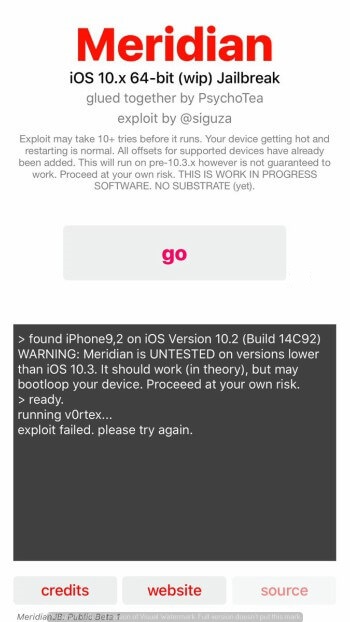

Step 10: Wait,until setup is complete. After that, the message “your device has been freed” appears. If the message “exploit failed” appears, restart the application.
Step 11: Reboot the device and the Cydia application will appear on the home screen.
Step 12: You can also install Cydia manually via SSH. For everything to work, you must useport 2222. Run the following command:
tar -xf /meridian/dpkg.tar -C /
It will install “dpkg” on your device and you can open the Cydia app.