If you might think that the Health app is just another pointless program, you should definitely
The Health app satisfies the mostpretentious requirements in the field of health and fitness. So, on the basis of the HealthKit software interface, it ensures that Apple Watch collects data on your daily activity, heart rate, and workouts.
Advertising
Advertising
However, the Health app is not justdata store. With every iOS update, Apple improves the program. Still think that “Health” is just wasting your device’s memory? We advise you to look at the application from a different angle! Especially if you own an Apple Watch. You will certainly appreciate the useful and competently presented content of the application, which can help you in the implementation of your personal fitness plan.
A Long Way iPhone Health App
The Health program began very modestly andhas come a long way in development. Released in 2014 as part of iOS 8, the application was quite simple and could only present data about the user’s health in the format of boring statistics. In order to find useful information, I had to scroll through a whole series of characteristics unknown to most users, such as the vick expiratory flow rate or the perfusion index. The appendix contained some half-baked (at best simplified) diagrams.
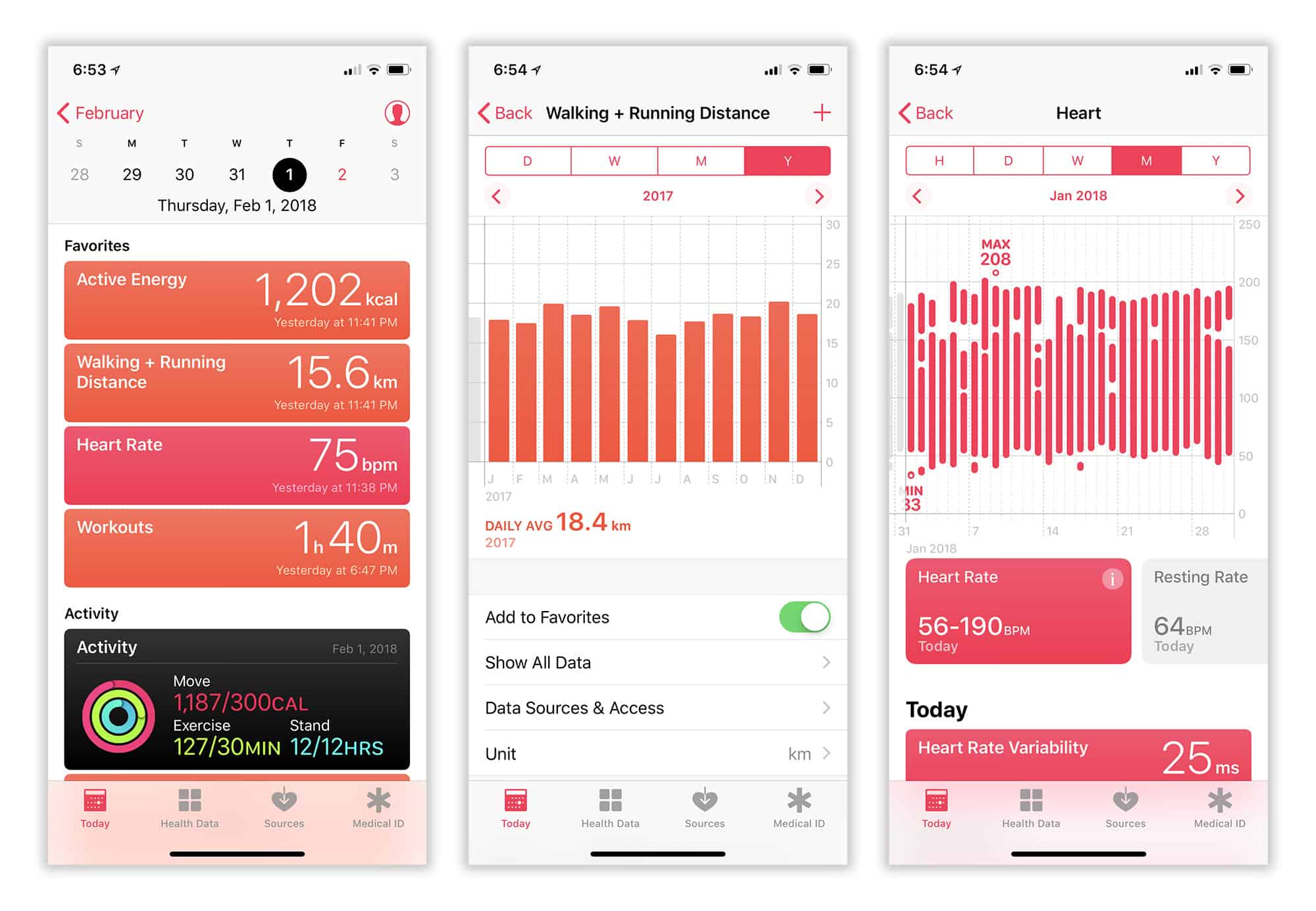
iOS 11 Health app - Birda completely different flight. It provides a convenient, at-a-glance overview of key statistics about your health in the Today tab. Interactive charts allow you to visually evaluate your data. Configure the display of your favorite statistical parameters. For example, you can even display maps of your training routes.
Advertising
Advertising
The Today tab has such a strange namebecause it displays not only information of the current day. Here you can view graphs of your activity by day, week, month and even year. Apple has added so many features to the app that it's easy to get confused. So just remember: double-clicking the Today tab will always display information for the current day.
Advertising
Advertising

Health and Activity apps: what's the difference?
If you're using an Apple Watch, the appActivity is installed on your iPhone automatically. On the surface, the Health and Activity apps look very similar, but they have one important difference: Activity only displays data collected by the Apple Watch, while Health processes all the user's health and activity information.
This means that by registering your workout inApple Watch, you will get it displayed in both applications. However, any activity or workout logged on iPhone will only appear in the Health app. It is “Health” that is the repository of your medical data (blood type, presence/absence of allergies, etc.).
Thus, “Health” provides mucha more complete view of your statistics. It includes almost all of the Activity app data, including activity rings. Really, all you'll ever need "Activity" for is keeping track of your accomplishments, sharing your activity with friends, and viewing split timestamps you've recorded during your workouts.
Hopefully, with the release of iOS 12, Apple will give us a unified version of the Health and Activity apps, which will help eliminate duplication that confuses the user.
How to populate the Health app with useful statistics
A saying as old as time in the fitness world,that “What you put in is what you get out” is true for the Health app as well. It will be useful to you exactly to the extent that you enter into it exactly the data you need.
Great news for Apple Watch owners -Chances are you're already looking at a lot of useful statistics. Four built-in apps on Apple Watch automatically add your information to Health: Activity, Workout, Heart Rate, and Breathing.
To make sure the settings are correct,Launch the Watch app on your iPhone and check that your heart rate and fitness trackers are active. Also make sure to enable the activity tracker. If you have not already done so, launch the Activity application on the Apple Watch and follow the standard instructions.
If you don't have an Apple Watch, don't despair either.costs. The coprocessor built into iPhone (iPhone 5s and later) collects information about your activity when you're on the move with your phone in your pocket or wallet. You may find that the device has already counted the number of steps, time spent standing, and even the number of stairs climbed (the latter function works on iPhone 6 and later devices, as it uses the device's built-in barometer).
Advertising
Advertising
The best part is that such statistics are only a small part compared to all the capabilities of the Health program. You only need to set the application settings correctly.
Collect power and sleep data from third-party apps with HealthKit
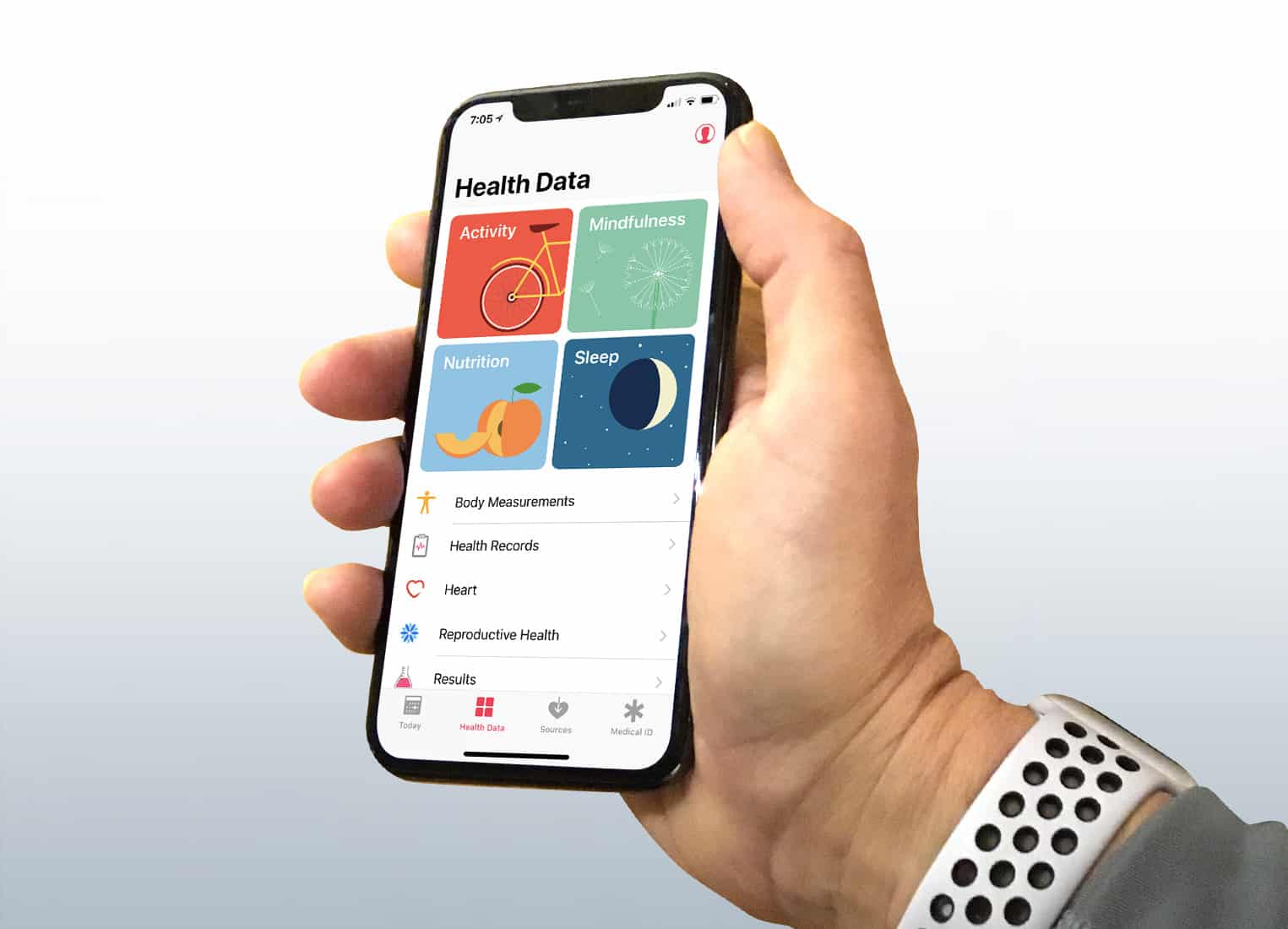
When you go to the “Meddata” tab, you will see four large squares with the most popular types of data that the Health application processes: “Activity”, “Awareness”, “Nutrition”, “Sleep”.
If you have an Apple Watch, populate categories"Activity" and "Awareness" will be well provided by Apple's embedded applications. (For example, in order to capture the minutes of “awareness”, you can use the regular “Breath” application.) However, for the “Food” and “Sleep” categories, the current picture is that you need to use third-party applications to fully load the data.
So that you can choose programs byto your taste, the application "Health" is equipped with convenient recommendations. Just click on one of the squares and you will see a list of applications that collect a certain type of data. It also displays links to download them from the App Store.
For example, the popular Sleep Cycle application is suitable for tracking sleep on iPhone, and in the case of Apple Watch, it is worth trying the Pillow program.
Advertising
Advertising

Update data using third-party devices
If you are serious about trackinghealth data, you will probably find the sensors built into the iPhone and Apple Watch not good enough. In this case, there are many special gadgets compatible with the Health application.
Apple recently acquired Beddit, a companymaking a sleep tracker that you can place under the sheets of your bed. Not cheap ($149), but comfortable, because you don’t have to sleep with the watch on your wrist.
Regarding heart rate tracking, opticalApple Watch sensors are not accurate enough. For example, serious athletes prefer Polar and other chest-mounted Bluetooth heart rate sensors. These are electrode sensors, the reliability of which is much higher than optical ones.
Noteworthy and floor scales withWi-Fi interface. You can specify your weight in the Health application manually, but on a regular basis, such an activity can be very troublesome. For automation of the process, for example, Nokia Body Composition Wi-Fi Scale smart scales are useful. By collecting data from the gadget, Health will be able to schedule your weight changes. A scale may also provide an estimate of the percentage of body fat, but the accuracy of such measurements is not always satisfactory.
Conflict of information received from different sources? Prioritizing data sources will help
As you begin to use everythingnew applications for recording data on health and fitness activity, there are problems of duplication and conflict of data. For example, if you register a workout on the iPhone without removing the Apple Watch, both devices record the number of calories you spent during the lesson. If the Health program reads this data twice, you will see incorrect information as a result.
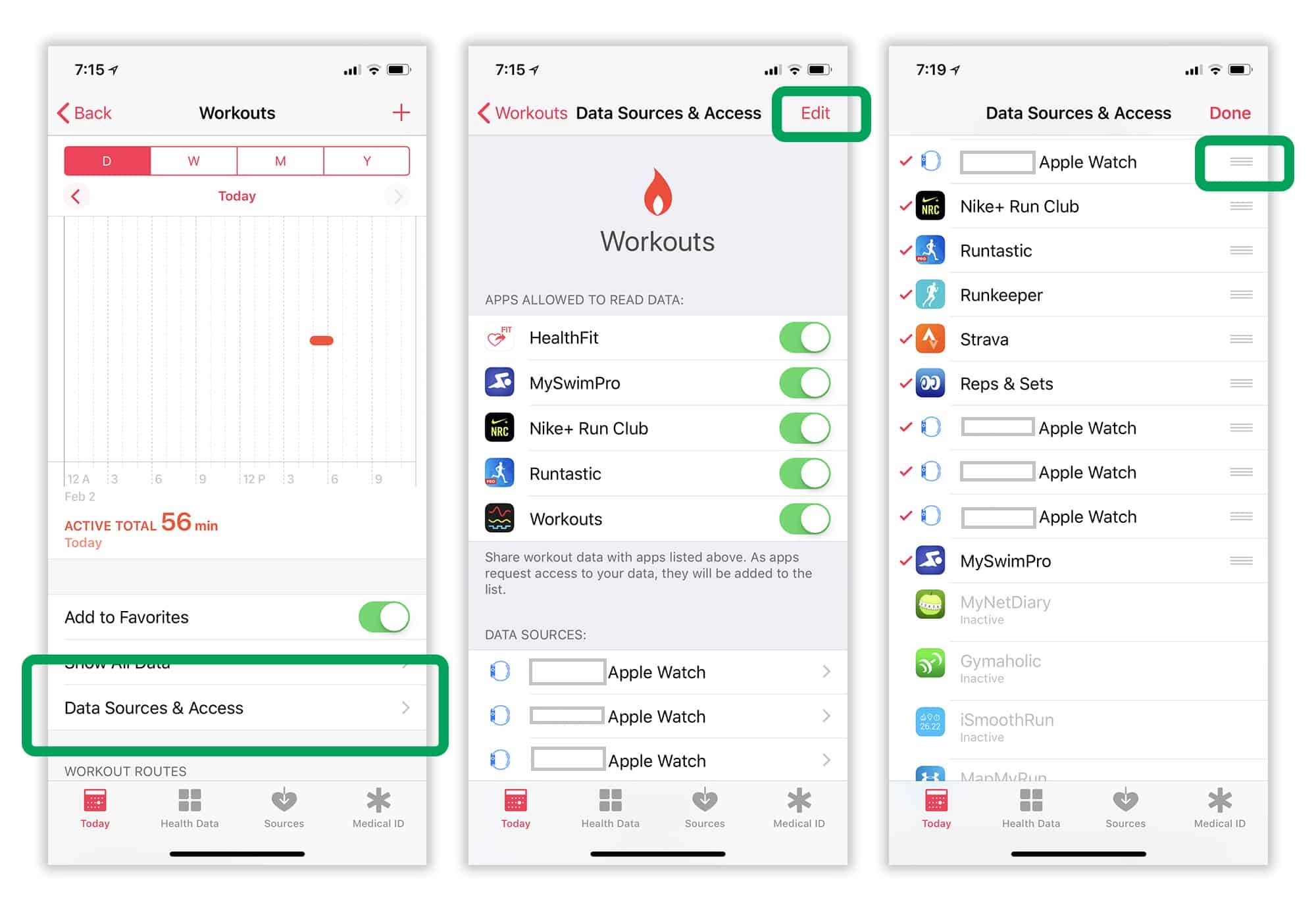
To solve this problem, Apple compares the date,time and duration of recorded activities. If they match, then data from one source is ignored, and from another - are uploaded to the Health application. By default, priority is given to data coming from the Apple Watch, however, you can configure the prioritization yourself. To do this, simply select the data type you want (for example, “Steps”). Now click "Data Sources and Access", And then select the"Change»In the upper right corner of the screen. Now you can reorder the item in the list of data sources by simply dragging it down and up. To do this, hold the icon with the image of three gray stripes located to the right of the program name. Top sources from the list take precedence over those below. All results will be displayed, however, in the event of a conflict of one type of data, only the source with the highest priority will be taken into account when compiling statistics.

Third-party applications: access control settings
In the "Sources" tab you can see a list of allthird-party programs that the user has approved access to the Health app. Even if other health and fitness apps are installed on your iPhone, they will never appear on the list unless you gave them access to the Health app data.
Most third-party programs thatintegrate with the Health application, request permission for access at the first start. However, some work differently, requesting access to certain types of information only when you use the functions associated with this data.
Revoke application access to program data"Health" is possible in the "Sources" tab. However, you should think carefully before committing such an action. If you revoke access, the program will not receive notifications, so the next time it is used, it won’t even be able to warn you about it, which will no longer record your health and fitness data.
Favorite Settings: Turn Health into a Personal Fitness Bar
Customize the Today tab by adding specifictypes of indicators in the category of favorites. To do this, select the type of data that you want to display in the "Today" tab, and make sure that the "Favorite" switch is active.
By setting your favorite settings, you canturn Health into a personal dashboard that will fit your fitness goals exactly. For example, we will show what data is useful to you in cases if you are going to reduce weight, do bodybuilding or run a marathon:
"Favorites" for those who want to lose weight
If you want to reduce your weight, usually thismeans a desire to reduce body fat. In this case, it makes sense to make the selected indicators weight and amount of fat. In order to reduce weight, you will need to reduce the number of calories consumed and increase the number of calories burned, so the “Energy value” and “Activity energy” indicators also fall into the favorites list.
- Weight
- Body fat percentage
- Energy value
- Activity energy
"Favorites" for bodybuilders
Bodybuilders want to gain weight, but at the cost ofmuscle building, not fat. Therefore, the list of favorites sent "Weight" and "lean body mass." The bodybuilder also pays attention to the ratio of macronutrients (proteins, fats, carbohydrates) in his diet, so they should also be included in your favorites. If a bodybuilder doesn’t eat, this usually means that he is training in the gym, so “Workouts” is another item on the list.
- Weight
- Lean body mass
- Squirrels
- Carbohydrates
- Total fat
- Training
"Favorites" for marathon runners
If you are preparing to run a marathon, then one ofThe most important aspects of your plan should be volume, because you will need to run many kilometers. Therefore, we add indicators such as “Training” and “Distance of walking and running” to the list of favorites. With these activities, you will also need to keep track of calories to make sure you are eating enough. Finally, it is worth adding the “Pulse at rest” indicator to monitor the level of your overall cardio training (the lower the heart rate at rest, the usually this level is higher).
- Training
- Walking and running distance
- Energy of activity
- Energy value
- Pulse at rest
Export health data
The Health app is not only a tool for importing data. You can also export data from there using HealthKit.
Dieting apps (Lose It!, MyFitnessPal and others) count your active calories, so they can use that data to adjust your daily intake.
Unfortunately, not all fitness programs today receive training data from the Health application. The Strava application, however, promises to add such an option in the near future.
There is also the option to export the entireapplication information base. To do this, go to your profile in "Health" (the silhouette icon located in the upper right corner of the screen on the "Today" tab) and click "Export medical data."
Plan your fitness with the Apple Health app
The Health app, which brings together manydisparate elements, can provide you with a complete overview of your fitness history, displaying all the important statistics in one simple dashboard. Plus, devices like the Apple Watch make it easy to automatically download the data you need.
If you seriously decide to get in good shape, thenthe constant real-time feedback provided by Health will serve you well on the way to the goal. Well, "buried" the program in the "Unwanted" folder? Maybe right now is the time to extract it from there and turn your attention.