Linkedin is a social network that gives you the opportunity to realize your professional skills by collaborating with
Advertising
Advertising
To date, more than 590 million. users all over the world are registered on the Linkedin network. Of particular importance, the Linkedin page is for people in the Internet programming field and other professions - for those who seek to find a decent job, including outside the country. In Russia, Linkedin quickly gained recognition and became an indispensable attribute for a modern professional. However, in 2016, Roskomnadzor issued a decree banning access to the site. Today, Linkedin is not available in Russia, and for millions of people this is a professional tragedy.
Reason for Linkedin blocking in Russia
Blocking certain social networks alwayscauses a lot of controversy and disagreement. Some people think that nothing “nightmare” happened, because this is just a social network and you can use any other resource. Others lose far more than a way to chat with their friends. Given the scale of the LinkedIn network, the reason for blocking it should be really significant.
As the head of Roskomnadzor Alexander Zharov explained,Linkedin blocking caused by a fixed data leak. He did not explain what data was illegally “published,” nor did he give an answer to the question of who suffered from this leak. Along with this, Alexander added that it is possible to use domestic networks.
Advertising
Advertising
But what if you can’t? What to do for those for whom the Linkedin page is the only way to dialogue with foreign colleagues, employees and employers? Opt out of the network at all? Of course not!
In order to successfully bypass the lock and continue to use the site, you can:
- Install browser extension.
- Take advantage of modern VPN services.
Browser extensions
Today browsers have extensions that allowBypass the blocking of Roskomnadzor and successfully use the blocked resources. Extensions for the browser are quite convenient to use, they are installed directly in the browser and work when it is opened or launched with one click. The downside of browsers is that they provide protection only at a basic level.
Most of these extensions are free, but some require registration. There are paid extensions with different subscription options. Below we will talk about the best free VPN extensions for browsers.
Advertising
Advertising
TunnelBear VPN

TunnelBear VPN – one of the most popularextensions available in most browsers. With it, you can safely browse and use any website without losing speed. There are 15 countries available to connect to, but to access them you need to create a free account. With such an account, 750 MB of traffic is available, but you can increase it for free by sharing the extension on Twitter.
Hotspot shield


Advertising
Advertising
Hotspot Shield is also one of the popular extensions.You can use it for free or sign up for a paid subscription. To use the extension, you don't even need to create an account. There are no traffic restrictions either. The only difference between the free version and the paid one is – limited number of available servers. You can connect to servers in the USA, Canada, France, the Netherlands and Denmark for free. If you subscribe, the number of available countries will increase significantly, and you will also receive additional functions.
Touch VPN


You can also use this extension.free and without registration. Four countries are available for connection: USA, Canada, France and Denmark. There is also a function that automatically selects the best option for connection, which is very convenient if the country is not important for you. The only drawback of this extension is that the connection speed may drop in some scenarios.
VPN services
VPNs are the best way tosuccessful use of Linkedin in Russia. This is a private virtual network that uses an encryption key, and this significantly increases the security of information exchange. The protection provided by VPN is considered much more effective than browser extension.
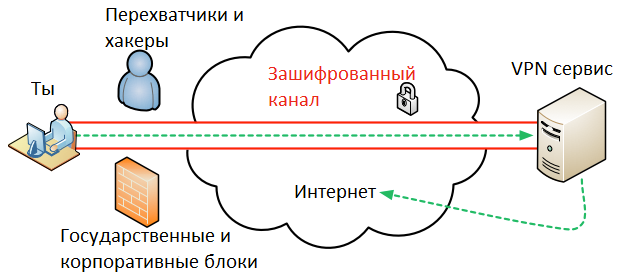

VPN helps not only to unblock Linkedin in Russia, but also to remove bans from other popular resources that we need.
Installed services like any otherprograms and they act not only in the browser, but protect your entire computer. On the net you will find many different options and you can choose the one that suits you best. Note that some of the above extensions for browsers are available in the form of programs that can be installed on your PC.
Here is a list of just a few examples of all available VPN services:
- NordVPN
- CyberGhost
- ExpressVPN
- Private Internet Access (PIA)
- Surfshark
Remember, only you can limit your freedom on the network.