If you often communicate with people from different countries for work or for some other reason, then the application
Advertising
Advertising
how add tongue oniPhone
First, you need to add the desired language to your iPhone. This is done through the applicationSettings.
one)Go toMainand selectKeyboard.
2)ClickKeyboardsand then selectNew keyboard.
3)In sectionOther keyboardsiphoneselect the desired language.
The selected language appears in the list of your keyboards. If you want to add several languages, just do this process again for each of them.
How to change the language toApple Watch
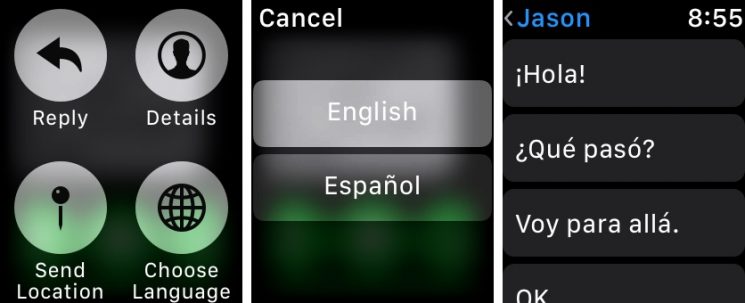
On your Apple Watch, open the appMessages.
one)Open the message you want to reply to in another language.
2) Press hardon the screen and pressChoose language.
3)On the screen that opens, select the desired language.
Then you can use one of the standard answers or dictate the answer yourself in the selected language.

Please note that only this message will be sent in this language. The settings will not be applied to all others, so the process will need to be done every time.