The WhatsApp messenger provides users with the opportunity not only to call friends, but also to record and
However, voice recording has a drawback -the user may accidentally click on the record button, and without any confirmation requests, a voice message will be sent. Unfortunately, WhatsApp does not allow you to remove the record button, but there is a workaround.
Advertising
Advertising
If you rarely use the recording functionvoice messages, you can disable the access of the application to the microphone - then the recording option will not work. We’ll show you how to turn off whatsapp recording on your iPhone.
How to disable voice dialing inWhatsapp
Step 1:Launch the Settings menu on your iPhone.
Step 2:Scroll down the screen and select Privacy.
Advertising
Advertising
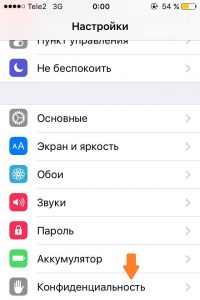

Step 3:Select Microphone.
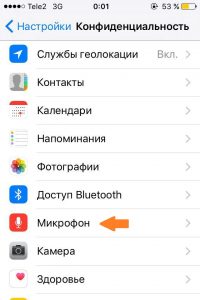

Step 4:A list of applications that have requested access to your device's microphone will appear on the screen. Find the WhatsApp switch in the list and deactivate it.
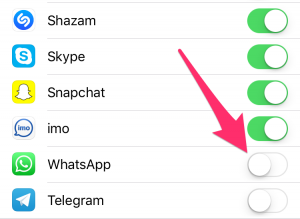

From now on, pressing the record button in WhatsApp will not work. Instead of starting recording, you will see a pop-up notification in which the WhatsApp application again asks for access to the microphone.
Remember: having deprived WhatsApp of access to the microphone, you will not be able to use other functions related to voice messages. However, at any time you can activate the switch again.
If you want to learn more about WhatsApp, the following articles come in handy:
- Top 19 WhatsApp Tricks on iPhone
- How to enable two-step verification in WhatsApp on iPhone
- How to read WhatsApp message on iPhone without sending notification to sender
Have a question? Drop us a line in the comments!