Last year, Night mode was added to the web version of YouTube, and now the dark interface has been introduced on mobile.
The new dark mode in the YouTube app for iOS reduces eye strain at night.
If you have an iPhone X, it will also help.save battery power since OLED displays do not need backlighting. They can highlight pixels individually, resulting in darker images that consume less energy.
The new feature is available in the YouTube app for iOS version 13.01.4 and later.
To find the version number of the application on your smartphone, click on the profile icon in the upper right corner, select Settings and scroll to the bottom of the list.
Perhaps your function is not yet available. Then you have to wait a couple of days until it appears in the application automatically.
In the registry for the update 13.01.4, the new night mode is not even mentioned.
How to enable Night mode on YouTube for iOS
one)Open the applicationYouTube.
2)Click on yoursProfilein the upper right corner.
3)SelectSettings.
four)Click on the switch next toNight mode.
five)Close settings.
The YouTube app should now display with a dark interface.
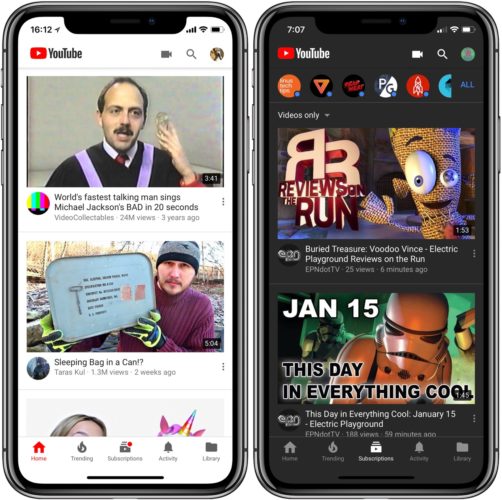

As mentioned above, the function is available only in version 13.01.4, and for some users it will appear a bit later.
Night mode on YouTube.com
You can also enable a dark interface in the web version of YouTube. To do this, click on your profile icon, selectNight modeand turn on the switch.
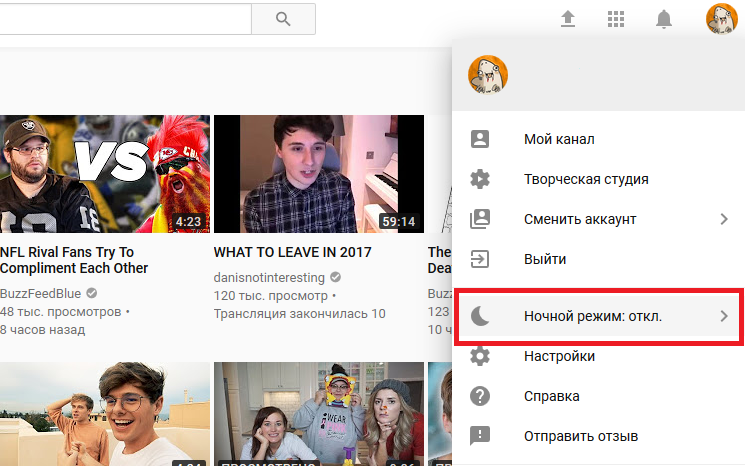

As you can see in the screenshot below, the white elements will turn black. Your laptop will not stop consuming less power, but the eye strain will be less, especially at night.


The night mode for YouTube.com will need to be enabled in each browser separately.