Hands-free – A handy feature that lets you output audio during calls to your iPhone through regular speakers
Many iPhone owners probably already know howUse the speakerphone, and if you are one of them, this article is not for you. We appeal to those who just bought an iPhone and do not yet know how all its functions work.
You can start a call and transfer it right awayon the speaker or do it later at any time in the conversation. In any case, this is done very easily. Similarly, you can turn off the speaker at any time. Below about everything in more detail.
How to turn on the speakerphone during calls
Turning on speakerphone on iPhone is very easy, and one way works on all models and all versions of the system.
- Start the call as usual through the Phone or Contacts application.
- During dialing or the conversation itself, activate the screen of your smartphone.
- Press the “Speaker” button to output audio to the speakers. She will turn white. This means that the speaker is active.
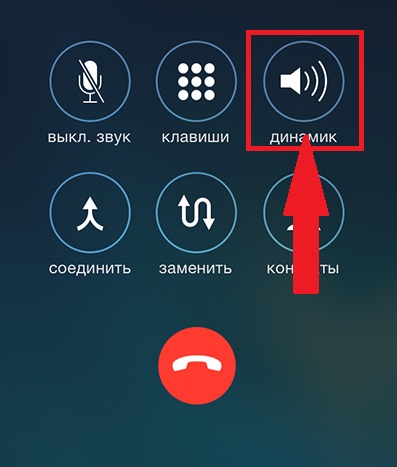

That's all, you put your iPhone in speaker mode. Now the audio will be output to the main speakers, and not to the speaker for calls.
The speaker can also be used during FaceTime audio calls. The method works the same way.
Please note that if you minimized the screen with a call, you will have to return to the Phone application to turn the Speaker on or off.
How to turn off the speakerphone oniphone
Turning off the speakerphone is just as easy. This can be done at any time during the conversation, or it will turn off automatically after it ends.
- Activate the iPhone screen during a call.
- Press the “Speaker” button so that it ceases to be white.
You can turn off and turn on the speakerphone as many times as you like during a call.
There are other features related to iPhone.speaker. For example, you can start calls through the speaker using Siri. In addition, in the settings, you can make the Speaker always be turned on by default. All these functions are very convenient when you need free hands.
If before you did not know how to enable or disable the speakerphone, now you know how easy and convenient it is.