Recently, iPhone X owners have started complaining that they can'tAnswer calls as soon as they start
The network even appeared a video on which the essenceThe problems are shown clearly. In addition, some users report that their proximity sensor does not work during calls, and the display does not light up when they remove the smartphone from the ear.
Advertising
Advertising
Faced with such a problem is rather unpleasantafter the purchase, the iPhone X is so expensive. Even the cheapest phones can do the job. Apple is already aware of the problem and is working on a solution to it. However, in some cases, you can solve the problem yourself by trying several methods, which we will discuss below.
#1.Update before last versioniOS
If you still haven’t done so, upgrade your iPhone X to the latest available version of iOS.
# 2 Force reboot device
Like all technical issues, a regular reboot of the iPhone X can solve this.
Advertising
Advertising
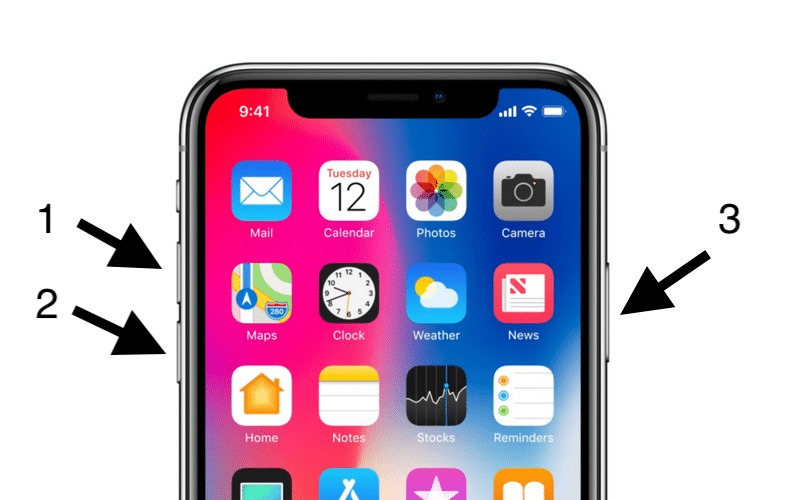
It is worth noting that with the iPhone X, the way to force a reboot has changed. Follow the instructions below:
- Quickly press and release the buttonVolume up.
- Quickly press and release the buttonVolume down.
- ClampSide buttonuntil the Apple logo appears on the screen of the device.

# 3 Reset network settings
You can also try resetting your network settings. This will clear the cache, DHCP settings and other network data. To reset network settings, go toSettings > Basic > Resetand selectReset Network Settings.
#4.CustomizeiPhoneas new
If none of the methods above helped, it remainsjust reset your iPhone X and set it up as new. Thus, you can start from scratch and get rid of all the settings that may cause a problem.
#5.Contact to specialist
If it was not possible to solve the problem, then it is worth contacting a specialist. Perhaps the problem is technical in nature.
If your city has an authorized Apple service center, you should contact it. You can also contact the staff of reliable stores that sell Apple appliances.