Despite Facebook's attempts to oppose the permanent deletion of any user account,
Account deactivation means mostThe information stored on your Facebook profile will be temporarily deleted, however you can restore this data at any time. Profile information, photos and posts will remain on your Facebook, while being invisible to other users, including friends.
Deleting an account means complete disappearancethis information. This is a much safer and more effective method of removing your Facebook page from the World Wide Web, but also the most radical one. If you ever decide to use Facebook again, you will have to create a profile from scratch - re-add posts and photos, search for friends and make settings.
Permanently delete your accountFacebook
Before permanently deleting your Facebook account, there are three important things to consider:
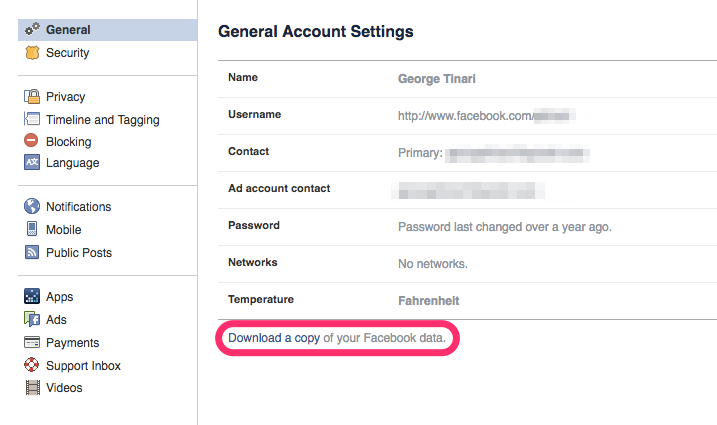
- Save all your information. To do this, log in to Facebook from your account, visit the “General Account Settings” menu at facebook.com/settings and click on “Download a copy of your information on Facebook”. This will provide an opportunity, if necessary, to recover data after you begin the process of deleting your account.
 You must understand that even afterPermanent deletion of your Facebook account, the traces of your presence on this social network will not disappear. For example, your personal messages sent by you will not disappear, as they are stored not only on your Facebook, but also in the recipient’s profile.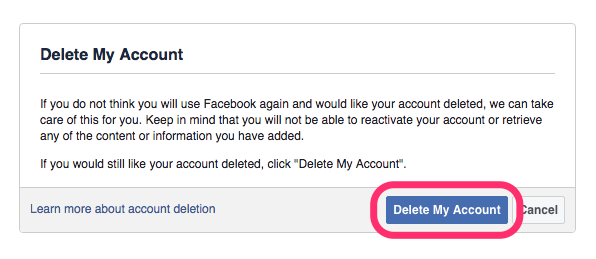
 Finally, a complete account deletion may lastup to 90 days after the creation of the request. All your data will become unavailable immediately after submitting the application, but will continue to remain on Facebook servers for a certain period of cleaning.
If you are sure that you want to delete your account, visit the special page at this link.
Facebook account deactivation
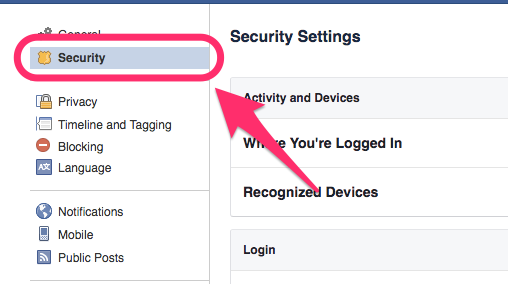
If you found the complete deletion of the account tooa radical decision, the option of deactivation will be most appropriate. This is a simpler and much less risky process. Just visit the "General Account Settings" menu at this link and select "Security" on the left.

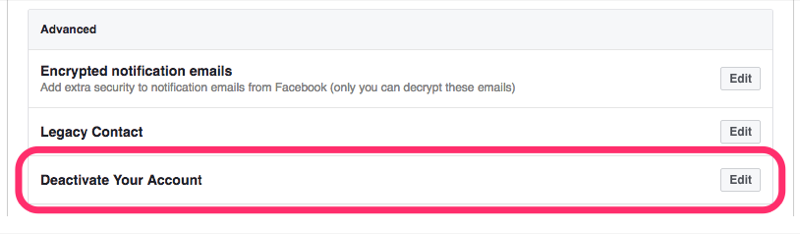
At the bottom there is a “Deactivate Account” setting. Click “Edit” and then “Deactivate Account”.

Once a deactivated account at any time can be restored at your request.