If you're trying to lose weight, then Apple Watch will help you with this. To do this, set yourself a goal to walk 10,000 steps.
Why count steps, not calories?
Thanks to the heart rate monitor, AppleCounts the number of calories you burn during the day. However, to get more accurate measurements, especially during workouts, you should tell the watch what kind of exercise you're doing, such as running indoors or outdoors, walking on the elliptical, and so on.
Advertising
Advertising
You may forget to do this manually every time.This is one of the disadvantages of the Apple Watch. It would be ideal if the watch itself asked me what exercise I was doing, thereby pushing me to do it. For this reason, it is better to count the number of steps.
How to find out how many steps you’ve taken on Apple Watch
- Launch the Activity app. This can be done on the main screen by pressing the crown. Or if you use Watch face, find this app there.
- Switch to view mode or to the main screen of the Activity application.
- Scroll down the display with your finger or digital head.
- There you will see the number of steps −Total steps,Active caloriesAndDistance (Total Distance).
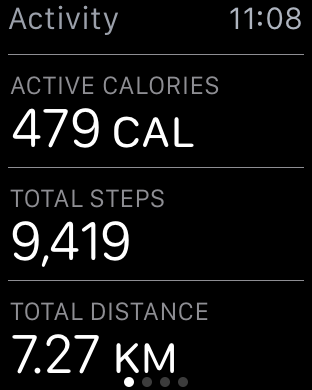

It would be nice if Apple made it easierprocess of reviewing steps. There are apps like StepCard (link to app in AppStore – free) that allow you to add step count display on the display. Unfortunately, such applications are not very accurate and do not display changes in the number of steps in real time.
Do you use your Apple Watch for sports and counting the number of steps? Does this help you keep fit? Write in the comments.