The new AirPods Pro are more open to customization than regular AirPods, thanks to pressure sensors built into each
Advertising
Advertising
This time, Apple added a pressure sensor to each earpiece. In fact, they turn the surface of the headphones into a multitask button.


Sensors allow you to control music and calls, as well as switch between active noise reduction and Transparent mode. Below we will describe how to use them.
Advertising
Advertising
How to use AirPods Pro controls
As we wrote above, with the help of pressure sensors built into AirPods Pro you can stop and skip tracks, answer calls, etc.
- Press:Start, pause, answer call.
- Double tap:Switch track forward.
- Triple press:Switch track back.
- Long clamping:Switch between Active Noise Canceling and Transparent Mode.
You can also say “Hi Siri” and ask your personal assistant to include a specific song / album / playlist, call someone, show you the way, etc.
This is not the only way to control the headphones. You can switch between noise reduction and Transparent mode using the volume slider in the Control Center.
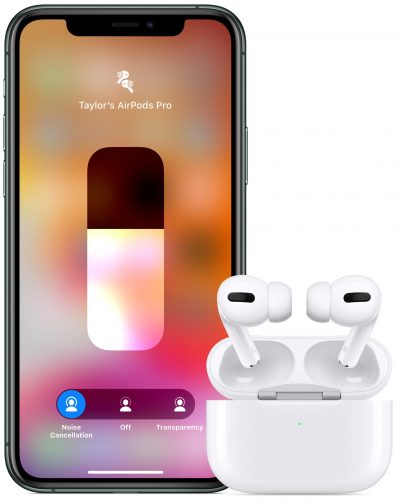

Have an Apple Watch? Click the AirPlay icon while playing music to open the AirPods settings!
How to activate Siri instead of noise reduction
You can configure Siri activation instead of controlling noise reduction while holding the headphone.
one)Open the applicationSettingson your device running iOS 13.2 or later.
2)Select sectionBluetoothfrom the main list.
3) Click the icon"i"next to your AirPods Pro.
four)SelectLeftorRightunder the headingPress and holdAirplans.
five)Now selectSirito activate the personal assistant by holding the headphones.
Select Available Modes
You can not only choose a name for your headphones and customize how they respond to taps. You can also select the modes between which you can switch by holding the headphones.
one)Open the applicationSettingson your device running iOS 13.2 or later.
2)Select sectionBluetoothfrom the main list.
3) Click the icon"i"next to your AirPods Pro.
four)SelectLeftorRightunder the headingPress and holdAirplans.
five)SelectNoise control.
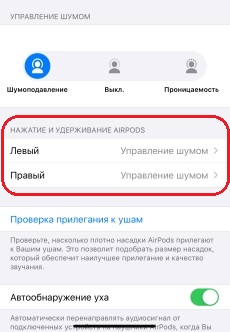

6)Select the modes between which the headphones will switch:
- Noise suppression:Active noise cancellation blocks out extraneous sounds from outside.
- Permeability:Transparent mode allows you to listen to music and still hear some of the sounds around you.
- Off:This option disables both modes.
That's all. Now, clamping the headphones, you will switch between the selected modes.


Advertising
Advertising
You can configure Siri activation by holding the left earphone, and switch modes by holding the right earpiece.
AirPods Pro not only has excellent qualitysound, but also protection against water and sweat (IPX4). Headphones for 20,990 rubles come with three earbuds that should fit any ear.
In addition, there is a special test in the Bluetooth settings that will help determine the ideal size of the liner for you.
You can learn more about headphones if you read the technical specifications of AirPods Pro.