Today, you will learn why cyberattacks occur, who is behind them, and how to protect yourself and your

The most popular cyber attack methods in 2021 are phishing and ransomware. Their share is 20% and 22% respectively.
Who is behind the cyberattacks?
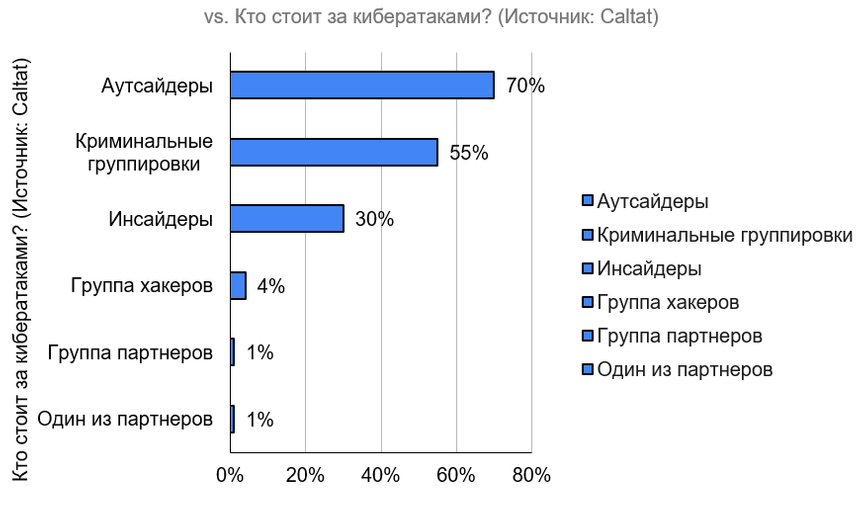
According to our data breach report inBy 2022, the majority of cyberattacks are carried out by outsiders (outside hackers), insiders (people from the inner circle), company partners, as well as organized crime and affiliated groups. In percentage terms, it looks like this:
Whether hackedcomputer / smartphone of a specific person, or everyone in a row, cyber attacks have a number of common stages. An attack, especially if the hacker is very stubborn, can consist of repetitive steps. The cyber fraudster will check your security for weaknesses, which, in the end, will bring him closer to the final goal.
Cyber attacks consist of four stages:
-
SurveyThe attacker checks and examines the available information about the potential victim to find possible vulnerabilities.
-
Deliveryis the path to the vulnerable point in the system.
-
Breach— when a vulnerability is used to access password-protected/private data.
-
Affect— after gaining access, the attacker copies the information to himself or turns it onBlackmail mode.
More about each of them:
1. Survey
Any information that will help deceive you and steal your data is collected and studied.
Open sources such asLinkedIn and Facebook* (*an organization banned in the Russian Federation), domain name management / search services and social networks. And public search methods, and network scanning tools (how long have you checked your router settings and Wi-Fi password for leaks, by the way?). Checking security systems in the organization and specifically on your computer, as well as the computers of your colleagues.
And all this in order to detect your mistake and find information that can be used in attacks. It is when:
-
You have posted information about the organization's network on the technical support forum
-
Inadvertently forgot to remove hidden properties from documents such as author, software version, and file save locations
Hackers also love to use social engineering (such as social networks). If users are naive and kind enough, this will allow access to additional, less open information.
2. Delivery
During the delivery phase, the cracker will try to exploit the vulnerability it has found. Let's say:
-
Try to access the organization's online services
-
Send an email with a link to a malicious site, or an attachment with a virus inside
-
Hand over a virus-infected flash drive
-
Create a fake website in the hope that the user will visit it
The main thing here for a hacker is choosing the best wayforce you to activate the virus or press a combination of commands that will give it access to your computer / smartphone. In the event of a DDOS attack (when the site is blocked by a large number of requests that exceed the network bandwidth), sometimes it will be enough to establish several connections to the computer to block it for other users.
3. Breach
The harm to you or your employer will depend on the nature of the vulnerability and how it was exploited. Data theft can allow hackers to:
-
Make changes that affect the operation of the system
-
Get access to online accounts
-
Take full control of your computer, tablet or smartphone
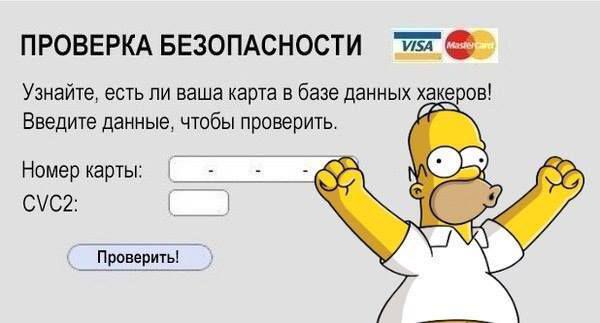
Once the hacker gains such access, he will begin to pretend to be a victim and use his legal rights to go to other systems.
4. Affect
Internet scammers checked your systems forcomputer/laptop/smartphone, and now they will try to expand their access and install the always-on presence feature (this is also sometimes called “consolidation”). For example, hijack your account to keep access permanent. Do you have access to an account? After that, install automatic scanning tools to find out your logins and passwords from other social networks and take control of more information. At the same time, hackers will be very careful that their actions cannot be noticed by standard system monitoring, and sometimes they will turn off this monitoring.
If the attackers are determined enough and you haven't discovered the hack, they will continue to act until they reach their ultimate goals. For example:
-
Get information that they otherwise would not be able to get. For example, intellectual property or trade secrets.
-
Make changes to their advantage, such as creating payments into a bank account they control.
-
disrupt the normal operation of the business. For example, they will overload the organization's Internet connection so that employees cannot communicate from the outside, or remove all operating systems from users' computers.
Once they reach their prices, morecapable attackers will leave, carefully removing all evidence of their presence. But sometimes they can create an access route for future visits by other hackers to whom they have sold access. And some of them can seriously damage your system or create as much "noise" as possible to advertise their success.

 12
12
How do you know if your data has been stolen?
Main signs:
1. "Unable to sign in to Apple ID" notification
Your account contains payment information, contact information, and confidential information about how you access the services.If you're asked toshare your Apple ID password, it maybe a phishing attack.
2. Refusal to receive a tax deduction
Identity thieves can request a refund from government agenciesIn this case, the authorities will inform you about the application.
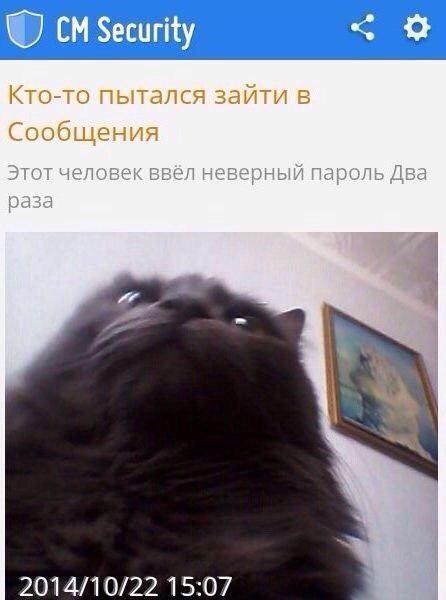
3. Unknown login notifications
When you enter your username and password from a new device, you can receive notifications on a familiar device.If your location, time, or device isn't associated with you, it's likely that someone else is using your profile.
4. Harassment by debt collectors
Debt collectors will call you and come to your home if the identity thief filesYou will not be able to pay the bills.
5. Suspicious transactions on your bank statement
If you don't see any unknown loan applications on your bank statement, or if you see purchases or transactions you didn't make, it may beAlways contact financial service providers immediately if you find strange transactions in your reporting.
6. Refusal to grant a loan or credit
Such a situation does not necessarily mean identity theft, but if you meet the eligibility requirements for a loan, a denial mayIndicate that someone has used your personal information to commit fraud.
7. Can't login to social media account
The password on the page has been changed or it has been blocked by the site administration for suspicious activity — all these are signs of the work of cybercriminals.
What should a user whose data has been stolen do?
Unfortunately, when information about the leak has already become public knowledge, there is nowhere else to rush. It is necessary to calm down, not to panic and determine a plan for further action.
First of all, it is worth soberly assessing the scale of the problem.
In most cases, a leak becomesknown either from the mailing of the "leaked" service, or from media reports. In both cases, the data that became available to the attackers is briefly listed. Usually we are talking about login, password, full name, email address, mobile phone number, address of residence (or delivery) and information about orders. But sometimes much more important data leaks to the Web: information about bank cards, bank account balances, as well as scans of various documents, such as passports. It is not at all necessary that all the listed data will leak into the Network at once, so it is important to soberly assess how this leak will affect you personally.
If logins and passwords are leakedusers should be replaced as soon as possible. At the same time, if the same password is used on several sites, then you need to change it everywhere, even if the logins on different sites are different. Yes, it can take a long time and cause some inconvenience, but it is better to put in a little effort today than to find out tomorrow that you have “borrowed” a hefty amount from friends on your favorite social network. Some browsers, such as Google Chrome, display information about weak passwords known to attackers - do not ignore this warning and change the problematic password.
If the data of bank accounts was leakedcards, you should contact the bank support service - most likely, you will need to visit the bank branch in person. In fairness, it should be noted that banks are very scrupulous about the safety of customer bank card data. First of all, because the law will be on the client's side if someone illegally uses his card data. Therefore, bank security services constantly monitor sites where personal data is sold, conduct test purchases and block compromised cards. So in most cases, the bank will find out about such a leak before you do and take all necessary measures. But still it is better not to leave anything to chance and contact the bank yourself.
Worst of all, the situation is if you get into a leakdocument scans. Surely everyone has heard about cases when, based on a scan of a passport, loans, one-day firms or installments in online stores were issued to the victim. Fortunately, the days when scammers could do almost anything on a scan of a passport are in the past. And even if a scan of your passport ended up on the Web, this is not a reason to reissue the document.
However, having passport data in handperson, an attacker can also obtain other data about him (for example, TIN through the website of the Federal Tax Service). And already having additional information in hand, scammers can, for example, send a very plausible letter on behalf of the tax office informing about “unpaid fines”. The only defense here is mindfulness. Check the sender and remember: if someone knows your passport data, this does not mean that this someone represents government agencies.
How to ensure data security?
We are unable to completely prevent data breaches. But to reduce the risk of losing money to a minimum is in our power. In turn, I can give the following recommendations:
-
Use secondary channels or two-factor authentication to validate requests to change account information.
-
Make sure the URL in the emails is related to the company/individual it came from.
-
Be alert for hyperlinks that may contain spelling errors of the actual domain name.
-
Refrain from providing credentials forlogin or PII (a type of data that identifies a person's unique identity) of any kind via email. Keep in mind that many emails asking for your personal information may appear legitimate.
-
Confirm the email address usedto send emails, especially when using a mobile or portable device, making sure the sender's address matches who it's coming from.
-
Make sure the settings on employee computers are enabled to allow full email extensions to be viewed.
-
Regularly check your personal financial accounts for irregularities such as missing deposits.
-
Do not tell anyone the full details of your card and do not post its photos on the network. If someone wants to transfer money to you, he only needs to know the card number or even just the phone number.
-
Enter card details only on secure sitesreliable companies. The official websites of financial organizations, as well as many online stores and services in the Yandex and Mail.ru search engines are marked with checkmarks. A secure connection is easily recognized by the closed padlock icon and an address that starts with https://.
-
Connect SMS alerts or push notifications about transactions. So you will immediately know if someone makes a payment on the card without your consent.
-
Use strong passwords for your emailmail and personal accounts on the sites. Passwords like 12345 or Password will not protect you. Ideally, all passwords should be different, long, with uppercase and lowercase letters, numbers, and special characters. At the same time, it is desirable that the password makes sense to you and you can remember it. Like card details, passwords must be kept confidential.