All updates Windows 10 from Microsoft
How Microsoft is changing Windows
In the new test build of Windows 10 from MicrosoftBeta testers found mention of the new WinUI graphics platform. We are talking about updating the Start menu, desktop and general notification center. Let's remember that WinUI is a new generation of Microsoft's user interface platform for current versions of Windows and devices with two screens like the Surface Duo. Microsoft has previously confirmed that WinUI can be used to update the interface of existing Win32 applications, as well as during the development of new Win32 or UWP products.
By the way, WinUI is directly linked in the presentedMicrosoft's 2017 Fluent Design interface. Once the changes are implemented, Start, Action Center, and the desktop may have a new branding with rounded window corners and a blurry background.
According to Windows Latest,Beta testers found references to previously unused design components in the new version of Windows 10, number 20197. The new design will affect the Action Center, Start menu and desktop. The components themselves are called WinUIDesktopActionCenter, WinUIDesktopStartMenu and WinUIOnDesktop.
The very concept of WinUI will delight users notonly Windows 10. Changes will also affect the new version of the OS - Windows 10X for non-standard gadgets, here we mean devices with two screens. The interface will be applied to older and updated Win32 apps, and the changes will also affect the Universal Windows Platform (UWP) apps.
 This is probably what the new Windows 10 start menu will eventually look like. Source: www.windowslatest.com
As a result, Fluent Design will become a replacement for the previous oneWindows interface—Modern. In the new interface, Microsoft abandoned the flat design implemented in Modern. Now the company has focused on intuitive controls, using various effects such as illuminated icons and background blur.
What will change with the transition to WinUI
In the available stable builds of Windows 10,including the 2004 release in May 2020, the Start menu, Action Center, and a number of other interface components are written using eXtensible Application Markup Language (XAML). Recall that this language was developed by Microsoft itself. For stable operation of the interface, the components Windows.UI.XAML are used.
It is currently not known for certain whether it usesconcept of WinUI language XAML. In general, the main goal of moving Windows to WinUI was to make common controls available across the entire Windows platform. In addition, developers want to improve consistency in the operating system as a whole. The same applies to its design. Quite a radical solution for Windows and Microsoft in general.
The date of transition to WinUI has not yet been approvedfinally, however, in one of the next updates to Windows 10, users may expect new buttons in the style of Fluent Design, windows with rounded corners, and other appearance features characteristic of this interface.
Implementation will be gradual
The very style of Fluent Design by Microsoftfirst disclosed less than two years after the release of Windows 10 itself. Recall that its distribution started at the end of July 2015, while Fluent Design was demonstrated in May 2017 at the Build 2017 conference.
Fluent Design Gradual Implementation Startedalmost immediately after his debut. For example, in February 2018, test builds of Update 1803 appeared, which added additional animation when opening an item in the Start menu and pop-up windows of various applications, an Acrylic effect that blurred image outlines on the taskbar, and a new stylized design Edge browser, which at that time had not yet switched to the Blink engine.
In test build 18237 in the middleSeptember 2018, Microsoft continued to integrate Fluent Design into its desktop OS. In particular, the "acrylic" effect appeared on the login screen - the background became blurred so that the user could focus his eyes on the password entry form.
Windows 10 major upgrade to version 2004The spring 2020 sample also contained Fluent Design elements, but this time more noticeable to the user. The changes affected a number of icons for native Windows applications, as well as programs from the Microsoft Office suite.
And yet, Microsoft may not be completedecided what the new design of the Start menu would be. In July 2019, it was reported that it was waiting for a full-scale redesign, but without the use of rounded corners and other characteristic features of Fluent Design.
Problems of the latter Windows 10
Windows 10 update causes BSOD, slows performance for some users
Microsoft has released a batch of new updatesWindows that are causing serious problems for some users. Recent "bug fixing" updates released by the company may be some of the worst, leading to Blue Screen of Death (BSOD) errors, performance issues, and other bugs.
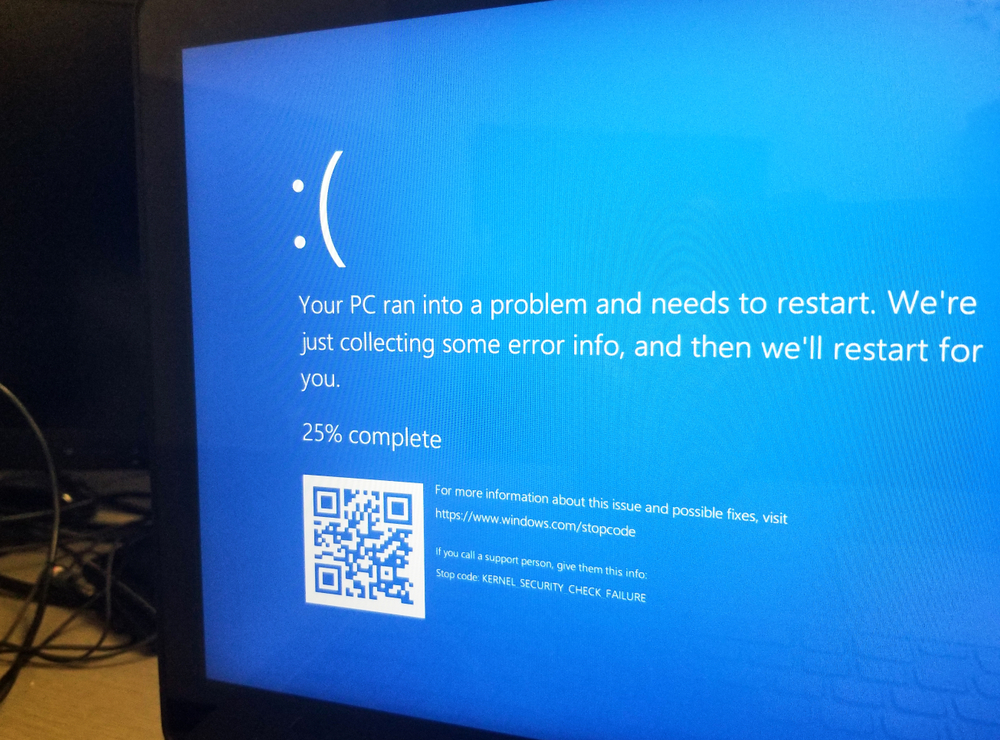
On August 11, Microsoft released two updates -Windows 10 KB4549951 and Windows 10 KB4566782 to make several security fixes, including a security fix for input devices (mouse, keyboard, or pen).
A number of users have found that this patchbrought more problems than it fixes. Many people couldn't install the update at all, while others continued to experience Blue Screen of Death and even Green Screen of Death errors.
"19041.450 and 19041.423 (previewed last month) really breaks my Thinkpad X390 when Hyper-V is installed. Windows Hello camera stops working and machine gives BSOD when going to sleep or trying to start Lenovo Vantage,” noted one user.
Blue screens of death appear periodically, but other users experience a cycle of errors during normal OS operation.
“I installed the update last Tuesday August 2020 and broke the IR camera on my X1EG2 and the BSOD on the Lenovo Vantage,” another user noted.
Based on reports, it looks like cumulativeWindows 10 August 2020 Updates may crash some computers (mainly Lenovo ThinkPad hardware) when Hyper-V, Intel Virtualization, or Windows Sandbox features are enabled.
Lenovo users also noted issues with the August Windows 10 security patch, and disabling the virtualization feature solves the issue for them.
If you are not using any of the aforementioned features and are still getting Blue Screen of Death errors, then you need to revert to your previous version of Windows.
Performance, network issues
Depending on your version of Windows 10, youget update KB4549951 or KB4566782. Some of the issues reported by users include system slowdowns, increased boot times, lower frames per second in games, not working external hard drives, and slow File Explorer.
“Every time I try to open something,my screen freezes and responds after a few seconds. It often freezes when I try to open a folder, video, music, code editor, Android emulator, Adobe XD or any other window, it freezes, "one user stated and others have also documented a similar problem.
"This update has made your computer unusable.use. Windows Explorer starts and freezes. I can't use external hard drives. The download freezes. All kinds of problems. Now I have to spend hours erasing and reinstalling everything,” another user emphasized.
Likewise, others also reported increased boot times and system slowdowns after installing the August 2020 update.
Again, it's worth noting that not everyone has problems with the update, but if you do run into problems, it is recommended that you remove the patch and pause the update.
Microsoft has not yet commented on the reports.
Windows 10 contains a hidden setting that doubles the speed
Despite a number of bugs and problems in Windows 10,One of the most widespread operating systems in the world has something to please its users. Few people know that Windows 10 contains a hidden setting that doubles the speed. Few people know about this “secret OS accelerator,” but taking advantage of this opportunity is quite simple—you don’t need to use any third-party software.
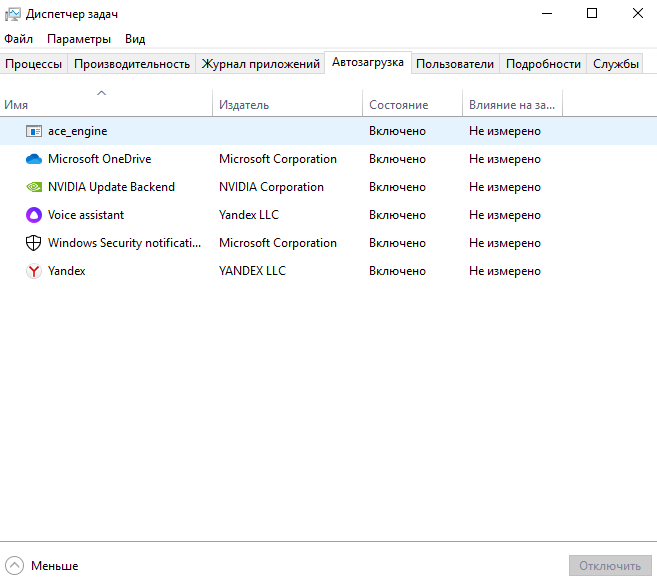
- To increase the performance of any device,running on Windows 10, start the Task Manager application in any way. The easiest way to do this is through the Start menu by entering the name of the required program in the search. If you don't want to waste time searching, just press the Ctrl + Shift + Esc keyboard shortcut - the Task Manager will start immediately.
- In the application, go to the "Startup" section. Read the contents of this section carefully. Only the main drivers should be enabled, while absolutely all other third-party applications, including messengers, should be turned off. If you need them, you can start them manually when you turn on your computer.
- Save changes and reboot. The next time you turn on Windows 10, you will notice a difference in the increase in operating speed.
Not just loading the operating systemhappens to work faster, she herself will delight in the speed of tasks. The fact is that various applications that only waste system resources will not work in the background on an ongoing basis.
Read also
Humanity will exhaust the permissible resources of the Earth tomorrow. What does it mean?
Astronomers see how a black hole emits flickering gamma rays
There may be more rogue planets than stars in our galaxy