If you have a semi-tethered jailbreak like Electra installed on your device, then you probably know that its
If you install the SafeShutdown jailbreak tweak, then you do not have to reinstall the jailbreak after the smartphone turns off due to a dead battery.
In fact, a tweak just does not allow your smartphoneshut down completely. Instead, it enters the device into the most energy-saving mode in which you cannot use it until you charge it to any set percentage of battery power.
SafeShutdown's maximum power saving mode does the following:
- The display turns off.
- Normal power saving mode is activated.
- The smartphone stops responding to button presses.
- Awakening on raising is disconnected.
- All notifications and alarms are blocked.
- The flash turns off.
- All active screen recordings are automatically stopped and saved.
- All processes in applications are terminated.
- All sounds and vibration are muted.
- And much more…
In this condition, your device saves the remaining battery power. Tweak simply does not allow him to disconnect. The percentage of charge on which the tweak starts to work, you set.
When you charge the device at a sufficient percentage, it will respring and the jailbreak will remain active. You will not need to reinstall it through the computer.
After installing the tweak, a new section will appear in the Settings:
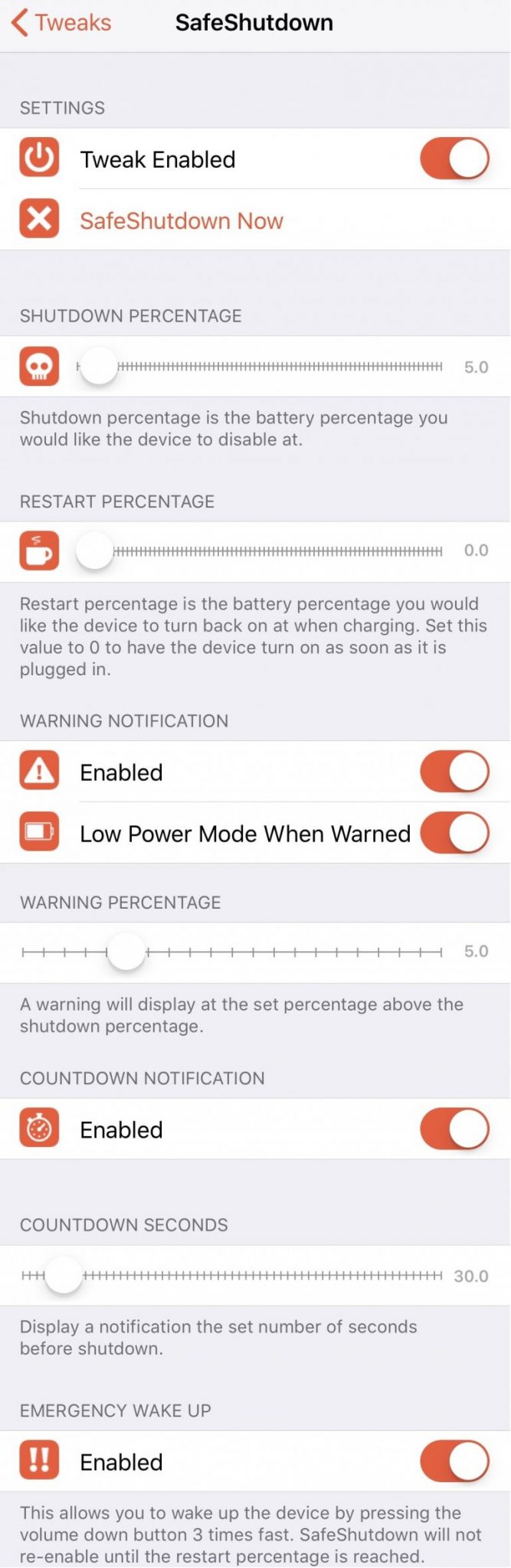

Here you can:
- Enable and disable the tweak.
- Activate SafeShutdown forcibly.
- Set the charge level to activate SafeShutdown.
- Set the charge level to disable SafeShutdown.
- Enable SafeShutdown activation alert notifications.
- Enable power saving mode when SafeShutdown is notified.
- Set the charge level for a notification.
- Set a countdown timer for SafeShutdown.
- Set a timer.
- Set up emergency wake-ups that can bypass SafeShutdown mode using a special combination of button presses.
It's good that the developer added a fewfunctions warning you that the device will shut down soon. For example, alerts with alerts will be very useful, because you will be ready to activate SafeShutdown in advance.
Moreover, you can use emergency wakeup to bypass SafeShutdown lock. This can come in handy when you need to call emergency surveillance or something like that.
This tweak should appeal to manyusers, although reinstalling the jailbreak is not very difficult. Nevertheless, it will be useful to users who do not have access to a computer for a long time.
If you want to install the SafeShutdown tweak,You can download it for free from the BigBoss repository. To activate the tweak you will need to pay. SafeShutdown was tested on iPhone X with iOS 11.3.1 jailbreak, and it should work on all devices with iOS 11 jailbreak.