Starting with last year's iPhone X, Apple got rid of the Home button for its entire line of smartphones and replaced it with
The Home indicator also perfectly complements the systemiOS, like melted butter complements a fresh soft loaf. In addition, thanks to him, Apple was able to achieve a design with a display on the entire front panel. However, the indicator also has its drawbacks. Fortunately, a new jailbreak tweak can fix some of them.XEdgeProtect.
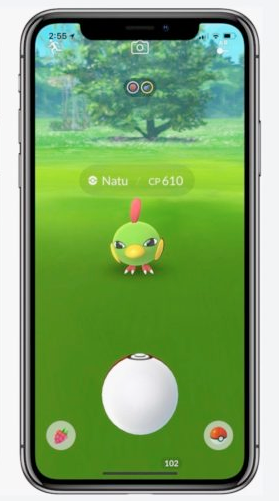
One of the main disadvantages of the Home indicatorlies in the fact that because of it it is very easy to accidentally close the application. This is especially noticeable in games like Pokémon GO, when you accidentally swipe the indicator in an attempt to catch a Pokemon. See how close the home indicator is to pokeball:

XEdgeProtect tweak also reduces conflicts of the Home indicator with other jailbreak tweaks like FloatyDock. Most likely, there are still a lot of tweaks where it is needed.
XEdgeProtect solves problems by making a gesture byindicator in a two-step process. After installing the tweak, the Home indicator will automatically disappear after a prolonged lack of activity so that you do not accidentally swipe it with your first swipe. When you swipe the indicator for the first time, it will become brighter, and you can perform the usual gesture. Everything is very simple!
So far, XEdgeProtect tweak only works oniPhone X. Support for iPhone XR, XS with XS Max would also be added if jailbreak existed for them. In addition, the tweak can work on other models with LittleX and HomeGesture tweaks that mimic the indicator, but this is not official.
If you are interested in the XEdgeProtect tweak, you can download it for free from the Packix repository.